Participant
November 4, 2020
Question

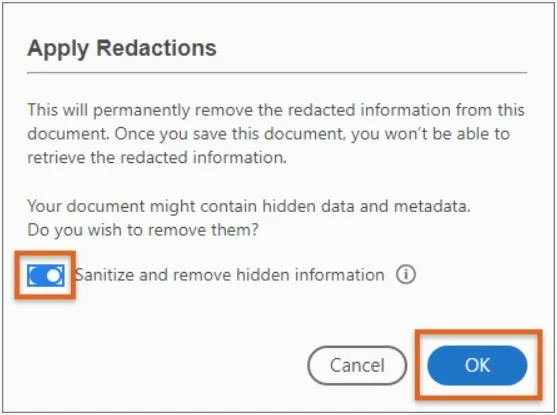
Acrobat not responding when sanitizing and after redacting

  • November 4, 2020
  • 1 reply
  • 2790 views

Hello!  

     When sanitize button is on and selected, and trying to save.  Adobe Acrobat stops responding and reducing PDF size progress bar is stuck.  When sanitize button is off, it works find and saves the .pdf document.  But, would need to sanitize.  Repair installation, Adobe Acrobat is up to date, uninstalled and reinstalled Acrobat thru Adobe Creative Cloud with the same issue.  Any suggestions?
 

This topic has been closed for replies.

1 reply

Amal.
Legend
November 4, 2020

Hi there


Hope you are doing well and sorry for the trouble. As described the application is not responding when sanitizing and after redaction.


Would you mind sharing the version of the Adobe Acrobat DC you are using? To check the version go to Help > About Acrobat and make sure you have the latest version 20.13.20064 (Released on 3rd Nov 2020) Go to Help > Check for Updates. You may also download the patch using the link: https://www.adobe.com/devnet-docs/acrobatetk/tools/ReleaseNotesDC/index.html


You may also try to repair the installation (Windows Only) Go to Help > Repair Installation and reboot the computer once see if that helps.


If it still doesn't work, please try to turn off the protected mode for testing (Windows Only). Go to Edit > Preferences > Enhanced Security  > Uncheck 'Enable protected mode at startup', turn off the protected mode and uncheck Enhanced Security > Click OK

Note: Turning off the security may possess security risks. Please turn on the security after testing.


You may also try to reset the preferences to default as described in the help page: https://community.adobe.com/t5/acrobat/how-to-reset-acrobat-preference-settings-to-default/td-p/4792082?page=1


If it still doesn't work, please try to create a new test user profile in Windows or enable the root account in Mac and try using the application there and check.


You may also look at the help pages listed below:

For Windows: https://helpx.adobe.com/x-productkb/global/troubleshoot-system-errors-freezes-windows.html

For Mac: https://helpx.adobe.com/in/x-productkb/global/troubleshoot-system-errors-freezes-mac.html


Regards

Amal