


Participating Frequently
Dec 3, 2020 5:52 PM UTC
Question

Acrobat PDF / Page Transitions Not Displaying or Working / Acrobat Pro DC

PDF not showing transitions when in full-screen view?


====

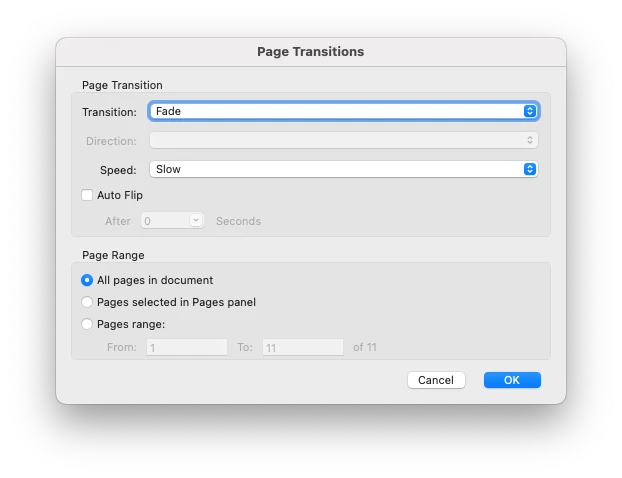
A PDF that includes page transitions of  "Fade" and "Slow" on ALL pages is no longer showing the transitions. The full screen view only jumps (like a jump-cut) to the next page, it does not do the smooth transition I normally expected.


What might I be doing wrong?
Image of the settings I nromally use and my Mac specs below.


Replies appreciated!

-- SEAN
 

Specs for me //

• OS = Big Sur 11.0.1
• Adobe Acrobat Pro DC = Continous Release 2020.013.20064
• MacBook Pro (15-inch, 2019, 2.4GHz 8-Core Intel Core i9) 32 GB 2400 MHz DDR4
• Graphics Radeon Pro 560X 4GB

66 replies

Participant
Jan 5, 2025 8:08 PM UTC

Has this been solved? I'm still having this issue 01/05/2025

Translate
Participant
Jan 7, 2025 3:03 AM UTC

Obviously, NO. It has not been solved. The only thing Adobe has done about it is IGNORE IT. And ignore it's users. I sent them a desktop video demonstrating the problem and never got a response. Well, they may have responded in a DM on X, but I deleted my X account. It's crazyt that you get more response from them on social media than here. What the hell is this "Community" for if not issues like this. 5 years and still not fixed. 

Translate
Participant
Jun 27, 2025 9:42 AM UTC

End of June 2025: no page transitions even though the feature is still included. WtF? Either solve the issue or take the feature out.

Translate
e.
Participant
Dec 15, 2024 7:12 PM UTC

This issue is still ongoing now over 4 years later. It should have been a high priority and it should have been fixed. As of 12/15/24 page transitions are not working when presenting a pdf in full screen mode (or otherwise) despite having set them correctly. This used to simply work. If Adobe considers PDFs to be a legitimate presentation tool then they should support the feature.

Translate
StudioRydo
Participating Frequently
Dec 16, 2024 7:51 AM UTC

100%! Absolutely ridiculous. 

If it isn't going to be fixed, the feature should just be removed. Total joke. 

Translate
Participant
Aug 3, 2024 6:37 PM UTC

I've complained about this to various Adobe account on X. And just got a response on one of them that seems like an actual human. Sometimes X seems to get more notice than the community support pages do. We shall see

Translate
Participating Frequently
May 30, 2024 9:59 AM UTC

Come on Adobe, I send out my portfolio to clients using the PDF fade feature and would LOVE for you to fix this issue. It's been 3 years!!! 

Translate
jayar256
Participating Frequently
May 30, 2024 10:42 AM UTC

I've given up. Along with other problems, this takes the cake. Adobe: I quit. 
Cancelled my contract. 

Translate
Harald E Brandt
Known Participant
Nov 5, 2021 9:11 AM UTC

I have doubts that Adobe even has any intents towards solving this. Consider the following post from 2018: Interactive PDF is dead. Although that blog post has a different focus, it is easy to perceive the move away from pdf as a format for content that has some elements of "rich content". 


Page transitions is only one such simple form of rich content, but there are other things that have been neglected in pdf, such as to embed movies and audio in pdf, something that would have been a natural thing in a slideshow exported from Lightroom. You could (with considerable struggle) embed movies in pdf, but its display in Acrobat relied on Flash, which has been retired. All my slideshows that have embedded movies are now "dead" since Flash is completely abandoned in the latest macOS.


The link I gave above suggests html 5, but I simply don't want to produce slideshows as a folder with html files and a bunch of separate ("easy stealable") photo files etcetera. In addition, there is no way to make this "html folder" to automatically open in a full screen slideshow mode with no clutter. The beauty of pdf was that it was a single file, which would open in full screen with nice transitions, provided it was opened in Adobe Reader or Acrobat.


I liked the simplicity of exporting slideshows from Lightroom into self contained pdfs. I don't see a viable simple alternative right now.

Translate
jayar256
Participating Frequently
Nov 5, 2021 9:23 AM UTC

It does indeed appear that Adobe doesn't care about this. At least they should say so – something like "f**k you all, find a workaround". 

Translate
Participant
Nov 5, 2021 11:16 AM UTC

The option is still there in preferences. If it can't be used it shouldn't be there.

Translate
StudioRydo
Participating Frequently
Nov 4, 2021 8:33 PM UTC

I've been having the same problem for a year and I went to great lengths with Adobe (in November 2020) to highlight it. Beyond frustrating to see that it still hasn't been fixed. 


They must have a pile of these cases by now … 

Translate
Known Participant
Oct 22, 2021 8:01 PM UTC

This does seem ridiculous. I just hit this bug for the first time (hadn't needed transitions). Presentation is on Monday and I have no way to make this work. Guesss I'll import into Keynote or something, but come on Adobe. This is pretty important to a lot of professional designers.

 
Translate
Dave__M
Community Expert
Community Expert
Oct 22, 2021 9:14 PM UTC

Sadly, this is not the first or only bug I'm seeing spoken of here on the forums... that are taking a very long time for resolution (hopefully).

I hope this gets fixed finally.

Dave

Translate
essgenius2
Participant
Nov 2, 2021 10:56 AM UTC

I think I'll see if I can start a new thread because Adobe are clearly ignoring this one and/or simply don't have the answer. I am surprised though that more people aren't raising this as an issue.

Translate
Participant
Oct 20, 2021 9:01 AM UTC

Does anyone know if there's any update on this as it all seems to have gone quiet and I am only just having this problem since my employers bought me a new MacBook Pro?

Translate
Known Participant
Oct 22, 2021 8:00 PM UTC

This does seem ridiculous. I just hit this bug for the first time (hadn't needed transitions). Presentation is on Monday and I have no way to make this work. Guesss I'll import into Keynote or something, but come on Adobe. This is pretty important to a lot of professional designers.

Translate
Known Participant
Oct 22, 2021 8:03 PM UTC

Interesting you can't delete a comment, apparently? I hit the wrong "reply" button. Sorry to post it twice.

Translate
Camilla Asra
Participant
Oct 5, 2021 2:05 PM UTC

I was attempting to apply page transitions for a presentation I'm doing in an hour.
As it (obviously) wasn't working, I then googled it, and found this thread. So frustrating.
And we're now less than two months away from the one year anniversary of this post. How long can it possibly take to fix it Adobe?

Translate
gloofer
Participating Frequently
Sep 26, 2021 5:39 PM UTC

I'm using macOS Catalina (10.15.7) and it doesn't work in this version either. Seems to be a very tricky bug for Adobe to fix, the three year anniversary for this bug report is just a few month away 😴

Translate
gloofer
Participating Frequently
Sep 26, 2021 5:43 PM UTC

Sorry, it should be "one year anniversary" of course. Still really bad.

Translate