
Participating Frequently
December 3, 2020
Question

Acrobat PDF / Page Transitions Not Displaying or Working / Acrobat Pro DC

  • December 3, 2020
  • 14 replies
  • 23206 views

PDF not showing transitions when in full-screen view?


====

A PDF that includes page transitions of  "Fade" and "Slow" on ALL pages is no longer showing the transitions. The full screen view only jumps (like a jump-cut) to the next page, it does not do the smooth transition I normally expected.


What might I be doing wrong?
Image of the settings I nromally use and my Mac specs below.


Replies appreciated!

-- SEAN
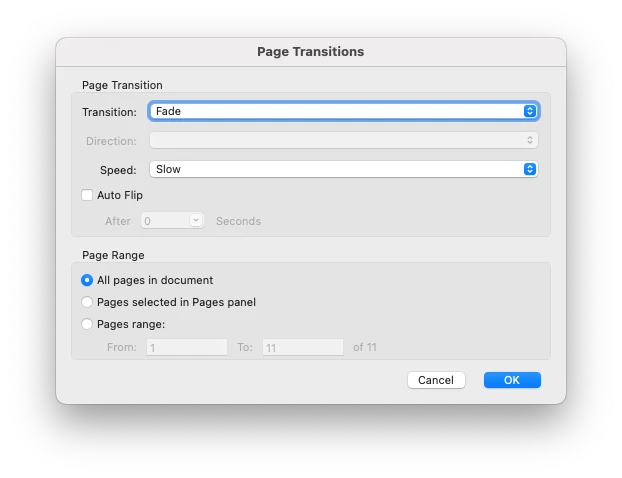
 

Specs for me //

• OS = Big Sur 11.0.1
• Adobe Acrobat Pro DC = Continous Release 2020.013.20064
• MacBook Pro (15-inch, 2019, 2.4GHz 8-Core Intel Core i9) 32 GB 2400 MHz DDR4
• Graphics Radeon Pro 560X 4GB

14 replies

Participant
September 4, 2021

9 months after the original post and still no fix?  Hello Adobe are you listening???

Participant
September 8, 2021

Didn't realise this was a thing until I tried the page transitions for a doc I'm presenting on Friday to a bunch of stakeholders! No biggie Adobe.

9mths and no word from Adobe? That's not good.

A true sense of a brand is how they react when things go wrong. Not right!

Known Participant
June 30, 2021

Almost 7 months since the original post, and this issue still persists.

All of my Adobe CC apps (including Acrobat Pro DC) are up-to-date, and I'm running the most recent version of Mac OS Big Sur — 11.2.3.

It would be great if Adobe could fix this issue.

Participant
September 4, 2021

9 months after the original post and still no fix?  Hello Adobe are you listening???

E. SeanAuthor
Participating Frequently
September 4, 2021

I'd like to see an Adobe rep reply to us too. This has limited the functionality of PDFs — I miss being able to wow a client with smooth transitions.

jayar256
Participating Frequently
April 26, 2021

I've been having the same problem. Good to hear that it's not my mistake. But it sure would be nice to have it fixed. Hellooo Adobe -- are you listening?!?!

Graveybaby
Participant
April 27, 2021

Hello Adobe

It would appear that you have an issue here and there are many of us that are getting quite frustrated with the intergration between the new OS update and your software. Please pay this the atention it deserves we all pay you guys a lot of money each month for a service that is slipping...

Participant
June 1, 2021

This has been happening to me since last year (2020). I eventually bought a new macbook, installed the latest adobe CC, but the issue remains.

E. SeanAuthor
Participating Frequently
December 3, 2020

I now have an open case-number with Adobe support. We have escalated to "Tier 2" — I am suspecting that the upgrade to Big Sur OS is causing a confict (but I'm not a trained professional). I will post here once they are able to get back to me.

E. SeanAuthor
Participating Frequently
December 8, 2020

UPDATE:

It's a Bug / They are fixing many / Told to contact them again on Monday December 14th, 2020.


DETAILS:

The chat support team from Adobe has confirmed that although this does not seem to be on the "official" bug list, it is an issue caused by the update to Mac OS Big Sur 11.0.1. 


REASON WE CARE ABOUT PAGE TRANSITIONS:
It lets me use native professional level software to generate a client-ready (page transition playing) presentation. Lets us use the same PROFESSIONAL InDesign authoring file for other production needs too. I find the page transitions to be important, as it puts Acrobat Pro in class with PowerPoint or Keynote. I hate craking-open Keynote or PowerPoint, and love using this to avoid it. We hope this feature works as-expected soon.


We are keeping our support ticket open, and I will follow-up again on Monday.


Theo Heldens
Inspiring
January 11, 2021

I have tried a lot to solve the problem. Good to see that it is a bug. 
Were are a month further. Is there any news?