


Participant
September 16, 2026
Answered

Acrobat Pro 2024: JPEG export to network drive leaves AcroLocked file, and Classic View option is missing

  • September 16, 2026
  • 4 replies
  • 35 views

Hi,

I am testing Adobe Acrobat Pro 2024 on Windows and have run into two issues that I am hoping someone can clarify.

The first issue is with exporting PDF files to JPEG.

If I convert a PDF to JPEG and save it locally, the export completes normally and the JPEG file is created.

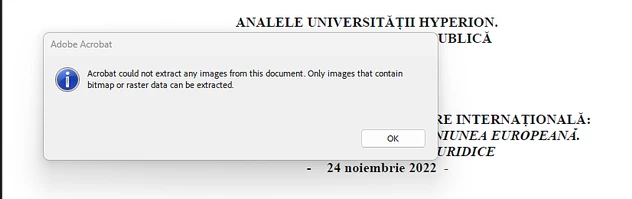
If I perform the same conversion and save directly to a network drive, Acrobat creates an AcroLocked temporary file instead of completing the JPEG export.

I have confirmed the following:

  1. The same PDF exports correctly to JPEG when saved locally.
  2. The issue only appears when the destination is a network location.
  3. The user has write access to the network folder.
  4. The behavior is reproducible in Acrobat Pro 2024.

I found older Adobe Community discussions describing very similar behavior where JPEG export succeeds locally but fails on a network drive, while leaving a temporary file behind. Some users reported that disabling Protected Mode allowed the export to work, but I would prefer not to disable a security feature as a permanent workaround.

Is this a known issue in Acrobat Pro 2024? Is there a supported fix that allows JPEG exports directly to network locations while keeping Protected Mode enabled?

My second question is about the Acrobat interface.

One of our users previously used Acrobat Pro 2020 and strongly prefers the older interface. Adobe's current documentation says that on Windows I should be able to go to:

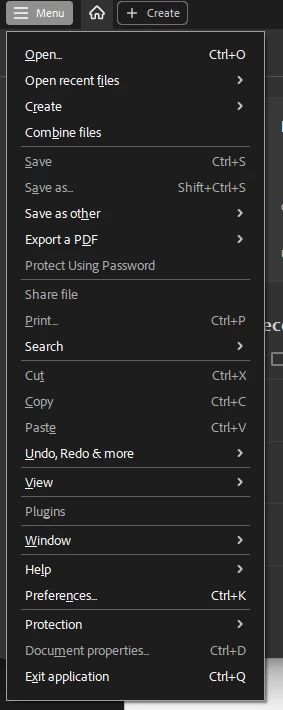
Menu > Disable new Acrobat

and restart Acrobat to return to the previous interface.

However, in our installation of Acrobat Pro 2024, Disable new Acrobat does not appear anywhere in the Menu.

I also tested the commonly referenced registry preferences for the Acrobat interface, but they did not change the UI.

I have seen other Acrobat Pro 2024 users report that the option is missing as well, while some other 2024 users appear to still have it available.

Is the classic interface supported in Acrobat Pro 2024?

If it is supported, is there an enterprise setting, registry value, or other supported method to enable it when Disable new Acrobat does not appear in the Menu?

Thank you for any guidance. I’ve provided screenshots for more detail.

Error with 

Cannot disable new interface


    Correct answer Enchanted_Hummingbird0c22

    I’m closing the loop on this. Disabling protect mode on startup resolved issues for our employees. Not ideal for security, but we have compensating controls so this feature does not provide as big of a security uplift.

    4 replies

    Enchanted_Hummingbird0c22AuthorCorrect answer
    Participant
    September 18, 2026

    I’m closing the loop on this. Disabling protect mode on startup resolved issues for our employees. Not ideal for security, but we have compensating controls so this feature does not provide as big of a security uplift.

    Participant
    September 16, 2026

    I have an update on the JPEG export. One of our employees was able to test this workaround, and unfortunately it did not work. Adobe keeps creating tmp files in the network drive where the export happens, and no export occurs.


    I’ve verified with the user that their network drive is currently in the list of privileged locations


    Is there a setting I am missing? 

    Participating Frequently
    September 16, 2026

    For the JPEG export, since it works locally but leaves an AcroLocked file only when saving to the network drive, I’d look at Acrobat’s security restrictions rather than the PDF itself.

    I wouldn’t leave Protected Mode disabled as a permanent fix. Adobe recommends keeping it enabled. You could test the network folder as a Privileged Location under Preferences > Security (Enhanced) and see if the export works. Adobe supports trusted folders for workflows that need access to files or network locations.

    For the classic interface, Adobe’s current documentation still shows Menu > Disable new Acrobat on Windows. If that option is completely missing in Acrobat Pro 2024, I’d check whether the installation is being managed by an enterprise policy or whether the specific Acrobat build has the new experience forced.

    If this is an enterprise deployment, checking the FeatureLockDown policies would be my next step rather than adding random registry values.

    Participant
    September 16, 2026

    For the security restrictions, this is something I will try with my employees. Thank you.

    I checked the FeatureLockDown settings as well.

    The installation is Acrobat Pro 2024 Classic, downloaded from Adobe’s Acrobat Pro 2024 page.

    I tested:

    HKLM\SOFTWARE\Policies\Adobe\Adobe Acrobat\DC\FeatureLockDown

    with bEnableAV2Enterprise set to 0, and I also tested the user preference bEnableAV2 set to 0.

    Neither setting changed the interface, and “Disable new Acrobat” is still completely absent from the Menu.

    Adobe’s preference reference appears to list both bEnableAV2Enterprise and bEnableAV2 as Continuous track settings, which makes me wonder whether these settings are supported at all in Acrobat Pro 2024 Classic.

    Is there a supported FeatureLockDown policy specifically for Acrobat Pro 2024 Classic that restores the previous interface, or is the new interface mandatory on the 2024 Classic track?