
Participant
July 17, 2023
Question

Acrobat Pro (thru Creative Cloud) crashes after a few seconds.

  • July 17, 2023
  • 1 reply
  • 491 views

I have CC with all apps, version 5.11.0.522.1. I installed acrobat onto my new desktop today and now it crashes on load after a few seconds. 

I researched the forums and tried all the fixes that have been provided over the last 2-3 years. No help.

When I run as admin, acrobat opens and will run with this:
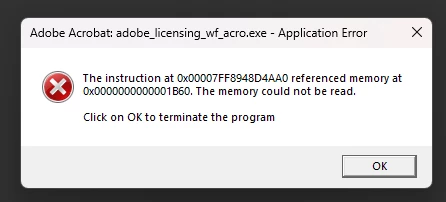
If I leave it, I can access my files. 
How can I resolve this? My account is in good standing and I have no other versions of acrobat on my computer.

This topic has been closed for replies.

1 reply

Cole_ArtAuthor
Participant
July 17, 2023


Update: these blank windows that open. 


Amal.
Community Manager
Community Manager
July 17, 2023

Hi @Cole_Art 

Hope you are doing well and sorry to hear that

What is the version of the Acrobat DC you are using? To check the version, go to Help > About Acrobat and make sure you have the recent version 23.03.20244 installed. Go to Help > Check for updates and reboot the computer once.

Also, try to repair the installation from the help menu (Win Only) and see if that works.

Please try to reset the Acrobat preferences as described here https://community.adobe.com/t5/acrobat-discussions/how-to-reset-acrobat-preference-settings-to-default/td-p/4792082


You may also, try to remove the application using the Acrobat cleaner tool https://www.adobe.com/devnet-docs/acrobatetk/tools/Labs/cleaner.html  , reboot the computer once and reinstall the application using the direct link
https://helpx.adobe.com/acrobat/kb/acrobat-dc-downloads.html  and see if that helps.


If it still doesn't work, would you mind collecting the Adobe CC logs https://helpx.adobe.com/creative-cloud/kb/cc-log-collector.html  , Procmon logs (Win Only) https://www.adobe.com/devnet-docs/acrobatetk/tools/Labs/acromonitor.html  and Crash/freeze logs https://helpx.adobe.com/acrobat/kb/collect-logs-crash-freeze.html  share them via any cloud storage? Just upload the log file to the cloud, generate the link, and share that link with us for further investigation.

Regards
Amal