Inspiring
February 21, 2024
Question

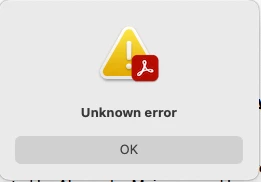
Acrobat Pro Unknown error

  • February 21, 2024
  • 1 reply
  • 639 views

When trying to convert a .pdf to a word doc I get this error. 


I tried with different .pdfs as well


Acrobat Version 008.20533

Mac 12.7.3
 

This topic has been closed for replies.

1 reply

Amal.
Community Manager
Community Manager
February 22, 2024

Hi @matthewdee 


I hope this message finds you well. I'm sorry to hear about the issue you're experiencing.


Upon reviewing the problem on my end, everything seems to be functioning correctly.


Could you please confirm if this issue persists with a specific PDF file or if it's occurring with all PDFs? If possible, try opening a different PDF to see if the problem persists. If the file is stored on a shared network or drive, I recommend downloading it locally to your computer and attempting to open it again.


Additionally, it might be helpful to reset the Acrobat preferences. You can follow the steps outlined in this guide: How to Reset Acrobat Preference Settings to Default.


Another troubleshooting step you can take, if applicable, is enabling the root account on your Mac. Here's a guide from Apple on how to do so: How to enable the root account on Mac.


Please give these suggestions a try and let me know if the issue persists.


~Amal


Inspiring
February 22, 2024

Happens with all pdf's all are stored locally


I uninstalled and re installed acrobat and still same problem


Root account is inly account on the machine


ONE IMPORTANT NOTE: I HAD THIS PLAN FOR A LONG TIME , I RECENTLY DOWNGRADED LAST MONTH TO JUST A PHOTOSHOP ACCOUNT THEN REALIZED I NEED ACROBAT AND ILLUSTRATOR SO I CHANGED THE PLAN TO WHAT I HAVE NOW.
 
COULD YOU CHECK THE ACCOUNT PLEASE
 
 
Amal.
Community Manager
Community Manager
February 23, 2024

Hi there


The email that you have shared was not registered with us.

Note: please do not share your personal information on the public platform.


Please try the steps in the given serquence and see if that works:

1. Remove the application using the Acrobat cleaner tool https://www.adobe.com/devnet-docs/acrobatetk/tools/Labs/cleaner.html 

2. Reboot the computer and reinstall the application using the direct link https://helpx.adobe.com/acrobat/kb/acrobat-dc-downloads.html


Let us know how it goes.


~Amal
