


Participant
January 11, 2023
Answered

Adobe Acrobat - Permanently Disable Home Screen Feature

  • January 11, 2023
  • 40 replies
  • 9221 views

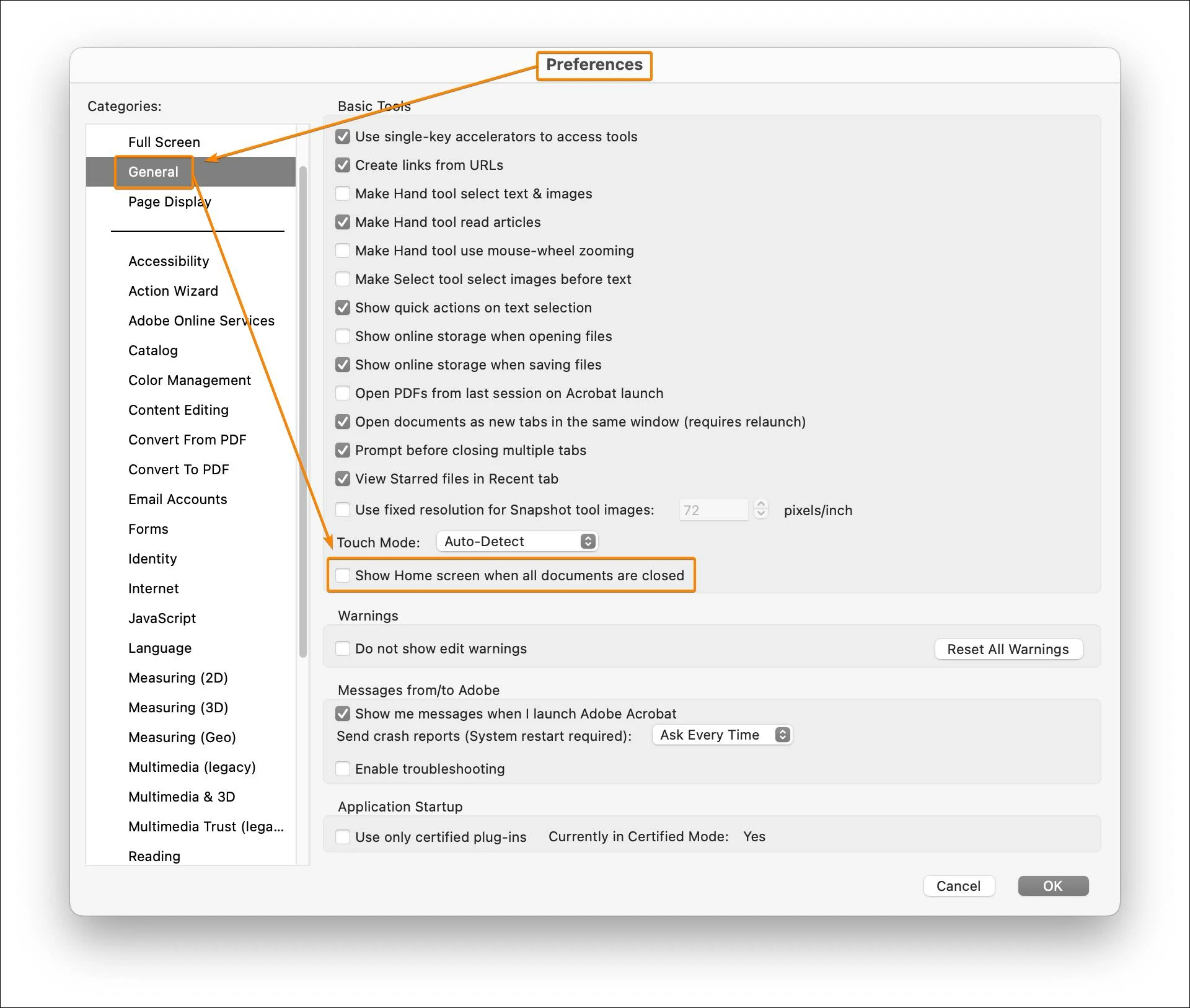
Please describe the exact preference in Adobe Acrobat Pro that permanently disables the Home Screen feature. Please don't send a pointless link to directions that don't solve my problem. Tell me exactly how to disable this pointless and annoying feature.



Correct answer JR Boulay

Ratushebarl Greg Harbour

Joe26853055d0nb

Simply uncheck this option in the Preferences (macOS only, not available for the Windows version).


40 replies

Participating Frequently
August 29, 2026

It's not clear which Acrobat you are using...free Reader or paid. In any case, in the paid Acrobat I am not seeing any difference in behaviour. In the free Reader, whether I have “Show Home screen” ticked or not does not seem to make any difference. I’d say it’s an Adobe flaw. Quite a nuisance.


Participant
August 28, 2026

Doesn’t work. MacOS 15.7.9 using latest greatest Acrobat...

Meenakshi Negi
Community Manager
Community Manager
August 31, 2026

Hi John29758264etvx,


Thank you for reaching out, and sorry to hear about your experience.

Could you please share more information about how the home screen appears for you, or whether it is not opening at all? It would be helpful if you could share a short video showing what happens and the options available under preferences. Please also share the Acrobat version number currently installed on your mac.


Let us know if you have any questions or need help.


Thanks,

Meenakshi

Participating Frequently
March 23, 2026

Acrobat 2025.001.21288

You can disable that visually cluttered and highly annoying screen by checking the “Disable Acrobat Studio to switch to classic home” on the Preferences > General screen. Restart Acrobat and no more screen clutter. Not sure when this option became available. Posting for others who land here because you feel the same way I do...no thanks Adobe! (And thanks for letting ME CHOOSE!).


Inspiring
May 6, 2025

Replying here - still not solved May 2025. None of JR Boulay's responses are effective. Adobe will need to code in this functionality.

JR Boulay
Community Expert
Community Expert
December 18, 2024

So you must uncheck these options:


Acrobate du PDF, InDesigner et Photoshopographe
Known Participant
December 18, 2024

Ok so that works, finally. Now if they can get rid of the blasted Welcome screen..


JR Boulay
Community Expert
Community Expert
January 30, 2025

"Ok so that works, finally. Now if they can get rid of the blasted Welcome screen.."

Uncheck this option:


Acrobate du PDF, InDesigner et Photoshopographe
JR Boulay
Community Expert
JR BoulayCommunity ExpertCorrect answer
Community Expert
December 16, 2024

Ratushebarl Greg Harbour

Joe26853055d0nb

Simply uncheck this option in the Preferences (macOS only, not available for the Windows version).


Acrobate du PDF, InDesigner et Photoshopographe
Known Participant
December 16, 2024

Unchecked, home screen still displays. Wrong answer sorry.


JR Boulay
Community Expert
Community Expert
December 17, 2024

Try to revert to the Classic UI: https://community.adobe.com/t5/acrobat-discussions/acrobat-2023-how-to-revert-to-classic-gui-user-interface/td-p/14052807
Consider the "new Acrobat" as a beta version, many features are still missing or half-implemented.

Acrobate du PDF, InDesigner et Photoshopographe
Inspiring
October 27, 2024

Being unable to disable homeview/screen is a great example why I'm replacing Acrobat with Preview for most use because of its scope creep from a useful utility to an app pursuing no clear purpose so just occluding its utility


JR Boulay
Community Expert
Community Expert
December 16, 2024

Preview, aka "the PDF killer".

This old article is still relevant: http://khkonsulting.com/2013/06/preview-app-killer-of-pdf-files/

Acrobate du PDF, InDesigner et Photoshopographe
Participant
September 8, 2024

Fullu agree. This is so dump. I'm using Adobe products for 30 years and I used to love the products they've made. Now I really hate Adobe. I love indesign. The people behind it know what thay are doing and don't force unnecessary changes.
It's how day say - what is the worst enemy of good?...Better. They are doing instant nonsense changes to Photoshop. Now they put their hands on Acrobat. What's the idea for changing interfaces, keyboard shortcuts, function usage? It's so stupid. If it wasn't for my clients who also struggle with adobe products, I would have changed it 8 years ago. But competitors are progressing and one day Adobe will end up like Quark, unless they stop messing with everything just for doing something. Better focus on making products work like it should – Illustrator the worst of all of them. Full of bugs, super slow almost unusable even on fastest macs, unprecise !!!. NIGHTMARE

Participant
October 23, 2024

Bumping to show my support. Found this thread googling hth to remove this feature -_____-.

JimRanes
Participant
June 18, 2024

This issue still is not solved. Replying to bump this topic. Anyone know of any progress on how to turn off the home screen? Very annoying. The setting in the preferences does NOT work. C'mon Adobe, PLEASE fix this!!!

Participant
February 7, 2024

This is beyond annoying.  All previous versions of Acrobat, ctrl-w would close the pdf and minimize acrobat.  Now i have to constantly content with this useless home screen taking up my entire desktop.

Participating Frequently
March 8, 2024

Agreed. It's beyond useless for me and a complete waste of space.
I really wish Adobe would listen to its customers. It seems very arrogant to simply ignore/deny requests to have the ability to completely custominze the workspace. Instead we have to deal with nonsense such as the uneeded/unwanted "home screen" and the bright blue "Adobe Account" button. Adobe appears to have become Quark from the '90s.