Participant
February 22, 2019
Answered

Adobe Acrobat Pro DC freezes for several seconds after opening a PDF - Windows 10

  • February 22, 2019
  • 53 replies
  • 106550 views

Hi Adobe Community,

Anyone have an issue with Adobe Acrobat Pro DC freezing for several seconds after opening a PDF on Windows 10. I tried uninstalling and installing as well and changing a few settings I saw suggested online like reducing the number of documents listed in the history. This problem just started today after having no issues for a long time. I didn't download, install, or update anything today.

Thanks!

This topic has been closed for replies.
Correct answer Tariq Ahmad

Hi all,

Sorry for the experience and thank you for bringing this to our notice. We appreciate your patience on this.

I would like to mention deleting Acrocef.exe is not an Adobe’s recommended solution or a workaround for this issue. Deleting the process might lead to malfunction of the various features of the product associated with the process. That being said, we are currently tracking this issue and will keep you posted. 

You may help us further by providing logs from your machine to investigate it further. For performance-related issues please follow the following steps carefully and help us with the logs:

  1. Logs from task manager:
  • Launch Adobe Acrobat Pro or Adobe Acrobat Reader.
  • Launch Task Manager, by right-clicking on the taskbar of the screen and choose Task Manager. Make sure you have the “Processes” tab available/clicked.
  • When the issue occurs right-click on Acrobat of Reader process to create dump files (screenshot attached)
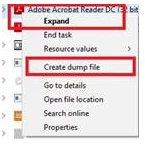
      

Step 1: Download the Procmon tool from https://docs.microsoft.com/en-us/sysinternals/downloads/procmon

Step 2: launch procmon.exe.

Step 3: Set the below filter in procmon (optional ), do the required steps/ workflow and save the logs in the end.

The process dumps along with procmon logs will help us investigate the issue in detail. Once the logs are available, please upload the log files to either ( Dropbox, OneDrive, Google Drive or any other cloud option you have) and share the public link with us via private message:

How to send a private message: https://forums.adobe.com/thread/1184148?start=0&tstart=0

Tariq Dar

53 replies

Participant
April 16, 2019

Same problem as everyone else.    Acrobat DC hangs on launch for 10-20 seconds every time it opens.    I disabled enhanced security, and mine still hangs.    Very annoying problem for my users, as they open PDF from email all day long, and don't just leave acrobat running all the time.  Meaning, they getting the adobe spinning wheel of death 20 times per day.

Windows 10 Pro version 1809

Adobe Acrobat DC 19.010.20100

lunamarc
Participating Frequently
April 16, 2019

I thought about what you posted. So, I figure, open it up and leave it open as I too do this all day long with email and other tasks.

It hangs on launch!

Still waiting....

danielp68887195
Participant
April 8, 2019

Same trouble there with Reader DC 2019.010.20098

Removing signature check fix my problème.

Thank you

Participant
April 4, 2019

my win 10 laptop, no issues. My win 10 desktop, "not responding" as soon as I click on literally anything in the program window.

I can't even try the "fixes" that that has been described in this thread because no matter what I do, it goes into "not responding" mode as soon as I click.....

Participant
April 12, 2019

Update:

win10 laptop started doing it not long after my initial post...... at least on the laptop it gives me time to go into the settings and remove the signature verification check - so laptop is fixed..... desktop..... not so much

March 28, 2019

I figured that disabling the Sandbox property minimizes freezing.

Goto:

Preferences->Security (Enhanced)->Enable Protected Mode at startup

and disable this feature.

Probably not the best way concerning security but that bloody annoying freezing is almost gone now.

Participating Frequently
March 28, 2019

Thanks, Thomas, that seemed to work for me. Although, my options in Security (Enhanced) were not quite the same as yours. I didn't have protected mode at startup, but I did disable "enable enhanced security" and voila. Windows 10 Pro and latest version of Acrobat DC.

Participating Frequently
April 4, 2019

It started doing it again. Only thing I really did was restart my computer last night. The same security option is un-ticked but the original behavior has returned.

Participant
March 26, 2019

The problem is somewhere in the code. Forget antivirus and similar stuff. If you open a large document and once it is opened scroll down with mouse you have no freeze at all. BUT once you stop the mouse Acrobat try to do something that freeze the document for some seconds. So it is something inside the program that is executed once at program start. Indeed if you leave the acrobat opened you have no problem at all on next files

Participating Frequently
March 26, 2019

I would agree. Everything was working fine up till recently and everyone is having the same problem. It's the update, whatever they did.

wink002
Participant
March 23, 2019

I've had this same problem for weeks. Anytime I open an adobe file while an instance of Adobe is not already running, it will freeze for at least 5-10 seconds. Contacted Adobe and they "remoted" into my computer to witness the freezing. However, as part of the remoting, they required elevated privileges. At this point, the freezing quit occurring. It seemingly relates to startup checks (whether online or local) for which most normal Windows 10 users do not have permission.

This problem has been around for a while, and many people are experiencing it. Adobe needs to address this issue promptly. Creating a "hidden" admin account is not a solution.

Known Participant
March 22, 2019

I too have this problem appearing. It was on other versions and now it's back again. Very annoying and neither is Adobe being helpful on this.

michaelTGC
Participant
March 21, 2019

I have now turned off signature verification and disabled Collaboration Synchonizer and restarted my system.  There was still a good 15-second delay on startup (despite letting the computer settle after restarting and before opening Acrobat).  I'll monitor throughout the day and report back.  In the meantime, I wonder if anyone else on this thread is using both Acrobat and Quickbooks on the same computer where the issue appears.  I've noticed strange interactions between those two products in the past.

Thanks

cglassen
Participant
March 21, 2019

Now that you mention it - I have two workstations... The one with Quickbooks installed is having the issue.

Participant
March 20, 2019

I don't consider this a solution but I find the best work around is to open Adobe Acrobat DC directly and not by opening a PDF, then opening the PDF. There is still a freeze up initially but it's much shorter. Then don't close Acrobat only close your PDFs. Leaving Acrobat running seems to eliminate the freeze ups. I'm not used to that so if I do accidentally close Acrobat it always freezes when I reopen it however when I leave Acrobat open only closing the PDFs I don't appear to have any freeze ups.

Participant
March 20, 2019

Follow up report.

Maybe it was dumb luck, but my program is continuing to work smoothly without freezing, after going through the steps I mentioned earlier. To be clear, my documents would freeze for up to a minute.

Dell laptop - Window 10 Pro, 64 bit. Currently I have only Acrobat DC installed, no other Adobe product. Digital signatures turned off. Auto updater turned off.  Collaboration Synchronizer disabled in my startup services (task manager). I've opened and worked in at least a hundred documents in the past couple days. I almost feel bad that mine is no longer freezing and others are still experiencing trouble.

I'll check in with you guys in a few days and let you know if it reverts back.

hrrc73745
Participant
March 20, 2019

We have Windows 10.  Signature verification checked off in Acrobat.  Reader is not and has not been installed.  Acrobat Pro DC is the only Adobe product on the PC.

I agree with cglassen -- it seems that once the "freeze" is done, the online ID pops up in the upper right corner to show it is connected.

Each of my people has their own Adobe ID that they register the software with, since this is the DC (subscription model) software.  The software is installed and registered.

Adobe, do you have an update for us on this?  Is this something you can reproduce?  Do you need a PC that you can remotely look at that is having this issue?

Known Participant
March 20, 2019

Some of us are seeing improvements at least initially by turning off that Signature verification and restarting our computers.   If you are seeing that ID icon take a long time to log you in, maybe that is where the hiccup is happening in your situation. I for one did not see a delay in the icon/login verification during my issues.  This lockups/feezing issue wasn't happening for everyone at our location even though we all had the same version of Acrobat.

