Participant
February 22, 2019
Answered

Adobe Acrobat Pro DC freezes for several seconds after opening a PDF - Windows 10

  • February 22, 2019
  • 53 replies
  • 106550 views

Hi Adobe Community,

Anyone have an issue with Adobe Acrobat Pro DC freezing for several seconds after opening a PDF on Windows 10. I tried uninstalling and installing as well and changing a few settings I saw suggested online like reducing the number of documents listed in the history. This problem just started today after having no issues for a long time. I didn't download, install, or update anything today.

Thanks!

This topic has been closed for replies.
Correct answer Tariq Ahmad

Hi all,

Sorry for the experience and thank you for bringing this to our notice. We appreciate your patience on this.

I would like to mention deleting Acrocef.exe is not an Adobe’s recommended solution or a workaround for this issue. Deleting the process might lead to malfunction of the various features of the product associated with the process. That being said, we are currently tracking this issue and will keep you posted. 

You may help us further by providing logs from your machine to investigate it further. For performance-related issues please follow the following steps carefully and help us with the logs:

  1. Logs from task manager:
  • Launch Adobe Acrobat Pro or Adobe Acrobat Reader.
  • Launch Task Manager, by right-clicking on the taskbar of the screen and choose Task Manager. Make sure you have the “Processes” tab available/clicked.
  • When the issue occurs right-click on Acrobat of Reader process to create dump files (screenshot attached)
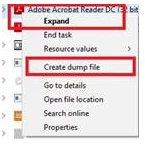
      

Step 1: Download the Procmon tool from https://docs.microsoft.com/en-us/sysinternals/downloads/procmon

Step 2: launch procmon.exe.

Step 3: Set the below filter in procmon (optional ), do the required steps/ workflow and save the logs in the end.

The process dumps along with procmon logs will help us investigate the issue in detail. Once the logs are available, please upload the log files to either ( Dropbox, OneDrive, Google Drive or any other cloud option you have) and share the public link with us via private message:

How to send a private message: https://forums.adobe.com/thread/1184148?start=0&tstart=0

Tariq Dar

53 replies

cglassen
Participant
March 20, 2019

Disabling Signature verification did not work for me. Acrobat does freeze without even opening a document. I've noticed that it seems to be checking for online notifications. Once it "unlocks" the notifications in the top right corner light up.

michaelTGC
Participant
March 20, 2019

I have been having the same issues on two different computers sharing the same network for a couple of weeks - intermittent slow response time when:

- opening Acrobat before the recent file list appears

- opening files

- trying to save files (save as function)

- when displaying a form (it sometimes comes up in bits and pieces - i.e. text displays several seconds before fields)

- when trying to scroll after the first page displays. 

These symptoms do not appear every time, but often enough during the day to be highly noticeable and aggravating.

I have 2019.010.20098 installed.  Adobe Reader is not installed, but Creative Cloud is.  Most of our files are stored on a NAS here in the office, so I thought it might have some connection with that, but other programs are not similarly affected.  I have not tried the remedial steps recommended by Akanchha yet (cleaning and reinstalling) in the hope that a definitive solution will arise.

Known Participant
March 20, 2019

MichaelTGC if you haven't yet, at least try the suggestion to turn off signature verification on open that was posted earlier.  Then remember to restart and test Acrobat use.  

cglassen
Participant
March 20, 2019

Also have this issue. Reader is not installed on my machine.

emily79697487
Participant
March 20, 2019

I'm having the same problem in my organisation across Server 2016 installations of Adobe Acrobat Pro. We're on version 2019.010.20098.

I have tried uninstalling everything and reinstalling from scratch but are having the same issue. I don't have Reader installed and I've already tried unticking the 'Enhanced Security' option which didn't make a difference.

Known Participant
March 19, 2019

I have the same issue when files open, but also getting constant freezing moments after every other little action performed.  Vers 19.010.20098

I tried turning off signature check on open.  I think it might have helped the opening pause, but I'm not certain because everything else is still being met with a couple second pause.   One example, adding watermark text, I get through typing a word and only two letters were typed.  I must wait, might see one more letter pop up.  Might not.  Then my cursor comes back and I know I can type again.  Right after finally getting the full watermark text in, it locks again.  On and on through out the whole time using it.

I might try one uninstall but this suggested step has never worked for any of my issues in the past.  I doubt I'm going to bother with "hidden admin" accounts and any of those suggestions.  I will attempt to roll back to prior versions first.

Known Participant
March 20, 2019

Update from my issue:  A day later after turning off the setting for signature recognition on open, I think I have noticed improvement in the freeze ups I was seeing.  PDFs are opening faster and able to flip pages right away right now.   I haven't seen many pause freezes today yet where they had been constant.   I doubled checked and I had no Reader software installed.   So one computer restart after the signature setting has been turned off may be all it takes.  May have worked for me.  Have only worked with maybe 5 PDFs so far today so...grain of salt my update.

I am still seeing a spinning icon appear often while perusing PDFs that I am not familiar with seeing in the past. But it doesn't appear to be slowing me down or locking me up at the moment.

Participant
March 19, 2019

Hello everyone. This is an update to a previous post where I suggested disabling signature verification. Unfortunately, not long after I posted that suggestion the freezing episodes started again. I tried the cleaning tool and while I was doing that, I noticed I had Acrobat DC, Creative Cloud and Adobe Reader installed on my machine. I uninstalled everything. If it had the name Adobe associated with it, I removed it. I even deleted any remaining folders I found that had the name Adobe.

I reinstalled Acrobat DC through my subscription, (only Acrobat DC, nothing else). I appreciated the fact that all my settings and preferences were maintained. The tool bars were reconstructed exactly the way I had them configured before the uninstall.

I've opened at least a hundred documents and have not encountered the freezing that was occurring before.

I think there might have been a conflict with the Adobe Reader program and Acrobat DC program.

Crossing my fingers

Dov Isaacs
Legend
March 19, 2019

I doubt that this is due to “a conflict between the Adobe Reader program and Acrobat DC program” but quite frankly, there is not any really good reason to have both installed. Acrobat is a superset of Reader including all the functions of Reader plus all the PDF manipulation features. Having both installed in parallel buys you nothing except the possibilities of conflicts.

          - Dov

- Dov Isaacs, former Adobe Principal Scientist (April 30, 1990 - May 30, 2021)
AkanchhaS8194121
Legend
March 15, 2019

Hi All,

We apologize for the delay in follow up.

Thanks for trying the troubleshooting steps suggested and sharing the updates. To get this issue escalated further and to know the root cause of the problem, we request you to check with the few more further troubleshooting steps suggested below-

1- Run the cleaner tool and remove the application once- Download Adobe Reader and Acrobat Cleaner Tool - Adobe Labs

Reinstall it through- Download and install Acrobat DC subscription

2- If you have got any internet security software installed, turn that off for a while and relaunch Acrobat.

[Antivirus software can help protect your computer against viruses and other security threats. In most cases, you shouldn't disable your antivirus software. If you have to temporarily disable it to install or activate other software, you should re-enable it as soon as you're done.]

3- Create Hidden Admin account and following these steps, and open Acrobat in hidden account.

1-Hold the Windows Key while pressing “R” to bring up the Windows Run dialog box.

2-Type: net user administrator /active:yes

3-Press “Enter“.

Replace “yes” with “no” to disable the admin account on the welcome screen

We would be looking forward for an update on this.

Thanks,

Akanchha

hrrc73745
Participant
March 18, 2019

Thank you.  We have this very issue.  The issue did not resolve itself by turning off signature verification.  Windows 10 Pro.  Using standard Windows defender software that comes with Windows 10.

We have done the steps of using the cleaning tool and re-installing.  We are not going to create hidden admin accounts to run in a different context.  This person already has full admin privileges on the computer (member of the "Administrators" group).

The user has discovered if they leave a PDF open by itself in Acrobat, they are able to open other documents without the delay/freeze in scrolling.  But every single first time they open a PDF without using this trick, Acrobat will stay locked up/frozen with no ability to scroll for 30 seconds to a minute.

Participant
March 21, 2019

We have this same problem.  Issue exists on Windows 10 and Windows 7 on multiple workstations with Adobe Reader DC 2019.010.20098. We have tried everything in this thread with limited results but no real fix.  This has been happening for last 30 days or more and was not an issue with prior versions.  We are hoping that Adobe will fix this soon.

Participant
March 14, 2019

Thanks to everyone for posting. I believe there have been several posts that have been helpful though I'm still having hanging issues and I believe from your posts it is tied to connecting to Adobe when first opening Acrobat. I am on a subscription and I couldn't find a way to go into "offline" mode to test this. If I close out tabs and leave Acrobat running I don't get hang ups after first opening Acrobat but that is not an ideal solution for me. If I close Acrobat and open it the program will always hang.

Participant
March 7, 2019

I too have this same problem. When I open a PDF document, the program stalls for sometimes up to a minute before allowing me to scroll through the pages or move the window on my screen. I noticed someone else complaining of delays associated with the blue account icon in the upper right portion of the window. My thoughts are, these two are unrelated. I am not a programmer and do not claim to know the internal workings of the Adobe program.

First: The stalling or freezing when documents are opened. I found that if I disable signature verification, my PDFs no longer freeze.

Click on the blue icon in the upper right portion of the window.

Click on preferences. Scroll down to Signatures. Find the section for "Verification, Control how and when signatures are verified". Click on the "More" button. Remove the check mark from the first box "Verify signatures when the document is opened"

After doing this exercise, I tested numerous documents and haven't had one freeze.

Second: The hesitation associated with the blue account icon. I still get a slight hesitation, one or two seconds, when the account icon connects and turns blue. This is certainly something I can live with compared to the one-minute delay I spoke of above.

I'm really interested in hearing if this works for others.

Good luck all.

Participant
March 7, 2019

I can confirm - in my case, disabling signature verification solved the problem of freezing when starting the program/opening documents.

Participant
July 11, 2019

You're doing God's work, thank you!

mikes49386657
Participant
March 3, 2019

I have this problem too. It appears to me that Acrobat is signing into my online account which causes the program to hang. When I first open a file the circular icon at the top right hand corner is white and then turns blue signalling that I have signed into my account. This is when the hang time occurs. If I open a file and start scrolling immediately the sign activity does not occur until I stop scrolling. Interested to know if this is what others are experiencing or is something different altogether.

