Participant
February 22, 2019
Answered

Adobe Acrobat Pro DC freezes for several seconds after opening a PDF - Windows 10

  • February 22, 2019
  • 53 replies
  • 106550 views

Hi Adobe Community,

Anyone have an issue with Adobe Acrobat Pro DC freezing for several seconds after opening a PDF on Windows 10. I tried uninstalling and installing as well and changing a few settings I saw suggested online like reducing the number of documents listed in the history. This problem just started today after having no issues for a long time. I didn't download, install, or update anything today.

Thanks!

This topic has been closed for replies.
Correct answer Tariq Ahmad

Hi all,

Sorry for the experience and thank you for bringing this to our notice. We appreciate your patience on this.

I would like to mention deleting Acrocef.exe is not an Adobe’s recommended solution or a workaround for this issue. Deleting the process might lead to malfunction of the various features of the product associated with the process. That being said, we are currently tracking this issue and will keep you posted. 

You may help us further by providing logs from your machine to investigate it further. For performance-related issues please follow the following steps carefully and help us with the logs:

  1. Logs from task manager:
  • Launch Adobe Acrobat Pro or Adobe Acrobat Reader.
  • Launch Task Manager, by right-clicking on the taskbar of the screen and choose Task Manager. Make sure you have the “Processes” tab available/clicked.
  • When the issue occurs right-click on Acrobat of Reader process to create dump files (screenshot attached)
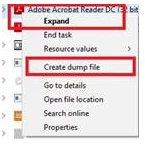
      

Step 1: Download the Procmon tool from https://docs.microsoft.com/en-us/sysinternals/downloads/procmon

Step 2: launch procmon.exe.

Step 3: Set the below filter in procmon (optional ), do the required steps/ workflow and save the logs in the end.

The process dumps along with procmon logs will help us investigate the issue in detail. Once the logs are available, please upload the log files to either ( Dropbox, OneDrive, Google Drive or any other cloud option you have) and share the public link with us via private message:

How to send a private message: https://forums.adobe.com/thread/1184148?start=0&tstart=0

Tariq Dar

53 replies

March 1, 2019

I work for a business who has several users that have seen this problem start in the past week or so on their devices. We have ran through the list of steps to take inside of the "Resolve Acrobat DC intermittent crashes on Windows" article and then some. I have been unable to send a crash report though, because the program does not technically crash and bring up the Windows Error Reporting dialog box. Instead it freezes for a time then will function again for a short period before freezing again. The timing of this issue seems to be suspiciously close to when the last Adobe Acrobat update was applied to the system. Please advise on the next steps to take to troubleshoot this very disruptive problem.

AkanchhaS8194121
Legend
February 27, 2019

Hi All,

Sorry to hear about the trouble.

Are you experiencing this issue after installing the latest patch 2019.010.20098? You may confirm whether you have got the Acrobat up to date or not. Open Acrobat>Help>About Acrobat.

DC Release Notes — Release Notes for Acrobat DC Products

Refer to the all troubleshooting steps suggested in help article here: Resolve Acrobat DC intermittent crashes on Windows  and let us know the result.

Check with a different PDF and see if that causes the same problem.

Regards,

Akanchha

Participant
February 27, 2019

I am experiencing the same issue where Adobe Acrobat Pro DC freezes up for a few seconds when I open a PDF.  I just verified that I have the most current patch installed (19.010.20098).  It is almost like the application is checking on something or trying to update or something. 

Participant
February 26, 2019

I'm having the same issue! Any luck figuring this out?

