

Adobe Reader on Mac Monterey: Zoom missing on toolbar
Like a lot of others, I can no longer change the Zoom via my tool bar, as the + _ and % buttons are all gone. I am not a big fan of + or -, as they are crude. I have always relied heavily and setting the percent.
I have read more than a dozen posts here, but the recommended solutions don't show here. When I go to View>Show/Hide>Toolbar Items>Show Select & Zoom Tools, the options for the old icons are not there. Here are my only options:
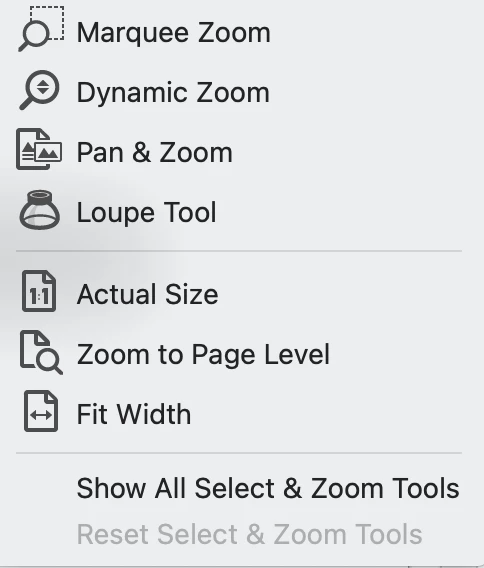
I have delete and uploaded Adobe Reader. I have tried going to default settings (which are already there, as I just uploaded) and rebotting.
I know that I can access Zoom + and - view the View tab or using the Comnmand function, but I'd really like the percent tab back. Is there a way to get in on Mac?
Thanks for any help on this!
David


 AdChoices