



NursingNnenna
Participant
June 17, 2026
Answered

All Tools Pane Disappears/Empty When I Select Edit PDF?

  • June 17, 2026
  • 107 replies
  • 27177 views

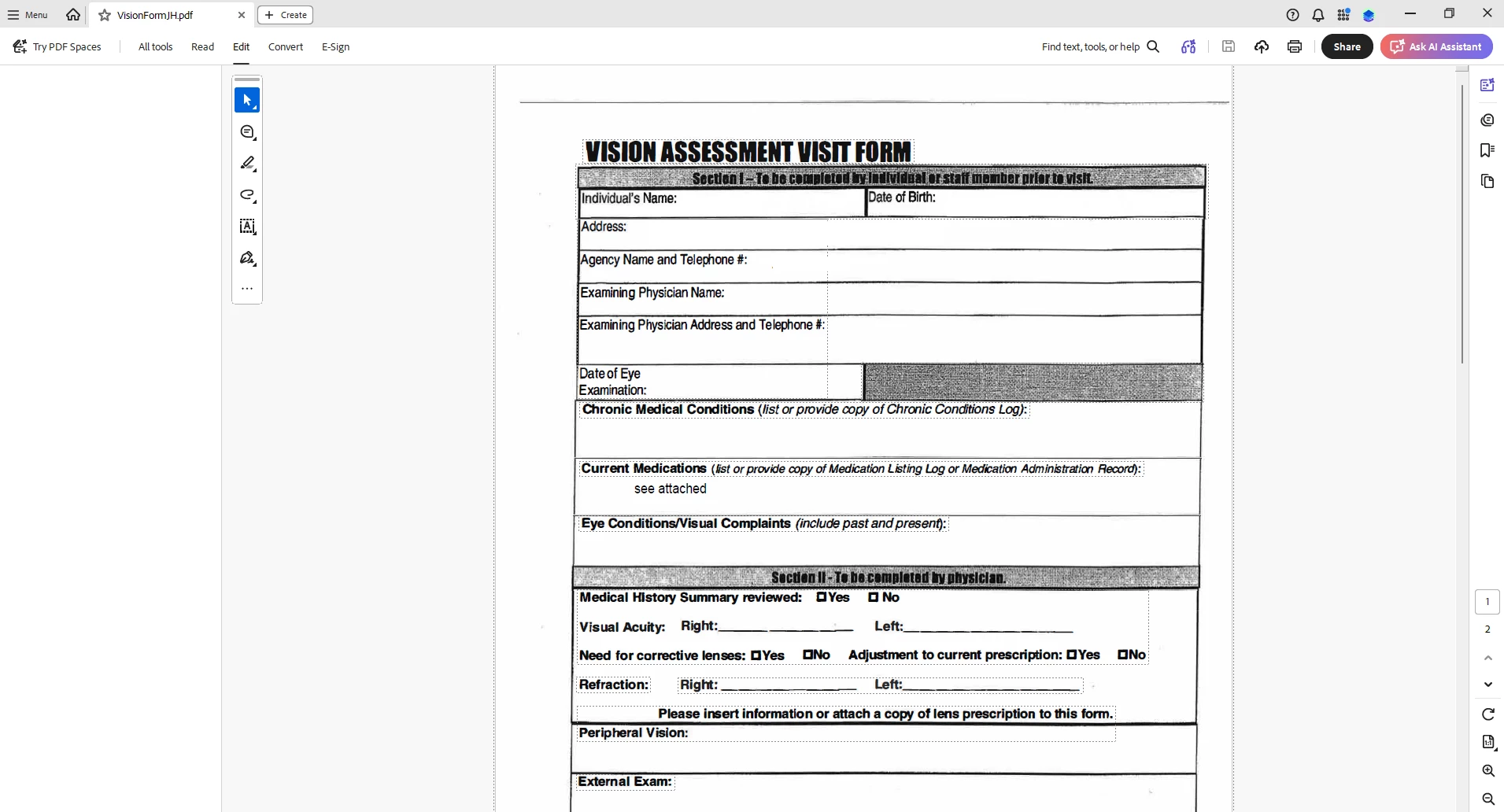
When I select “Edit PDF” option, the “All Tools” pane disappears.

This issue seems persistent.

I’ve tried looking at the view/show settings.

Running a repair on the installation.

Uninstalling and Reinstalling Adobe Acrobat.


Can someone please help or provide some suggestions?


Thank you,
 

    Correct answer Anand Sri Bhattacharya

    Hi All,


    Thanks for your patience and cooperation on this.

    The patch is available with the fix 26.001.21691, Planned update, Jun 25, 2026. Please install the latest build of Acrobat from Menu > Help> Check for updates. Restart the machine after installing the updates, and check the performance of the app.


    Let us know if you experience any issues after installing the latest build


    Regards,

    Anand Sri.

    107 replies

    Michael325901916lm5
    Participant
    June 18, 2026

    I am having the same problem. I have tried all of the solutions mentioned including Uninstalling and re-installing. The All Tools have not reappeared. This does not appear to be the case with others within my organization. My job includes preparing our PDF files for accessibility, so I need these tools often. It seems I can get to the tools through the tool search area, but this slows down my workflow and is very inconvenient.

    dave365x
    Participant
    June 18, 2026

    Adding that our organization started seeing this issue yesterday as well. Disabling New Acrobat has resolved it for our affected users so far.

    Cwhite1
    Participant
    June 18, 2026

    I have completed these things so far:

    • Checked and downloaded new updates
    • Restarted computer
    • Ran repair from within the app
    • Uninstalled the app
    • Restarted pc again post uninstall
    • Reinstalled the app
    • Checked and downloaded new updates (Odd that my brand new install needed updates)
    • Ran a repair through control panel instead of from within the app


    So far I have not been able to restore those tools.

    Thanks,

    -Cody

    Anand Sri Bhattacharya
    Community Manager
    Community Manager
    June 18, 2026

    hello ​@Cwhite1 


    I hope you are doing well, and we’re sorry for the trouble. Thanks for trying the steps. I have requested some additional information via email on the email address that you have used to log in to the community platform. Please check the email, and share the information via email only.


    Thanks for your cooperation on this.

    Regards,

    Anand Sri.

    Said36230099nnbf
    Participant
    June 18, 2026

    We are experiencing the same issue across the company, affecting more than 500 employees. Disabling the new Acrobat is not a viable solution, as it is equivalent to asking users to work on a different program. We need a proper solution as soon as possible. Thank you

    BenC2026
    Participant
    June 18, 2026

    Open Adobe Acrobat and go to menu in the top left. Go down the menu until you see Disable New Adobe and click it. This will ask you to restart Adobe, restart and it should open up Adobe again but looking a little bit different (older UI). Test out a pdf and tools panel. This has worked 4/4 times for me so far. 

    Anand Sri Bhattacharya
    Community Manager
    Community Manager
    June 18, 2026

    Hello ​@BenC2026 ​@mobyalex ​@jj_00 ​@chaitali_0179 ​@DSHAME125 ​@Lawrence219279676nrk ​@JohnFunk ​@avilaaa 


    I hope you are doing well, and thanks for your cooperation on this.

    I have requested some information via email. I have sent the email to the email ID that you used to log in to the community platform. Could you please check the email and share the requested information via email only?

    Regards,

    Anand Sri.

    mobyalex
    Participant
    June 18, 2026

    Have several users in our organization with this exact issue. Uninstall, reinstall, run cleaners, reboots, new machine, doesn’t matter. Tools don’t work in this version.

    Said36230099nnbf
    Participant
    June 18, 2026

    You need to install an older version. It works for me.

    jj_00
    Participant
    June 18, 2026

    We are having the same issue as well. I hope this gets fixed quickly.

    chaitali_0179
    June 18, 2026

    How will we know when the update is finished and ready? Also, if anyone needs, the web-versions works for these options.

    DSHAME125
    Participant
    June 18, 2026

    Hi All, Current work around that my teams has been using is to go into Menu>Disable New Acrobat>restart the program. You will be able to edit and everything but it will look like the old version of acrobat so you might need to re-orient yourself.

    Participant
    June 18, 2026

    This seems to be working for us too.

    JohnFunk
    Participant
    June 18, 2026

    Same; this is working for us as well.

    avilaaa
    Participant
    June 18, 2026

    We are having the same issue as well. Started yesterday. Updating and reinstalling did not fix it and disabling New Acrobat did not work either.
