


Participating Frequently
September 13, 2022
Answered

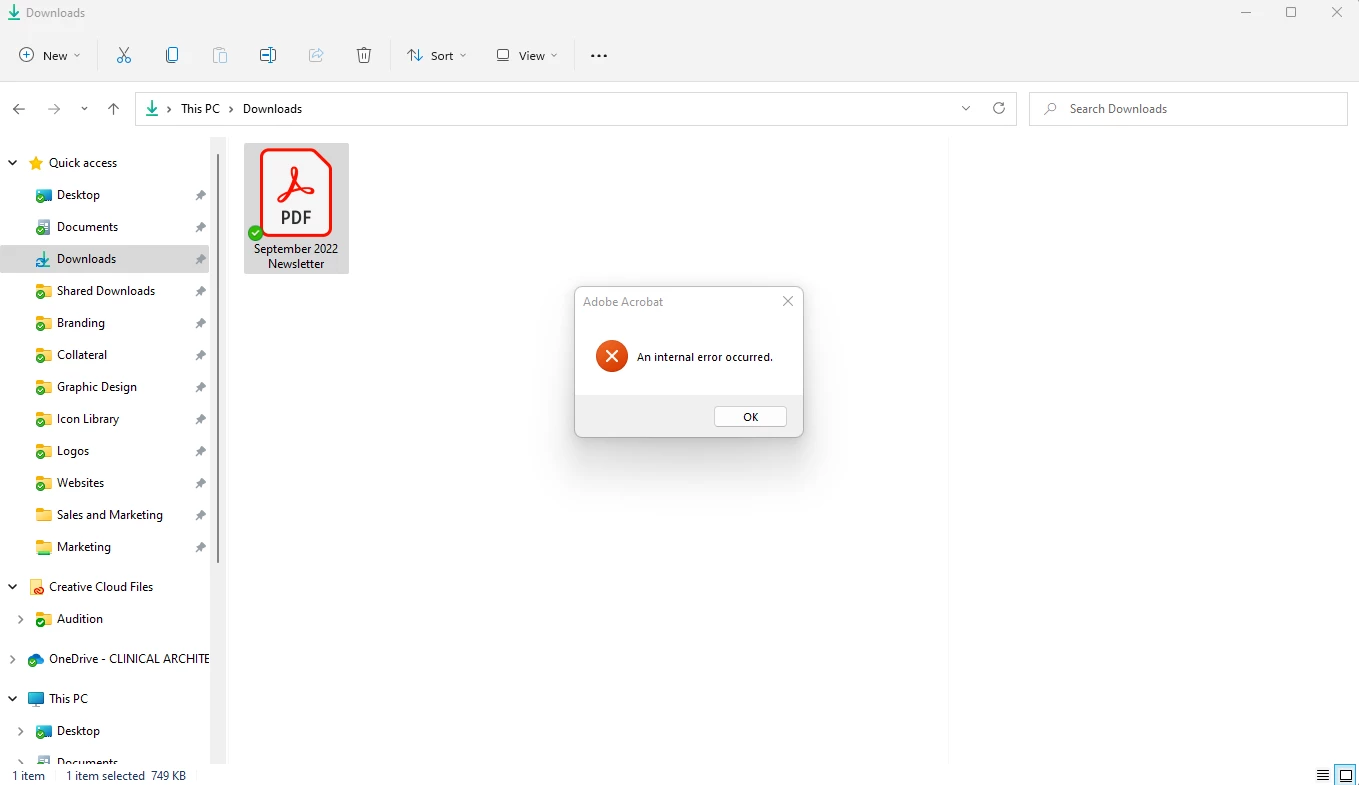
"An Internal Error Occured" when clicking on a PDF and Windows Explorer preview pane is showing.

  • September 13, 2022
  • 22 replies
  • 207643 views

Hi there,

Running Windows 11, up-to-date system and up-to-date Creative Cloud and Adobe Acrobat DC. I have my preview pane visible when going through my files, and sometime in the last 2 weeks PDFs no longer show up in the preview pane. Instead, windows explorer freezes for a few seconds and then shows an Adobe Acrobat "An Internal Error Occured" pop-up. I tried clearing out my temporary files, and tried creating a "2022" folder in C:\Users\(user)\AppData\Local\Adobe\Acrobat\ which was suggested in this thread. Neither worked. All other file types (.jpg, .doc, etc.) show up in the preview pane just fine. Any suggestions?
 

Correct answer Juan Cruz33608956vecu

Me paso lo mismo, entre en la ruto que colocaron y le saque los permisos heredados y borre los los desconocidos y hasta ahora funciona


22 replies

Participant
January 28, 2025

This worked for me...I right clicked on the .pdf file and set the default 'open with' to Adobe Acrobat Reader (from microsoft Edge) and I can now see the preview and that error no longer appears.

Participant
March 24, 2023

This worked for me!

sukuece619@gmailcom
Participant
February 23, 2023

Windows file Explorer > View > Deselect preview pane


Participant
March 2, 2023

Dumb answer, people are not looking to disable the Preview Panel, they want to use this feature to have a quick peek on PDF documents without having to open them one by one. 

Only solution for now is to check the Properties of the "Adobe" folder in AppData/Local/Adobe and remove the Unknown Account there.

sukuece619@gmailcom
Participant
February 23, 2023

Windows file Explorer > View > Deselect preview pane

Participant
January 25, 2023

thank you i am a btech student and i run into this problem and this realy works.

all you need to do is go to users/[username]/app data/local/adobe and then properties to account and deleting unwanted accounts. and try to again preview the required document


Participating Frequently
January 5, 2023

Is there any update from Adobe on this? It's been months, and the issue is not a small one - it's impacting my working life on an hourly basis. Can someone from Adobe please give an update on a permanent fix?

roberte97860397
Participant
January 11, 2023

I've tried the solution here. Didn't work for me. I then uninstalled and reinstalled Acrobat and now I can't even open the program. Pitiful Adobe assistance. 

Participant
January 20, 2023

I just managed to fix mine. Initially I didn't have any of the AccountsUnknown in my list but I uninstalled and reinstalled using CC and then right after reinstallation the AccountsUnknown were there. Removed them all and it began working instantly. Make sure you're checking the User\AppData\Local\Abobe and not Roaming or the other paths.

Participating Frequently
November 24, 2022

I've tried the fix, but for me there arent any unknown users to delete - anyone got any alternative ideas for me to try? Doing my head in - I literally create PDFs all day long. I'm pulling my hair out

Participant
November 28, 2022

I'm in the same boat: no unknown users to delete. This problem was intermittent 3 weeks ago but now it is constant. Adobe Acrobat DC full version is unusable.

Participant
November 28, 2022

As a follow up, I completely uninstalled Acrobat and re-downloaded it from Adobe. The continuus release version is 2022.003.20282, running on Windows 11. It seems to be working now.

Participant
November 6, 2022

This is driving me crazy! Have restarted, reinstalled, updated software... even got a new laptop! It's a work issued and had another problem but when I was reset back up with my credentials the error came with it. Very frstrating and confusing 

Participant
November 9, 2022

It seems to have worked!! Hallelujiah.

Participant
November 1, 2022

Take a bow! I've been struggling with no preview for months and then the 'Internal Error' started and it's totally stuffed up my workflow. Asked my tech husband to look at it and other solutions didn't work. He was going to do a reinstall of my computer tonight, but now he doesn't have to... and he knows how to fix it for others! Thank you, thank you, thank you!!!

Josh-Knight
Participant
October 28, 2022

I've tried all of the solutions listed here. I'm running Windows 11, completely upto date system. I've worked out it's an Adobe Acrobat DC issue by removing Adobe Acrobat and letting the system fallback to Foxit phantom pdf which was my previous default software. The moment I did this, all of the pdf's can be previewed without a fuss. 

I'm at a complete loss of how to resolve this for now and don't want to waste more time than I already have. 

RedFeathers
Inspiring
October 28, 2022

Hi Josholo,

Adobe hasn't been very helpful in this thread. I'm not sure how to apply the Account Unknown fix in Windows 11. Maybe start a new discussion?

If I find any helpful tips or solutions I'll post them here for you.


As a quick fix, you can disable the preview pane in your folders, but as a designer, it's almost as frustrating as the errors.

Josh-Knight
Participant
November 1, 2022

Its a very frusting error, especially if you are doing any design and you have alot of files. The preview screen can really help with workflow and efficiency. 
For now, using the default system viewer without Adobe Acrobat DC installed is getting me out of trouble and working without a fuss. When i'm not buried in projects, I'll revisit this one and see if I can resolve. 

Strange that the preview works inside application like outlook but not in explorer. I unfortunatley don't have all of these 'unknown accounts' which has stumped as to the source of the error.