Participating Frequently
April 10, 2019
Answered

Bleeds are turned on but cannot delete strange red box

  • April 10, 2019
  • 4 replies
  • 2901 views

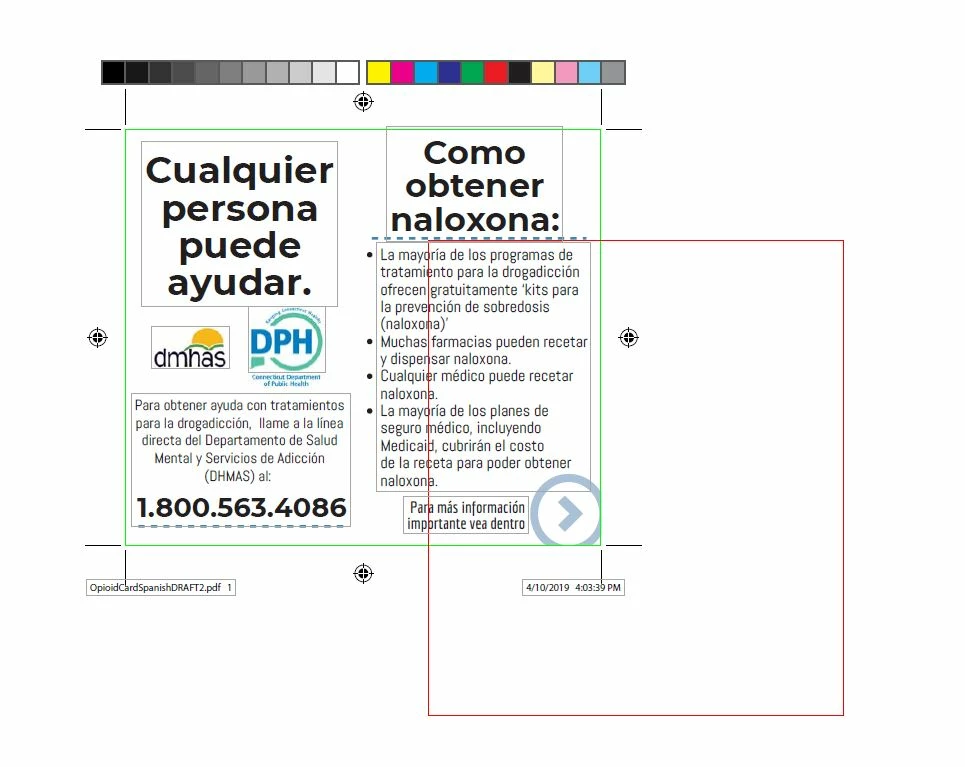
I turned the bleed marks on (through the print dialogue box) but a red box now appears out of alignment with the piece, and i cannot delete it.  I've tried higlighting the entire shape, zooming wayyyyy in to see if they're lines, but no luck  Argghhh.  Any help is appreciated!
This topic has been closed for replies.
Correct answer Stephen Marsh

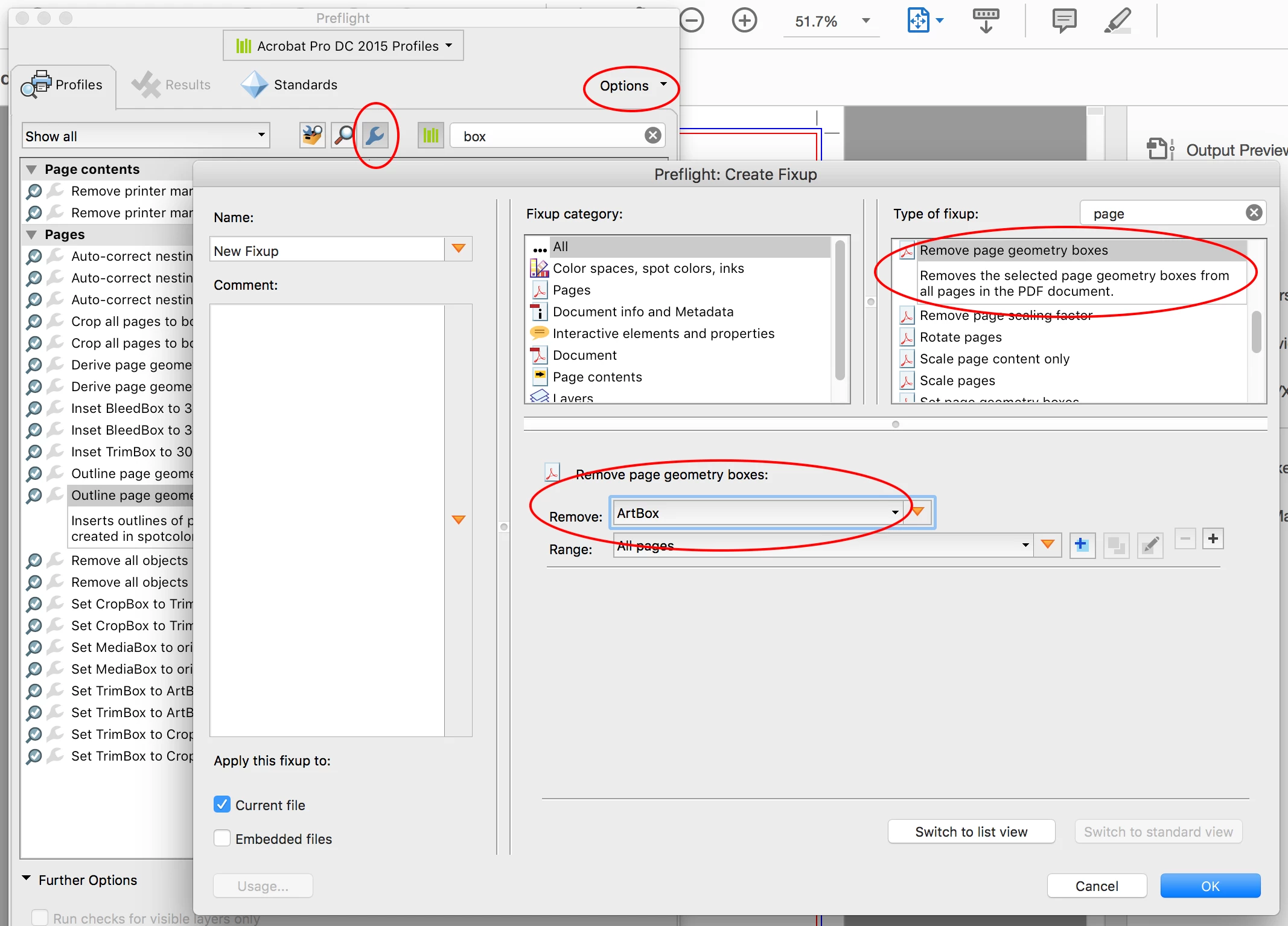
Thanks Abambo​ – now that I am in front of my computer I can see that this colour is the “ArtBox” which is not used by many programs, the TrimBox and or BleedBox are most critical for imposition and other prepress software… So one could use Tools > Print Production > Set Page Boxes to “set to zero” on the ArtBox which should set it to the media box dimensions and then it could be more easily adjusted to possibly match the TrimBox dimensions, or perhaps even better is to use Tools > Print Production > Preflight > Fixups to create a custom Fixup to totally remove the ArtBox:

4 replies

Participating Frequently
April 26, 2019

jane-e

Not sure I understand what you're looking at.  The times in your screen shot above are not when the content was created, only the 'last activity' timestamp.  Here are the timestamps from my account - the red-boxed content is my original posting date.  The reason - if you're interested - why I posted in different subgroups was because I did not have any bites on my first post on the 12th, and was up against a deadline to deliver a design to our printer for the card in the post.  I needed help quickly.  I took a chance and posted it in the first subgroup, then when that one didn't result in any responses, I picked another subgroup, then the same process the third time. It is a card our state dept of health is rolling out with critical information to help patients and their families, who have just suffered an opioid overdose, find substance use disorder treatment.

My profuse apologies for breaking a cardinal rule.  To everyone who responded and helped me with detail, clarity and positive enthusiasm...thank you!!

Abambo
Community Expert
Community Expert
April 26, 2019

dutcher0705  wrote

(...)why I posted in different subgroups was because I did not have any bites on my first post on the 12th, and was up against a deadline to deliver a design to our printer for the card in the post. (...)

It's ok (in this case ). Some fora are more active than others. What you could do when posting the same question in different fora, is to post a link to the one entry you would like to get answered. A moderator will then lock the rest.

FYI: to ping someone in your post precede the screen name by an "@".

ABAMBO | Hard- and Software Engineer | Photographer
jane-e
Community Expert
Community Expert
April 25, 2019

Hi dutcher0705

I locked your other two duplicate posts, timestamped within a minute or two of each other. Please post only once. Do not post three times in three forums. Thank you!

Luke Jennings
Inspiring
April 18, 2019

In addition to the good information above, it appears you are missing bleed, as indicated by the blue circle in the lower right corner and the crop marks should be offset from the trim line by at least .125"

The red box is indicating something has gone wrong with your art, trim and bleed boxes, possibly due to how the PDF was created.

I'm not sure which application created your PDF (Illustrator?) but normally you would export to PDF (InDesign) or save-as PDF (Illustrator, Photoshop) instead of print-to PDF.

Stephen Marsh
Community Expert
Community Expert
April 18, 2019

I’m not in front of the computer, so I may get this slightly wrong... however there is a preference option, page display to show the page boxes (trim, bleed, art etc).

Abambo
Community Expert
Community Expert
April 18, 2019

Just to confirm Stephen's assertion:

ABAMBO | Hard- and Software Engineer | Photographer
Stephen Marsh
Community Expert
Stephen MarshCommunity ExpertCorrect answer
Community Expert
April 18, 2019

Thanks Abambo​ – now that I am in front of my computer I can see that this colour is the “ArtBox” which is not used by many programs, the TrimBox and or BleedBox are most critical for imposition and other prepress software… So one could use Tools > Print Production > Set Page Boxes to “set to zero” on the ArtBox which should set it to the media box dimensions and then it could be more easily adjusted to possibly match the TrimBox dimensions, or perhaps even better is to use Tools > Print Production > Preflight > Fixups to create a custom Fixup to totally remove the ArtBox: