I can no longer drag pages from the Pages Thumbnail sidebar onto my desktop to make a new PDF of those pages. I haven't tried to do this since the last update came through... Is anybody else experiencing this?
It's extremely slow and frustrating having to manually right click extract, select the pages, open it in a new adobe window, then have to save the file through the menu.
I see the original post is 5 years old, so maybe this isn’t the same issue, but in case it helps someone, after about a month of troubleshooting with a user we identified an issue between Adobe Acrobat and Windows 11 that was resulting in similar symptoms. We could only reproduce the issue on that user’s computer, and sometimes it would work fine.
Here’s what the user was trying to do: From the Organize Pages tool, she was attempting to drag a page out of the PDF and into a File Explorer window to create a new PDF. We tried all kinds of suggestions from this thread and other similar ones, but none were consistent.
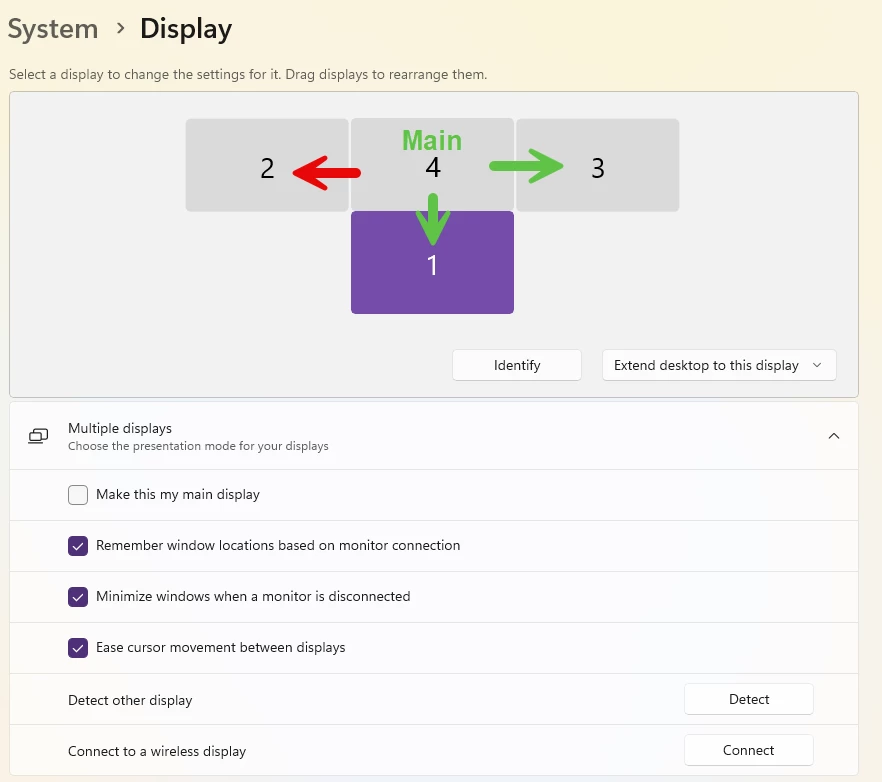
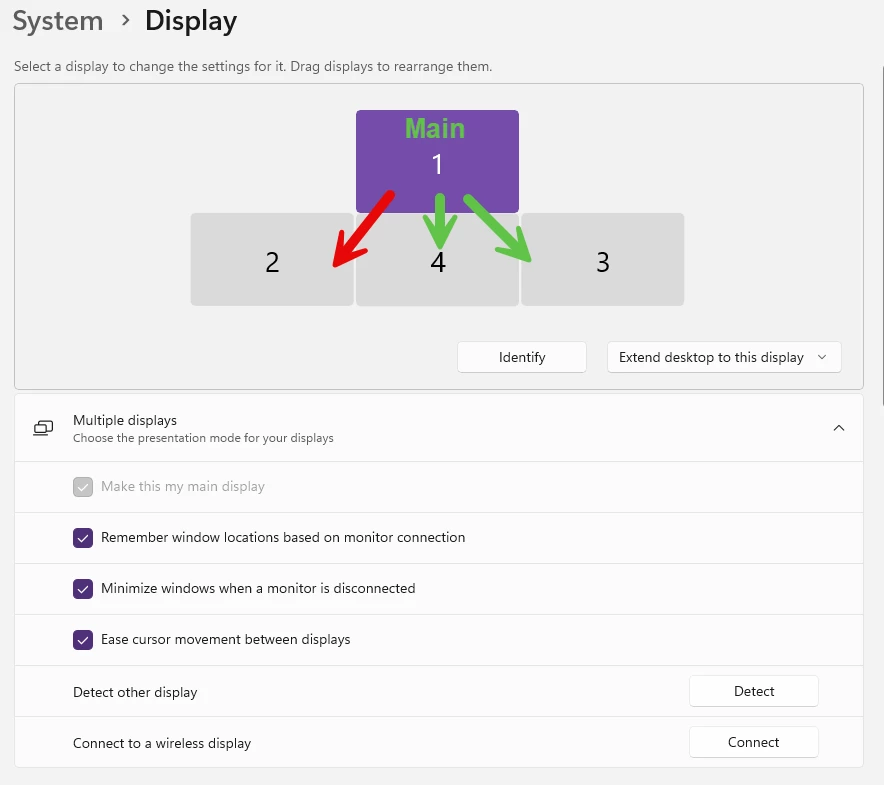
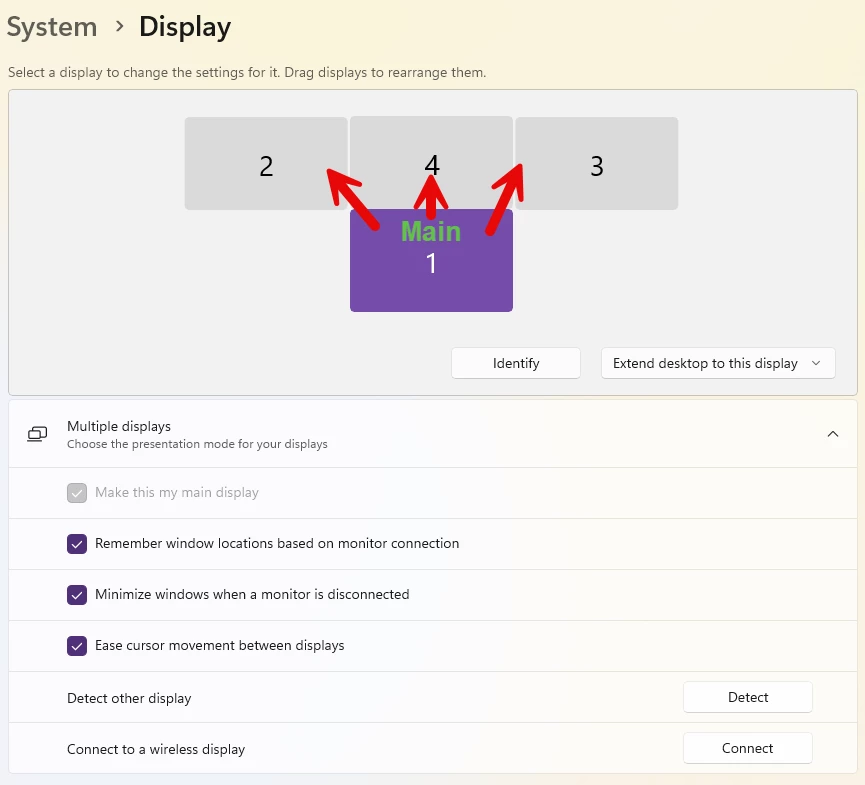
Ultimately, this is what we identified was causing the issue for her, and allowed me to reproduce the issue on my computer and others as well: On a Windows 11 computer, if you have more than one display, we had to set the far left , and top most display as the “Main Display”. If your “main display” is below or to the right of any other displays, it seems to break the click and drag as soon as you drag past the left or top edge towards the other display. I’m finding it difficult to explain that properly, so below are a few images showing display layouts I tried, and the results I received for those layouts. I indicate which display is set as the Main Display; I use a green arrow to indicate which screens I can drag to for that layout; and I use red arrows to indicate the screens I can’t drag to with that layout.
Hopefully someone else can use this information to actually solve the root cause, but in the meantime, my workaround for that user was to set her far left display (she had 3 total) as the Main Display, and that allowed the drag and drop feature to work on all 3 displays.
I see the original post is 5 years old, so maybe this isn’t the same issue, but in case it helps someone, after about a month of troubleshooting with a user we identified an issue between Adobe Acrobat and Windows 11 that was resulting in similar symptoms. We could only reproduce the issue on that user’s computer, and sometimes it would work fine.
Here’s what the user was trying to do: From the Organize Pages tool, she was attempting to drag a page out of the PDF and into a File Explorer window to create a new PDF. We tried all kinds of suggestions from this thread and other similar ones, but none were consistent.
Ultimately, this is what we identified was causing the issue for her, and allowed me to reproduce the issue on my computer and others as well: On a Windows 11 computer, if you have more than one display, we had to set the far left , and top most display as the “Main Display”. If your “main display” is below or to the right of any other displays, it seems to break the click and drag as soon as you drag past the left or top edge towards the other display. I’m finding it difficult to explain that properly, so below are a few images showing display layouts I tried, and the results I received for those layouts. I indicate which display is set as the Main Display; I use a green arrow to indicate which screens I can drag to for that layout; and I use red arrows to indicate the screens I can’t drag to with that layout.
Hopefully someone else can use this information to actually solve the root cause, but in the meantime, my workaround for that user was to set her far left display (she had 3 total) as the Main Display, and that allowed the drag and drop feature to work on all 3 displays.
Thank you for taking the time to investigate this and for sharing your findings with the community. We really appreciate the effort you’ve put into breaking this down and helping others in the thread.
Contributions like yours are very valuable, especially when they help highlight specific behaviors and provide clarity around what’s working and what’s not in real-world usage.
We’ll share your observations and the details you’ve provided here with our product team so they can review and better understand the scenario. Feedback like this plays an important role in helping us identify gaps and improve the overall experience.
If you have any additional details, such as the exact steps, the Acrobat version, or the environment where you’re seeing this, it would further help us with our investigation.
Thanks again for sharing your insights and supporting the community.
We’ve seen a few Acrobat and Windows updates since we started troubleshooting this issue, but right now my versions are:
Adobe Acrobat version: 2025.001.21288 | 64-bit
Windows 11: Version 25H2 (OS Build 26200.8037)
Steps to reproduce:
On my 2 monitor setup, I have display 1 on the left, and display 2 on the right.
Make display 2 the main display.
Open a PDF and put it on display 2.
Go to Organize Pages tool
Open a folder in Windows File Explorer, and put the File Explorer window on display 1.
Now, from Acrobat, drag a page from the PDF on Display 2, to the folder in the File Explorer window on Display 1.
Nothing happens.
Now move the File Explorer window to the same monitor as the PDF. Shrink them up so they both fit.
Drag a page from the PDF to the folder in the File Explorer window and it will prompt to save that page as a new PDF file. (If Acrobat’s “Protected Mode” is off it just creates an Untitled PDF instead of prompting to save.)
To get the drag and drop working on both screens again you have to set Display 1 as your main display, or reposition display 2 to the left of display 1 (in Windows System->Display) and apply the change.
If you're unable to drag pages from the Pages Thumbnail sidebar onto your desktop to create a new PDF after a recent update, try restarting the application and your computer. Check for the latest software updates, ensure proper file permissions, and confirm drag-and-drop settings. If the issue persists, contact the support team for your PDF software for further assistance.
I too have this issue, but not all the time. Adobe choose when it will allow dragging and dropping. Sometimes I can drag and drop, then 10 minutes later I can't. I cannot figure the issue out and it is so frustrating. IT cannot either. We have even uninstalled Adobe and reinstalled several times. Has anyone found a fix?
I've tried to read through this string and can't find an answer that works on my Mac. I'm using Adobe Pro DC, and my Security (enhanced) screen doesn't look like the ones posted. The drag and drop worked fine until about a week ago and now it doesn't work at all.
I had this same exact thing start happening to me after a got an update to Adobe. Thank goodness I found this article. I was able to go in and turn off protected mode and now I can move files again without being asked to save them. That was annoying. I always worry when patches download that a setting will be changed some place for some unknown reason. Thanks for sharing this fix.
I found a solution. You'll need to disable or turn off the Protected Mode 1. Edit->Preferences->Security (Enhanced) 2. Under Sandbox Protections, disable the Protected Mode 3. Restart the Adobe (close and open the program) 4. You're back in business
I managed to fix it by turning off protected mode & making sure it was turned off for startup also.
THEN I added my folder, the entire documents folder in my case, to the privledged lications section on the same settings page as above. I then restarted arcobat completely.
Not sure which bit fixed the problem but it's back working like it used to for me now.




 AdChoices