


Participant
June 20, 2022
Answered

Cannot Install/Use Preflight Tool

  • June 20, 2022
  • 16 replies
  • 33483 views

Clicking the "Preflight" button in Print Production mode just produces a message saying:

"Preflight is getting installed. Please wait to use this tool."
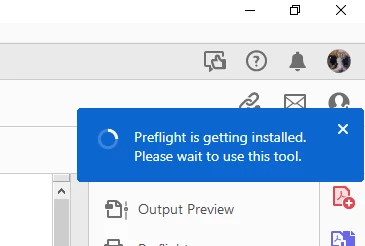
The first time I did this a little icon showed up next to feedback, help etc. indicating that something was happening. Eventually this said there was an error and Acrobat installation would be retried.

Now, no such thing shows up. Seemingly nothing happens at all other than showing that message. It's been 30 minutes so I really doubt it's a matter of impatience.

I have tried repairing Acrobat installation, and uninstalling/reinstalling through the Creative Cloud app to no avail. Any ideas on how to install/launch the Preflight tool?

Correct answer PVM Reklame

Step-by-Step Instructions:

  1. pen Windows Settings:

    • Press Windows Key + I to open Settings.

    • Go to AppsInstalled Apps (or Apps & Features, depending on Windows version).

  2. Find Adobe Acrobat:

    • Scroll down or search for "Adobe Acrobat" (look for Adobe Acrobat Pro, not just Reader).

  3. Click the three dots (…) or the app name → Select "Modify":

    • If you only see "Uninstall," click that and it might then give you an option to "Modify" (don’t worry, it won’t uninstall right away).

  4. Adobe Installer Opens:

    • You'll see the Acrobat Installer popup.

  5. Look for "Optional Features":

    • There will be a section or button like "Optional Features".

    • Find Preflight (it might be shown with a red cross ❌, which means it's disabled).

  6. Enable Preflight:

    • Click the red cross or checkbox to enable/install it.

  7. Continue Installation:

    • Proceed through the installer to finish enabling the feature.

16 replies

Participant
September 4, 2025

Same problem... 

Participating Frequently
September 1, 2025

Same problem.  "Manual install required".  Nothing I found online resolved the issue.  Tried installing, running Creative Cloud, reinstalling.  Revo uninstall.  Everything I found. I've had countless other problems before with other issues; none have been really resolved. I bought Foxit as a go-around for most of them, even though I have an Adobe subscription.  But  I need preflight for heavy editing, since Foxit won't do.  ILet's see if this one gets resolved.  Not optimistic though.   I suspect they took that feature away from my all-aps subscription as yet another greed play.   As if $840/month isn't enough from me.

Not surprised  Adobe stock is down 20% YTD when the market is up 10%.  That's what happens when you treat your customers as a nuisance.

Participating Frequently
September 1, 2025

Interesting, the last suggestion of modifying (as opposed to uninstalling), worked!  However, I had to do it twice.  The first time, nothing seemed to happen.  I got so pissed off that I posted a bit too early.  I tried it a second time, then something happened.  I rebooted, and now I have preflight!  Can't convert colors to output intent, but that's a fight for another day 🙂

PVM Reklame
PVM ReklameCorrect answer
Participant
August 27, 2025

Step-by-Step Instructions:

  1. pen Windows Settings:

    • Press Windows Key + I to open Settings.

    • Go to AppsInstalled Apps (or Apps & Features, depending on Windows version).

  2. Find Adobe Acrobat:

    • Scroll down or search for "Adobe Acrobat" (look for Adobe Acrobat Pro, not just Reader).

  3. Click the three dots (…) or the app name → Select "Modify":

    • If you only see "Uninstall," click that and it might then give you an option to "Modify" (don’t worry, it won’t uninstall right away).

  4. Adobe Installer Opens:

    • You'll see the Acrobat Installer popup.

  5. Look for "Optional Features":

    • There will be a section or button like "Optional Features".

    • Find Preflight (it might be shown with a red cross ❌, which means it's disabled).

  6. Enable Preflight:

    • Click the red cross or checkbox to enable/install it.

  7. Continue Installation:

    • Proceed through the installer to finish enabling the feature.

Participant
August 27, 2025

This worked!!

Participant
August 15, 2025

Ok, I found a solution that worked for me. 


1. Uninstall Adobe

2. Uninstall Adobe Cloud

3. Download and Run the Acrobat Cleaner Tool (Link)

4. Reboot your PC

5. Download the Acrobat Pro installer (Link

6. Extract the folder

7. Inside the Adobe Acrobat folder, execute "setup.exe"

8. ATTENTION: On the first window, please click on "Customise".

9. Now click on "Optional Features" and select "This feature, and all subfeatures, will be installed on local hard drive."

Under "Optional Features", we have the "Preflight" option. So, Adobe will install the Preflight without a network installation. 


10. After it, you can click on "Install". 


This process worked for me on different PCs (Win10 and Win11 - both 64-bit). 


Good luck to everyone! 

Marcus Barros. 

Participant
August 19, 2025

That worked for me, thx a lot...

Participant
July 18, 2025

Amazing that Adobe is hellbent on wasting all their money on adding AI features that have literally no use due to how bad they are, but can't fix a bug that prevents us from using the most useful part of Acrobat.

Participant
January 16, 2024

Same problem. Was able to use the preflight tool by switching back to the old UI. 

solution4
Inspiring
October 17, 2023

Same problem - is this the service of Adobe for the future? We paying your jobs, you not answering and not doing anything anymore, just waiting until those annoying customers are gone or run out of patience? We have to work with your tools, it's not that we entertain ourselves with your software.

It's getting unbelievable at this point.

Participating Frequently
October 17, 2023

I had an Adobe live chat session to fix my issue. They/I had no idea why pre-flight wouldn't launch in Acrobat 64bit for Windows so they suggested I uninstalled and reinstalled the 32bit version instead. They did all the work via screen share and this fixed the issue although I guess it was more of a workaround. Anyway, no problems with pre-flight since the downgrade to 32bit. Hope this helps.

solution4
Inspiring
October 17, 2023

Hi Paul,

thanks, gonna try that.
Cheers!

Inspiring
January 26, 2023

Latest versions of Adobe software are early access beta versions that should not be available to public. My preflight is broken now. Also Acrobat is only sofware that has no other versions available. 

Solution: https://helpx.adobe.com/download-install/kb/acrobat-downloads.html

Install Acrobat 2020 Pro and everything works.
And turn off automatic updates of all Adobe software.

Participant
December 24, 2022

Same here, I need convert to outline all character. But didn't work without prefilght features.

Participant
November 29, 2022

The solution (for me):

Click "Optimize PDF > Pre-Flight"

You'll see the "Preflight is installing" message

Click "Print Production" 

You'll see a message "you need to restart this app to use the newly installed features" (paraphrased)

Participant
December 2, 2022

It didn't work that solution.

Participating Frequently
December 19, 2022

Not sure if this helps, but found the panel had minimised, to a thin strip at the edge of the screen. So, it was working, but hidden from view. Managed to click on it and it appeared.