


Participant
June 20, 2022
Answered

Cannot Install/Use Preflight Tool

  • June 20, 2022
  • 16 replies
  • 33484 views

Clicking the "Preflight" button in Print Production mode just produces a message saying:

"Preflight is getting installed. Please wait to use this tool."
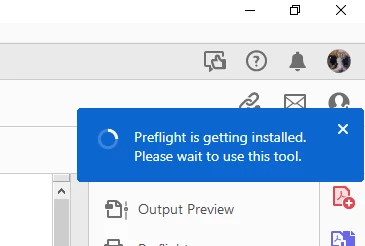
The first time I did this a little icon showed up next to feedback, help etc. indicating that something was happening. Eventually this said there was an error and Acrobat installation would be retried.

Now, no such thing shows up. Seemingly nothing happens at all other than showing that message. It's been 30 minutes so I really doubt it's a matter of impatience.

I have tried repairing Acrobat installation, and uninstalling/reinstalling through the Creative Cloud app to no avail. Any ideas on how to install/launch the Preflight tool?

Correct answer PVM Reklame

Step-by-Step Instructions:

  1. pen Windows Settings:

    • Press Windows Key + I to open Settings.

    • Go to AppsInstalled Apps (or Apps & Features, depending on Windows version).

  2. Find Adobe Acrobat:

    • Scroll down or search for "Adobe Acrobat" (look for Adobe Acrobat Pro, not just Reader).

  3. Click the three dots (…) or the app name → Select "Modify":

    • If you only see "Uninstall," click that and it might then give you an option to "Modify" (don’t worry, it won’t uninstall right away).

  4. Adobe Installer Opens:

    • You'll see the Acrobat Installer popup.

  5. Look for "Optional Features":

    • There will be a section or button like "Optional Features".

    • Find Preflight (it might be shown with a red cross ❌, which means it's disabled).

  6. Enable Preflight:

    • Click the red cross or checkbox to enable/install it.

  7. Continue Installation:

    • Proceed through the installer to finish enabling the feature.

16 replies

Participant
November 21, 2022

Same problem here...

@_AdobeSupport_ please get this done...

Elsie.Media
Participant
November 5, 2022

same problem...

Participant
October 12, 2022

same problem. Now the list is void

Known Participant
September 26, 2022

Same problem! 

Participant
June 23, 2022

I have the same problem, but doing those things you listed did not work for me.

Known Participant
August 4, 2022

Same problem.

Participant
June 20, 2022

Ok, I don't have a "solution", but I eliminated the problem.

Some combination of the following things caused it to actually install Preflight (listed in the order I did them):

- Checking for updates (from within Acrobat)

- Opening "Print Production Help"

- Viewing "About Plugins" dialog

- Viewing "About Acrobat" dialog

Participating Frequently
November 10, 2022

same here. come on Adobe, please can we have some support.