
RamyJo
Participant
June 11, 2024
Question

Change home default screen when opening Adobe Pro

  • June 11, 2024
  • 1 reply
  • 313 views

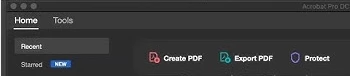
Whenever I used to open Adobe Pro the home screen (I guess that's what it's called) would show recent files along with tool options (create, organize, etc).  *See Image #1 below. But within the last day or so whenever I open it to created a pdf the create document option isn't on the home page. *See image #2 below. I have to click on tools and then created pdf. Even though it's only an extra step or two I would like to have it back on the home screen. How do I do that? I'm not very knowledge on the ins and outs of Pro. 


Thanks in advance for any and all help!


This topic has been closed for replies.

1 reply

Amal.
Community Manager
Community Manager
June 13, 2024

Hi @RamyJo 


Hope you are doing well.


What is the version of the OS and the Acrobat DC you are using? To check the version go to Help > About Acrobat and make sure you have the recent version 24.02.20759 installed. Go to Help > Check for updates and reboot the computer once.

Also try to repair the installation from the help menu (Win Only) and see if that works.

Please try to reset the Acrobat preferences as described here https://community.adobe.com/t5/acrobat-discussions/how-to-reset-acrobat-preference-settings-to-default/td-p/4792082 and see if that works.


~Amal
