
fugrosupportadobe
Participating Frequently
September 4, 2014
Answered

Changing The Document: Not Allowed

  • September 4, 2014
  • 11 replies
  • 72206 views

Hi,

Anyone who can help us on our issue regarding with the files created using Acrobat 7.

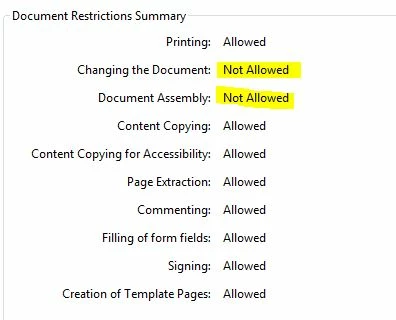
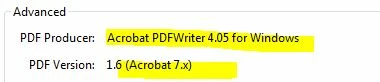
When we open the files using higher versions the Changing the Documents and Document Assembly always marked as Not Allowed but when we open it using Acrobat 7 all settings are Allowed. tried this in few computers running Acrobat 7 with same results.
This topic has been closed for replies.
Correct answer ygv7654

Hi, I just came across this forum because I was having the same problem. I eventually figured out a solution that worked for me, so I thought I would post it here if it might help someone. I have Adobe XI Pro and was not able to edit a document that had no security settings made by Adobe 7, I kept getting the message that it was signed. I went to Tools>Forms>Edit Form, and I got an error saying the document was signed, but it also asked me if I wanted to save a copy, so I did. Then I was able to edit the copy just fine. I had tried the "save as" option before that and it did not work, so it seems that 'saving a copy' and 'save as' are not the same. There may be another way to save a copy, but that's the solution I came across.

11 replies

ygv7654
ygv7654Correct answer
Participant
March 31, 2016

Hi, I just came across this forum because I was having the same problem. I eventually figured out a solution that worked for me, so I thought I would post it here if it might help someone. I have Adobe XI Pro and was not able to edit a document that had no security settings made by Adobe 7, I kept getting the message that it was signed. I went to Tools>Forms>Edit Form, and I got an error saying the document was signed, but it also asked me if I wanted to save a copy, so I did. Then I was able to edit the copy just fine. I had tried the "save as" option before that and it did not work, so it seems that 'saving a copy' and 'save as' are not the same. There may be another way to save a copy, but that's the solution I came across.

Participant
July 23, 2021

Also having an issue. I have extracted the pages with the "signature" and clicked "delete after extracting" and this seems to help. GLA!

fugrosupportadobe
Participating Frequently
September 13, 2014


Attention: Acrobat Product EXPERT


PLEASE Reply


Legend
September 13, 2014

I think you have a basic misunderstanding of how community forums work. Sorry.

fugrosupportadobe
Participating Frequently
September 13, 2014

Hi So sorry about that. I've contacted the Chat Support many times regarding with this issue and they told me the Adobe Communities are monitored/managed by Adobe Product Expert Support team (Adobe Employee) but up to now never heard from them. very frustrated on the support they gave us.

fugrosupportadobe
Participating Frequently
September 12, 2014

Anyone from Adobe Product Expert here...

Legend
September 12, 2014

You could try the Security & Digital Signatures forum.

fugrosupportadobe
Participating Frequently
September 12, 2014

Thanks I will try that

fugrosupportadobe
Participating Frequently
September 10, 2014

Bill is correct. after signing the PDF document, there is an option to lock the PDF file. For our case we never lock the files cause every modification made on the PDF files, user must digitally sign the document. :-)

Hope anyone from Adobe Product Expert can help us. I've tried the Adobe Chat support 3times but they cannot resolve our issue and always point me to this Community forum.

fugrosupportadobe
Participating Frequently
September 9, 2014

Hi, here is one more file created and signed using Acrobat 10 Pro(PC3). I able to insert page using Acrobat 7 Pro(PC2)

Page 1 with Sign - Acrobat 10 with inserted page.pdf - Google Drive

Legend
September 9, 2014

Yes. The locking of signed documents is a new feature of Acrobat, not a change in security.

Inspiring
September 9, 2014

That is apparently a change. My understanding was that signatures did not disallow changes, but any changes would invalidate the signature and you would have to get the signature anew.

fugrosupportadobe
Participating Frequently
September 9, 2014

here is the other test file created in PC3 which is running Acrobat 10 Pro. the document restrictions for this file when I open it using PC1 and PC2 (Acrobat 7 Pro) are all set to allowed.

Page 1 with Sign - Acrobat 10.pdf - Google Drive

Legend
September 9, 2014

Yes, what you say fully supports my reply. Don't expect to edit signed files.

fugrosupportadobe
Participating Frequently
September 9, 2014

Hi,

I have 3 PC. PC1 and PC2 are using Acrobat 7 Pro. PC3 is using Acrobat 10 Pro.

I've created and signed the PDF using PC1 then I access the PDF file using PC2. PC2 can insert page without a problem. all Document Restrictions are all set to All Allowed before and after PC2 modify the pdf file.

When I access this PDF file from PC3 even PC2 haven't modify it yet, the Changing the Documents and Document Assembly Not Allowed. :-)

fugrosupportadobe
Participating Frequently
September 8, 2014

anyone from Acrobat Product Expert who can help us on our issue... Thanks

Inspiring
September 8, 2014

Is it a document you can share, or do you have another example that you can share?

fugrosupportadobe
Participating Frequently
September 9, 2014

Hi, here is the sample file. 1st 3 pages created and signed using computer01, pages 4 and 5 inserted using computer02. both are using Acrobat 7 Pro.

Acrobat Test-file.pdf - Google Drive

fugrosupportadobe
Participating Frequently
September 5, 2014

Here is the Document Security Settings when I open using Acrobat 7 Pro

Legend
September 5, 2014

You are absolutely sure it is standard and pro? Because what you describe is exactly what Adobe Reader does.

fugrosupportadobe
Participating Frequently
September 5, 2014

Sorry to say but yes I'm 101% sure that I open using Acrobat Pro. below is using Acrobat X Pro Trial Version with complete Installation not typical..

fugrosupportadobe
Participating Frequently
September 5, 2014

Hi, Thanks for the reply.

If we open the files using Acrobat 7 Standard and Pro in any computer, the Document Restrictions Summary shows All Allowed


When we open the files using higher version (ver 8 to Ver 11) standard and Pro, the Document Restrictions Summary shows Changing the Documents and Document Assembly Not Allowed