


Participant
Apr 12, 2021 10:25 PM UTC
Answered

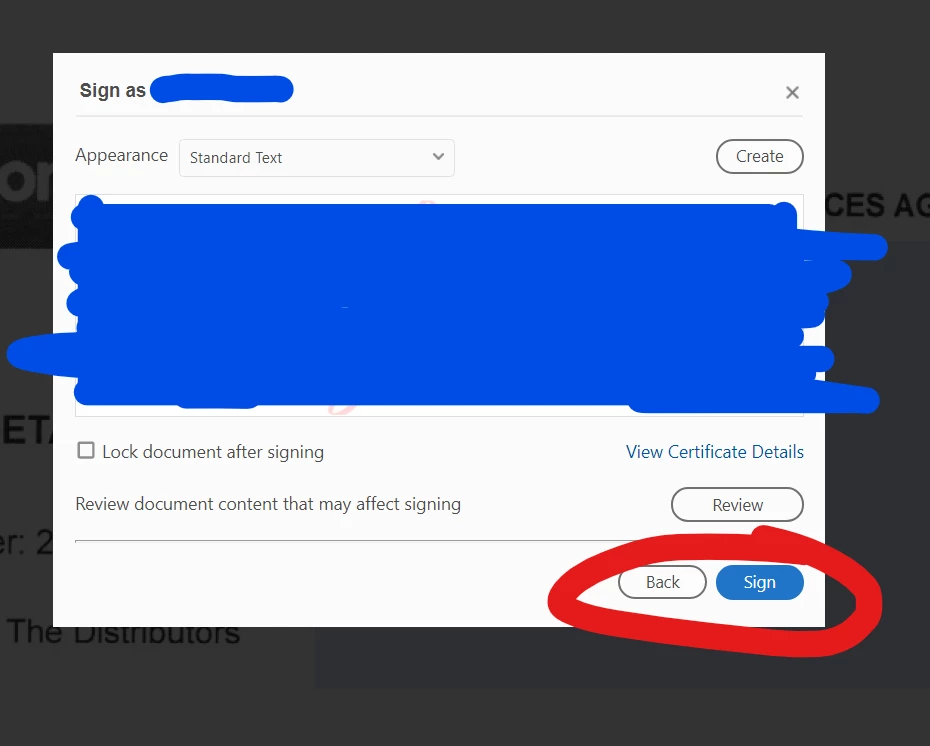
Digital Signature - Sign Button Not Working

When I go to complete my Digital Signature, it wont allow me to Sign.


I have tried Saving the Doument, Checking for Update, Uninstalling and Reinstalling Adobe, Creating a new Digital Signature......


Kai342601618827Correct answer
Participant
Dec 14, 2023 12:12 PM UTC

I am also facing the above described issue on a CC installation on a Win10 PC.

Due to the CC installation, i cannot use the Acrobate Cleaner based solution.

40 replies

2MuchtoDo
Participant
Feb 5, 2026 2:48 PM UTC

I am also having this same issue. I tried everything suggested in this thread and I have not had any success. Unfortunately, while changing settings, uninstalling, reinstalling, using the adobe cleaning tool, deleting files, “fixing the installation”, and doing updates, I created another problem. The pdf attachment that I’m (still) trying to sign now shows up in the email I received with a Google Chrome icon on the file instead of the Adobe icon that it used to have. (The file still opens up in Adobe though, and I made sure that my Windows settings shows Adobe Acrobat at the default program for pdf). 

Please--I need help! I’ve been trying to fix the issue with the signature for four days now. 

Translate
Participant
Jan 27, 2025 6:23 AM UTC

I know these posts are fairly old, but I did find a fix for this problem that worked for me and didn't involve uninstalling anything.  Unfortunately I don't know exactly what did the trick, but I went to Edit > Preferences > Signatures > Creation & Appearance.  And took the following steps:

1.  Ensured the Default Signing Method was set to Adobe Default Security
2.  Signing Format set to CAdES-Equivalent
3.  Made sure all boxes were unselected.  Unselected "Include signature's revocation status"
4.  I changed "Enable Review of Document Warnings" to "Never"
5.  I changed "Prevent Signing Until Warnings Are Reveiwed" to "Never"
6.  I deselected "Use modern user interface for signing and Digital ID configuration.
7.  I then created a signature under "New" 

After I hit ok, the document immediately allowed me to sign.  I did not need to restart the program or my computer or re-install anything.  It took about 60 seconds to complete. 

Translate
Participant
Oct 10, 2023 2:12 PM UTC

I am also facing this issue on a fresh new installation of CC on a Windows 11 PC. I'll confirm if the highlighted answer fixes this for me, but wanted to make ditto the above and make Adobe aware there seems to be a problem here!

Translate
Amal.
Legend
Oct 13, 2023 5:45 PM UTC

Sure! We are on standby. Please let us know if you experience any trouble and need more help.


~Amal

Translate
Participant
Oct 13, 2023 8:07 PM UTC

I am also having this same issue. Once I click the SIGN button it doesn't do anything. I have removed the software and re-installed the software per instructions from the Adobe techs aboove, but this has not remedied the problem. Please let us know of an immediate solution to this as I cannot sign needed documents until this is resolved! What solutions (outside of the ones already tried that have not worked) are there out there ??

Translate
MALDIVES  EXPERTS
Participant
Aug 16, 2023 7:27 AM UTC

I had the same problem. and have tired all the listed below however i still have not yet able to sign the documents. 

please help! 

Translate
Amal.
Legend
Aug 18, 2023 12:22 PM UTC

Hi there


What happens when you try to sign the PDF? Do you get any error messages? If yes, please share the screenshot or a small video recording to better understand.


What happens when you try to sign the PDF online via the link https://acrobat.adobe.com/link/home/ ?


~Amal

Translate
Participant
Aug 29, 2023 10:04 AM UTC

I have had the same problem as well.  It is only on one particular device.  It works if I sign on elsewhere, but that does not help me.  Also, if I sign in on another device, the layout is different, as though it has been updated, but no matter how many times I uninstall and reinstall on my main device, I still get the old style with the inability to use the esign facility.  What is happening?

Translate
Participating Frequently
Jun 9, 2022 2:44 PM UTC

I have the same problem on Windows 10: I get to this step, I click on the blue "Sign" button, it seems to react (color slightly changes) but nothing happens afterwards. I tried both ways, in a signature field or by drawing a rectangle.

This is so frustrating, this functionality worked a few weeks ago and I signed a PDF document. Now I need to sign a very important financial document and I'm stuck...

Adobe, please help!

Translate
Amal.
Legend
Jun 10, 2022 2:18 PM UTC

Hi there


Hope you are doing well and sorry for the trouble. As the issue still occurs, please remove the application using the Acrobat cleaner tool https://www.adobe.com/devnet-docs/acrobatetk/tools/Labs/cleaner.html reboot the computer and reinstall the application using the link https://helpx.adobe.com/acrobat/kb/acrobat-dc-downloads.html


Also try to sign the documents via document cloud https://acrobat.adobe.com/link/home/  and see if that helps.


Regards

Amal

Translate
Participant
Mar 15, 2023 8:45 PM UTC

I have tried all the suggestions.  Clean, uninstall, download zip file, etc.  Install, etc.  Nothing.  I have a critical document that needs a digital signature.  I have used this before.  My Adobe is a stand alone desk version.

Translate
Amal.
Legend
Apr 13, 2021 4:43 AM UTC

Hi Trent


Hope you are doing well and sorry for the trouble. As described you are unable to digitally sign the PDF.


Is this a behavior with a particular PDF file or with all the PDFs? Please try with a different PDF file and check.


As mentioned you have tried Saving the Document, Checking for Update, Uninstalling and Reinstalling Adobe, Creating a new Digital Signature but still the sign button is not working.


Please try to reset the Acrobat preferences to default as described in the help page https://community.adobe.com/t5/acrobat/how-to-reset-acrobat-preference-settings-to-default/td-p/4792082 and reboot the computer once and check if that helps.


If it still doesn't work, please create a new test user profile or enable the root account in Mac and try using the application there and check.


Regards

Amal


Translate
Trent5FBEAuthor
Participant
Apr 13, 2021 5:00 AM UTC

Hi,


I have reset Acrobat Preferences, but no luck......


What do you mean about test user profile? In Acrobat?

Translate