Participant
March 31, 2024
Answered

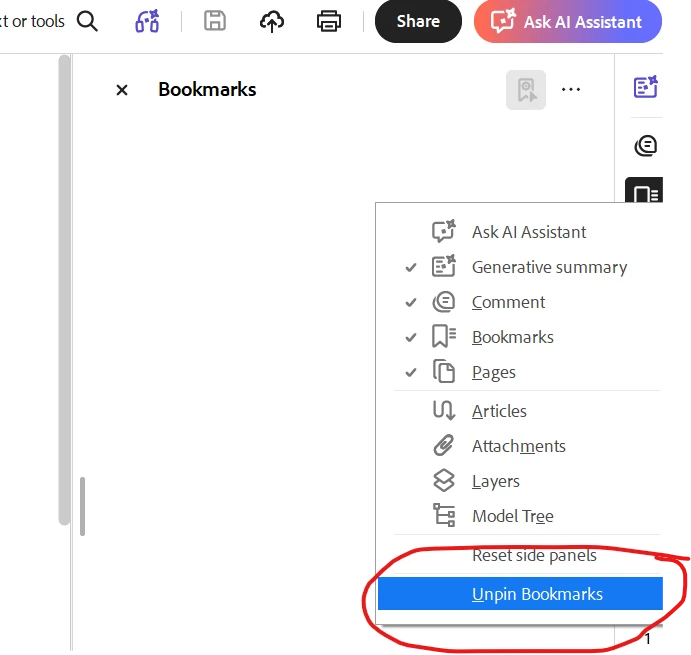
Disable "Bookmarks" Side Panel whenever opening a PDF

  • March 31, 2024
  • 14 replies
  • 19259 views

I would like the "Bookmarks" panel to NOT open when I first open an Adobe PDF.  How do I accomplish this?

Correct answer Dave Creamer of IDEAS

Your preference setting will affect documents that have their settings at default. 


If the PDF is set to open the bookmarks pane, it will open. As long as the document does not have password protection, you can close the panel, change the Document Properties, and save the PDF. You should you be able to set up an action for this if you deal with a lot of PDFs.


If you have control over the PDF settings in the original program, turn off the option to make bookmarks or at least, not to open the pane by default.


14 replies

Sam_11
Participant
May 11, 2026

This issue is completely absurd, it shrinks the pdf so small and I have to manually close the bookmarks every time now. Adobe needs to fix this.

AUniqueUsername
Participant
May 6, 2026

This is absolutely obnoxious, constant updates and they can’t fix this?  My fix will be a different application...

Da_Real_Madao
Participant
April 22, 2026

Can’t even thumb down the “Correct Answer” since it doesn’t help at all! 

chloe.g
Participant
April 9, 2026

Adjusting default view settings only has an effect on the “All tools” pane. It has no effect on the Bookmark pane, which always opens if a document has bookmarks. But I don’t care if a document has bookmarks. I DON’T WANT TO SEE THEM! You can’t even just shrink it down because it doesn’t even store the splitter distance. It also doesn’t make sense to store the bookmark pane setting in the document itself. A lot of academic literature contains a comprehensive bookmark list, but we can’t be opening and saving every document. That method doesn’t even work by the way, but even if it did, it wouldn’t be considered a solution.

When someone answers my question with "How long is a piece of string?", I throw a null reference exception.
matqwertygl
Participant
March 12, 2026

This is beyond a joke, I must open over 100 PDF documents a day, if not three times and every time I close the bookmark.  ADOBE, we pay for this software fix the f@£$$£ ISSUE!

sefgvdrgrg
Participant
March 9, 2026

ADOBE! REACT NOW !!!


This issue has been reported repeatedly and is wasting your user’s a lot of time. How can this easy fix take so long? 

I wont wait any longer and use/recommend alternatives to Adobe. This is ridiculous. 

ranv09
Participant
February 6, 2026

Super-annoying when trying to review multiple pdfs. Maybe Adobe can ask AI to write some code to fix this very annoying problem.

Userguynameplace
Participant
January 30, 2026

How does Adobe allow a bug like this to exist? In Foxit I was able to disable bookmarks with a few clicks of the mouse.

Participant
October 21, 2025

This issue has caused me to stop using Acrobat Reader on my macs

Dave Creamer of IDEAS
Community Expert
Dave Creamer of IDEASCommunity ExpertCorrect answer
Community Expert
June 3, 2025

Your preference setting will affect documents that have their settings at default. 


If the PDF is set to open the bookmarks pane, it will open. As long as the document does not have password protection, you can close the panel, change the Document Properties, and save the PDF. You should you be able to set up an action for this if you deal with a lot of PDFs.


If you have control over the PDF settings in the original program, turn off the option to make bookmarks or at least, not to open the pane by default.


David Creamer: Community Expert (ACI and ACE 1995-2023)
Participant
June 3, 2025
I can’t fill the forms out
Dave Creamer of IDEAS
Community Expert
Community Expert
June 3, 2025
quote
I can’t fill the forms out
By @lilbitx_9544

Is this post even connected to the original problem of disabling the bookmarks pane?


David Creamer: Community Expert (ACI and ACE 1995-2023)