Participant
March 31, 2024
Answered

Disable "Bookmarks" Side Panel whenever opening a PDF

  • March 31, 2024
  • 12 replies
  • 18309 views

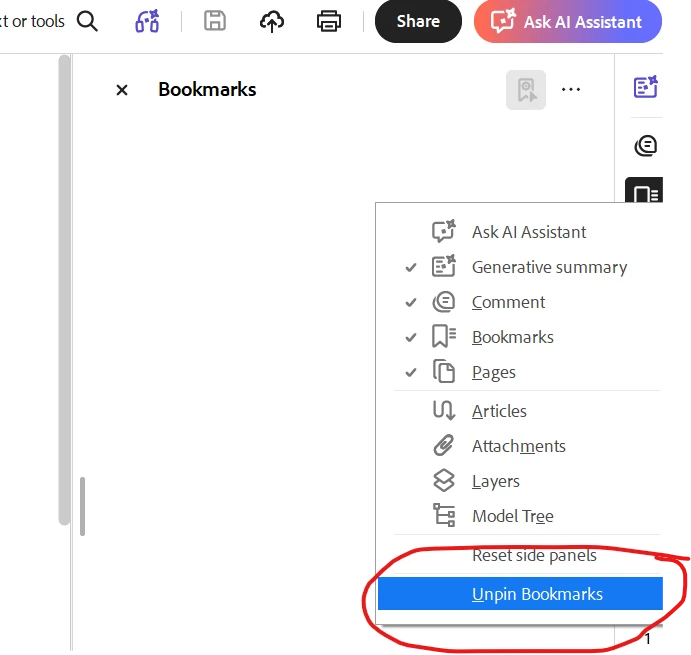
I would like the "Bookmarks" panel to NOT open when I first open an Adobe PDF.  How do I accomplish this?

Correct answer Dave Creamer of IDEAS

Your preference setting will affect documents that have their settings at default. 


If the PDF is set to open the bookmarks pane, it will open. As long as the document does not have password protection, you can close the panel, change the Document Properties, and save the PDF. You should you be able to set up an action for this if you deal with a lot of PDFs.


If you have control over the PDF settings in the original program, turn off the option to make bookmarks or at least, not to open the pane by default.


12 replies

Participant
April 1, 2024

1. open one pdf document
2. View>show/hide>Tool pane
3. click "restart" application

Participating Frequently
January 19, 2025

This recommendation does not turn it off permanently, but only for that instance (might as well click on the x box)

Legend
February 3, 2025

Hi @VladNJ,


Thank you for reaching out with your question. 
Sadly, it can be turned off permanently. This panel is driven by app preference and document property. 


Here is the app preference you may want to check:

  1. Launch Acrobat 
  2. Go to Preferences> Documents. Keyboard shortcut (Cmd + K) Mac and (Ctrl+K) Wins.
  3. Select "Restore last view settings when reopening documents"
  4. Click "OK"
  5. Open a PDF file.
  6. Close the bookmarks panel.
  7. Save and close the PDF file.
  8. The next time you open the same document you should have the bookmarks panel closed

Let us know if you have further questions.


~Tariq

BarlaeDC
Community Expert
Community Expert
April 1, 2024

HI,


If you go to the properties of the document and select "Initial View" then you can set what should happen on the PDF opening.


Dave Creamer of IDEAS
Community Expert
Community Expert
October 16, 2025

This would work as long as you can save the document. If it is protected, it won't "stick".


David Creamer: Community Expert (ACI and ACE 1995-2023)