Participant
March 31, 2024
Answered

Disable "Bookmarks" Side Panel whenever opening a PDF

  • March 31, 2024
  • 50 replies
  • 23461 views

I would like the "Bookmarks" panel to NOT open when I first open an Adobe PDF.  How do I accomplish this?

Correct answer afrazminhas

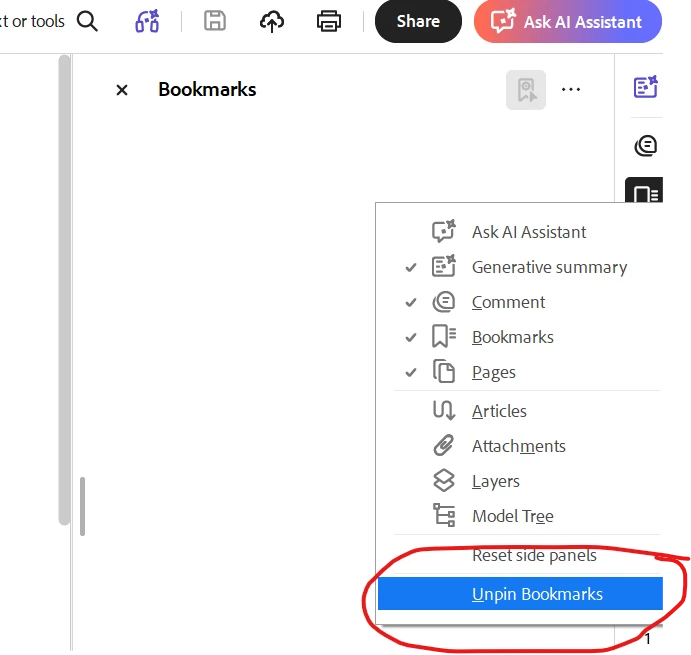
Right click on right bar where you see bookmark with other icons and select “UNPIN BOOKMARK”, and close bookmark pane manually. it wont open bydefault again when you open pdf. Problem solved. 

Thanks

Afraz


50 replies

Participant
August 10, 2026

I found this from another posting and it prevents Bookmarks from appearing after opening pdf.

The only solution that seems to work is to make a registry edit.

  1. click on Start in Windows then type regedit
  2. Navigate to:[Computer\HKEY_CLASSES_ROOT\Acrobat.Document.DC\shell\Open\command]
  3. To be safe, right click on the "command" folder and select "Export" to back up it before editing it.  
  4. Now amend the Data value to:
    "C:\Program Files\Adobe\Acrobat DC\Acrobat\Acrobat.exe" /A "navpanes=0" "%1"

Occasionally I’ve had to go back into regedit and redo the edits after the program updates and overwrites this entry.


Participant
July 6, 2026

This question is very very valid and extremely common.
Try to Google a question as ”adobe reader how to avoid opening all tools and bookmarks”.

I’m using Adobe Reader v2026.001.21691 and doesn’t have the panel shown above. 

Please don’t suggest the ‘Preferences’, ‘Documents’ and “Remember last state of…...” because that crappy solution doesn’t work at all.

Another suggestion this flaw in the reader was to save the view in the pdf file every time a new document is opened.
That can’t be the answer from a valid and professional employee.

Please do something about this flaw in the Reader. The problem has been around for years and annoys millions of users every day.


Participant
July 6, 2026

This ‘feature’ is so annoying and I’m using a lot of time every day to turn off both bookmarks pane and the tool pane.

I don’t wan’t to use these and instead have a full view of the document.
The ‘solution’ from Adobe was to turn off the panes, save the setup and that’s it. But, it doesn’t work at all. Like, not at all.

This thing annoyes me so much that I’m looking for another viewer of my pdf documents. Unfortunately, the company want’s to use Adobe and all employees are trying to get rid of these two panes every time a document is opened.

Guess what my colleagues and I think about Adobe Reader.

Participant
July 1, 2026

I have tried EVERYTHING!!! I open 100’s of PDF per day. Each stinking time I have to close bookmarks!

Nx8243
Participant
June 9, 2026

The “Correct Answer” isn’t correct! This feature is so annoying. The damn bookmark window takes up a 1/3 of my screen every freaking time! This needs turned off!

sefgvdrgrg
Participant
May 28, 2026

The new “solution” is not working. Right clicking anywhere in the screen does not cause anything to happen. This whole story is showing me, that Adobe is giving zero f*cks about their customers, because absolutely nobody was ever asking for bookmarks nor is anyone using it. This is so ridiculous that I deleted Adobe and use PDF-Xchange, and can recommend it to everyone. It so easy to set up with all your presets, and once you close the app, it will always open again with exactly the same settings - that’s all we were asking for. 

rdumon1414
Participating Frequently
May 28, 2026

Click “Menu” at the top left corner, go down, “Disable New Acrobat Reader”. 

afrazminhas
afrazminhasCorrect answer
Participant
May 14, 2026

Right click on right bar where you see bookmark with other icons and select “UNPIN BOOKMARK”, and close bookmark pane manually. it wont open bydefault again when you open pdf. Problem solved. 

Thanks

Afraz


Sam_11
Participant
May 11, 2026

This issue is completely absurd, it shrinks the pdf so small and I have to manually close the bookmarks every time now. Adobe needs to fix this.

afrazminhas
Participant
May 25, 2026

I posted fix 10 days ago, Check if that works for you.

rdumon1414
Participating Frequently
May 25, 2026

And it still isn’t correct. 

AUniqueUsername
Participant
May 6, 2026

This is absolutely obnoxious, constant updates and they can’t fix this?  My fix will be a different application...

Da_Real_Madao
Participant
April 22, 2026

Can’t even thumb down the “Correct Answer” since it doesn’t help at all!