Participant
April 18, 2019
Answered

Eliminate Home Screen when closing last PDF?

I'm new to Acrobat DC and am used to working with individual PDFs. I've got DC setup to NOT do tabbed management of multiple open files. How do I now stop it from reverting to a "Home Screen" showing recent files when I close the last open PDF?   I think, that when I close the last open PDF, Acrobat should just go away/die.

justlearnskills
justlearnskillsCorrect answer
Community Expert
October 16, 2026

​@Kevin350866590pbq First of all, you should have created a new post under your name versus posting on a 7 year old post! 

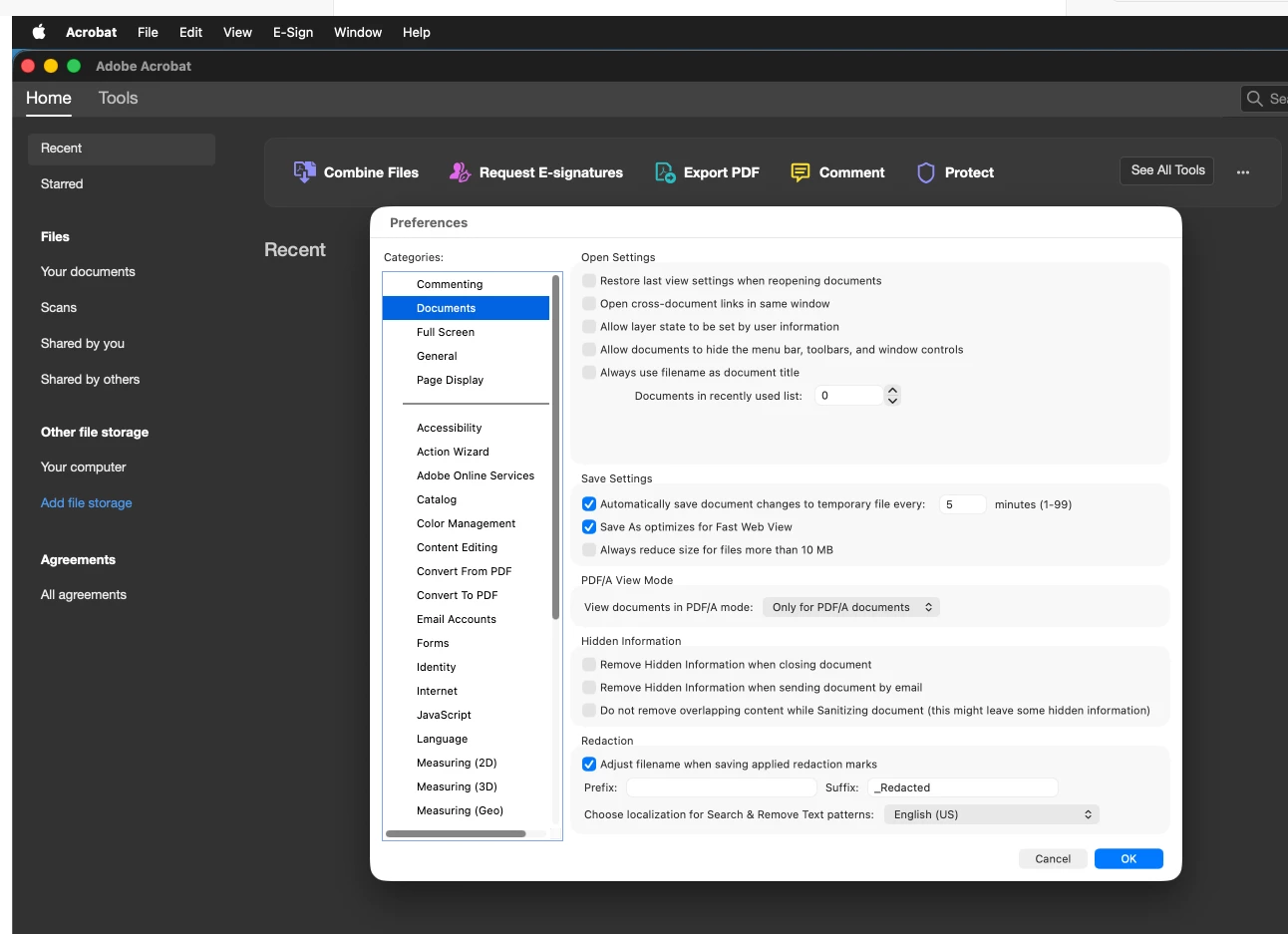
To fix the Home screen to show no recent files, open your Acrobat preferences - Documents - Open Settings - Documents in recently used list to zero. 


In my settings, I have unchecked all the ‘Open Settings’

m

46 replies

Participant
October 15, 2026

Four year later… I’m feeling this. Yet it WASN’T an issue for me for years (including 4 years ago). What gives??

Translate
justlearnskills
Community Expert
justlearnskillsCommunity ExpertCorrect answer
Community Expert
October 16, 2026

​@Kevin350866590pbq First of all, you should have created a new post under your name versus posting on a 7 year old post! 

To fix the Home screen to show no recent files, open your Acrobat preferences - Documents - Open Settings - Documents in recently used list to zero. 


In my settings, I have unchecked all the ‘Open Settings’

Translate
m
Known Participant
October 3, 2023

Replying to get updates. This is super annoying. Like someone putting their hands in front of my face every time I open the app.

Translate
Participant
September 10, 2023

hi guys i found this thread due to the very same annoying issue - however unchecking "Show homescreen when all documents are closed" box DID WORK for me - however reading the thread im curious as to why it isnt doing same for the other (highly frustrated) users here


the only other setting i have changed on my app to stop the Annoying right hand "Tools Pane" From appearing which is a checkbox - PREF > DOCUMENTS > "Remenber current state of tools pane"


Can you guys check this box and see if this helps to stop homepage?

Translate
Participant
September 12, 2023

Unfortunately, this checkbox seems to be missing (Acrobat Pro DC 2022.002.20191)

Translate
c.pfaffenbichler
Community Expert
Community Expert
July 14, 2023

Alas, doing that dozens of times a day is an annoyance. 

Translate
JR Boulay
Community Expert
Community Expert
June 13, 2023

---------------------

Translate
Acrobate du PDF, InDesigner et Photoshopographe
Participant
June 10, 2023

This is really annoying, it is well known that Adobe ignores known user problems for a long time, here in Germany it is the most used but also "most hated" company in the graphics industry, especially after the introduction of the expensive subscription model.


Anyway, to the thread question, I have a small workaround (Mac version). I close the last open PDF by directly clicking the little red close button on the document window. It's a little more work, but at least it helps until this annoying issue is (hopefully) resolved by Adobe.

Translate
mariahweyne
Inspiring
June 13, 2023

You can edit your preferences to open all documents in different tabs as opposed to different screens.

Go to edit - preferences - general - and make sure this is checked.

Here I have opened 6 different files, you can see the document name in the tab.

You can also close a tab with ctrl + w instead of the x.


Translate
Participant
June 14, 2023

The "open as tabs" setting was already checked, with no effect (it doesn't matter how that is set either). When closing the last open PDF document with cmd+W the annoying "homescreen" appears again (As said on Apple Version, Build 22.2.20191.0).
The only workaround so far is to close the last document directly with the red (X) button.

Translate
Participant
June 7, 2023

This is insanely annoying, even on the latest version of Acrobat Creative Cloud (on Windows, for what that's worth).
My workflow requires me to open a PDF, examine and analyze it, save if I've made any changes, then close, and open the next PDF file in a directory and repeat. I work in full screen mode, so when I close the PDF, I get the recently used files window at full screen.  I have to minimize THAT window before I can open the next PDF.  I have to do this OVER and OVER.  I can modify my workflow to open many files at once, but Acrobat doesn't show you the file name of the file you're working on, so that isn't my preferred workflow.  I want to open/edit/save/close/open next PDF, and I can't do that without minimizing a recent files window before opening the next PDF, and there doesn't appear to be ANY way around it.  This is madness!  Madness!

Translate
TJ3159
Participant
March 16, 2023

I might have cracked this - The preference under the "General" category "Show Home screen when all documents are closed" is dodgy: If it's unticked and the home screen still shows, tick it on and hit OK. Open Preferences again and tick it off and OK again. 

Quit Acrobat and launch it. The home screen will open, but open a PDF and close it  the home screen should close too.

This also might be an issue with multiple CC log ins - make sure Acrobat in all machines have the preference unticked.

Translate
Inspiring
March 16, 2023

Hi TJ


There is no longer a "Show Home screen" etc, someone has decided they are more important than the users. Sounds like we have to follow the fountain of truth!!!!

Translate
Participating Frequently
March 16, 2023

It's just such a belligerent approach - to force users to have to have the screen open... and not engage with any dialogue?  I'd love to know the internal process that some headstong bully from Adobe insists on doing it 'thier way'

Translate
ksahearn
Participant
January 12, 2023

Every time this is posted in the Support Community they close the request with some nonsense about "Since we don't have many people asking for this feature we're going to close this request HAVE A NICE DAY" - which is a lie and a freaking gaslighting bit of but holery as there are dozens of the same request. I don't know why they're running scared from this simple request - I close a PDF and I don't want the huge, ridiculous "HOME" panel sitting there. All they need to do is give us an option to disable it. When I want to see "recent files" I use my OS built in resource. When I close a PDF I don't want a big blocking piece of the software still sitting there.

Translate
Participant
January 13, 2023

it's simple Adobe is too big...they can't hear us!

Translate
Inspiring
March 3, 2023

they don't want to hear us, maybe software development has moved to inner mongolia.

Translate
paulf40009506
Participating Frequently
August 4, 2022

Why is this question considered solved? The answer provided by KimCSM is incorrect. It is stated by several community members that that solution is invalid.

Nevertheless, I have researched it and wasted way too much of my precious time trying to fix an adobe problem once again, only to find out the best thing to do is to make the superfluous screen is small as you can and put it on the far right of your monitor, so it is barely showing.

The other thing you can do is install an older version of acrobat which I plan to do as soon as Adobe shows me where to download older versions of acrobat. There's no option for older versions of acrobat in the Creative Cloud application. That would be too convenient!

Translate
Participant
October 21, 2022

same here, after closing pdf start screen pops up, in setup disabled it, seems not to work at all.

WHY???

Translate