Participant
April 18, 2019
Answered

Eliminate Home Screen when closing last PDF?

I'm new to Acrobat DC and am used to working with individual PDFs. I've got DC setup to NOT do tabbed management of multiple open files. How do I now stop it from reverting to a "Home Screen" showing recent files when I close the last open PDF?   I think, that when I close the last open PDF, Acrobat should just go away/die.

justlearnskills
justlearnskillsCorrect answer
Community Expert
October 16, 2026

​@Kevin350866590pbq First of all, you should have created a new post under your name versus posting on a 7 year old post! 

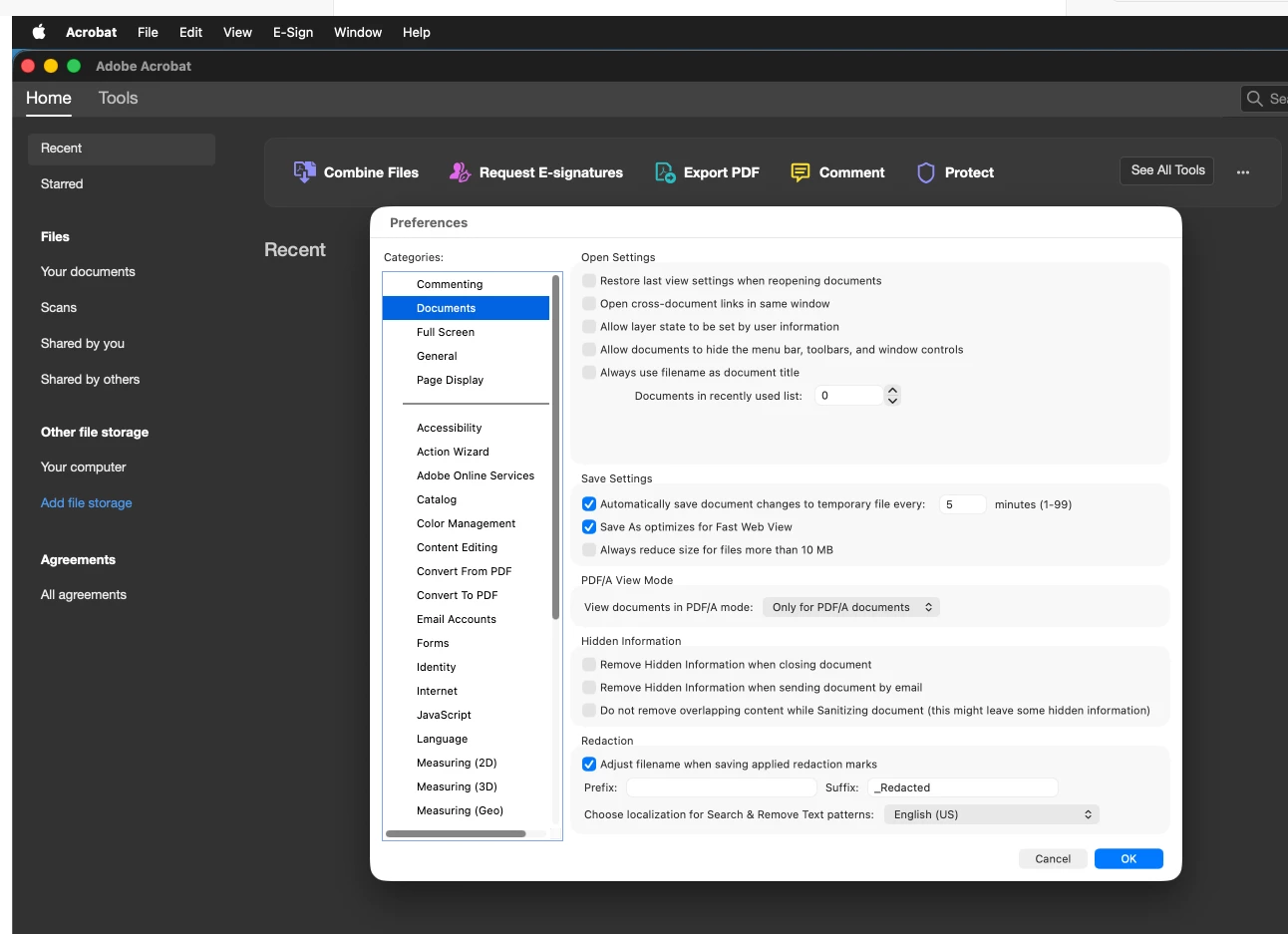
To fix the Home screen to show no recent files, open your Acrobat preferences - Documents - Open Settings - Documents in recently used list to zero. 


In my settings, I have unchecked all the ‘Open Settings’

m

46 replies

Participant
July 22, 2022

Mac user, same problem here in Acrobat DC. Unchecking "Show home screen when all documents are closed" has no impact. It's very frustrating to have this useless home screen blocking my view of my other applications. I saw a post elsewhere where someone said they'd changed their default OS settings to use Preview to view PDFs just to avoid this feature, and I might actually end up doing that, even though I'm opening PDFs all day.

Translate
Participating Frequently
July 22, 2022

That's such a good idea - well done Adobe pdf - shot yourself in the foot - very well done. I'm also using FIGMA as a replacement for ILLUSTRATOR. I guess this is what happens when ADOBE DOESN'T LISTEN to thier users. 

Translate
Participating Frequently
July 11, 2022

This doesn't work for me - any ideas? I still get the anoying home screen application window blocking everythign else from view - is like someone deliberatly getting infront of you view while you're trying to watch tv - seroiusly frustrating why it's default!

Translate
Participant
June 10, 2022

I hate this feature with a white hot passion. As others have noticed (and others have disagreed with), checking the "hide home screen" option does not hide the home screen at all. Never. This is constantly in my way, and is one of the worst "updates" I've ever seen. At this point, it's clear Adobe won't respond to the many requests to get rid of this (and what's with that ineffective checkbox?)

Translate
Participating Frequently
July 11, 2022

Any solutions - I'm staggered by there's no obvoius help or reaction from something so obvoiusly frustating. I'M MOVING TO FIGMA from now on. Stcik that in your pipes Adobe - you didn;t learn QUARKS lesson did you? 

Translate
photoretouchpro
Inspiring
November 11, 2020

This is terrible. Please disable this like you can on all other CC software.

Translate
ryan.thorpe
Participant
September 27, 2020

It's super annoying... I can't get rid of it either!!! I would love to... it's rubbish and I never use it! Adobe? Are you listenting?!!

Translate
Participating Frequently
June 3, 2019

Maybe this screen shot will help.

Translate
Participant
October 23, 2019

The Home Screen is a real time-wasting annoyance in my studio. We already have an operating system from Apple for finding and managing files, and we all have  learned to use it. Placing an "OS-Lite" in the way of tasks we need to complete is the opposite of good UX design. We need achieve MORE WITH LESS, not the same with more. Please Adobe... read this, and the many threads on this topic... and make the universally hated Home Screen switch off-able.

Translate
Participating Frequently
November 19, 2019

I agree that we do not need an additional OS-Lite on top of the MacOS. I especially despise the Home screen because I work in Prepress and continually have to open PDFs to edit them and then save them. I am forced to use the AdobeOS Lite to navigate to where I want to save the file. Very annoying Adobe! Give us the option to turn off!

Translate
Participant
May 31, 2019

Why does the app open randomly?

Translate
Participating Frequently
May 31, 2019

I think 1234567890!ABC simply wants to know how to disable the "Recent" or "Home" screen (not sure what Adobe calls it?) I find it constantly in my way also. When you close an open PDF it  automatically opens (even if you have previously closed it) and blocks my view of the desktop. I have yet to use any of the "Features" of this screen. Please give us a way to disable this "Feature".

Translate
Bernd Alheit
Community Expert
Community Expert
May 31, 2019

MS Windows or MacOS?

Translate
try67
Community Expert
Community Expert
May 31, 2019

I'm assuming Mac OS, as that doesn't happen on Windows.

Translate
jane-e
Community Expert
Community Expert
April 19, 2019

Hi

If you Quit Acrobat with documents open, then both the application and the documents will close. You will be asked whether or not to save unsaved files. It works this way in most computer applications, not just Acrobat.

~ Jane

Translate
try67
Community Expert
Community Expert
April 19, 2019

That's not possible. If you want to close the application you have to do so yourself. It will not close automatically when you close the last open file.

Translate