Participating Frequently
March 20, 2021
Answered

Embedded video in a PDF file won’t play in adobe reader.

  • March 20, 2021
  • 7 replies
  • 75131 views

When I embed a MP4 video in a PDF file, it plays nicely on Adobe Acrobat Pro, but not on Adobe Reader. (Both are the most recent edition, and run on Windows 10 Pro.) On reader, just the audio of the MP4 plays, but the image doesn’t show.

(I really don’t understand how Adobe add a feature to it’s PDF format that would be great if it worked, but turns out completely worthless since its own viewer can’t handle it.)

Does anyone know a solution or workaround?

Correct answer Manon D

I am having the same issue (vidoe clips playing as audio only).
Where can one find the "power saving/integrated graphics" option?
I assume it is under Edit > Preferences > ?


Hi Thomas,

It's in your OS/graphic card settings.

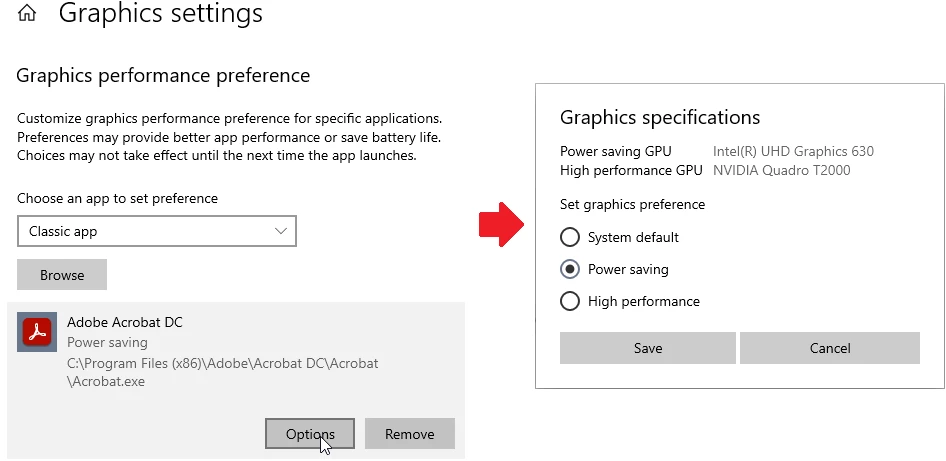
Here's the way to change it in Windows: 

  1. Search for Graphic Settings.
  2. In Choose an app to set preference, select Classic app, browse to your acrobat.exe file and click Add.
  3. In the Settings window, click Adobe then Options, and select Power Saving.


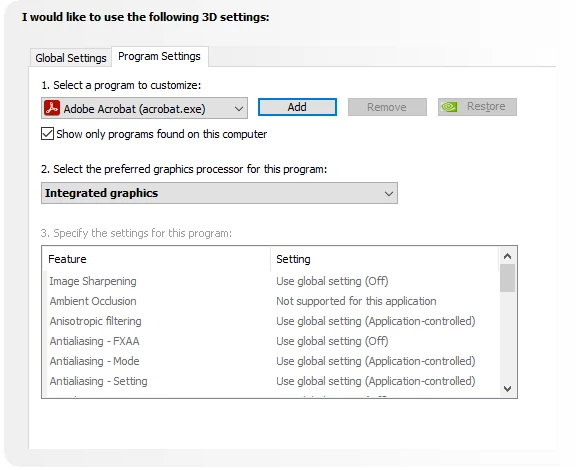
If you have NVIDIA, you can also do it from the Control Panel, in Manage 3D settings > Program Settings.


I hope this helps!

7 replies

Participant
October 2, 2023

Same issue here, tried EVERY "solution" the adobe team proposed with no success.

Honestly, it's just PATHETIC that the Adobe team suggests to change settings on computers since pdfs we make are meant to be sent and correctly visualised by clients. If a client opens a non-working pdf will just close and discard it. 

Dear Adobe, should understand that your software is not just used to make silly depliants or posters for the community charity event around the corner.

Your software is used by professionals to make money, every bug and defect in your software can cost hundreds if not thousands of $. You're totally failing to offer technical support to high end corporate users, and that's ridiculous. I'm not going to renew subscrition after it expires.

Amal.
Community Manager
Community Manager
October 2, 2023

Hi @DIEGO5C6C 


We are sorry to hear that.


What is the version of the Acrobat DC you are using? To check the version go to Help > About Acrobat and make sure you have the recent version 23.06.20320 installed. Go to Help > Check for updates and reboot the computer once.

Also try to repair the installation from the help menu (Win Only) and see if that works.

Please try to reset the Acrobat preferences as described here https://community.adobe.com/t5/acrobat-discussions/how-to-reset-acrobat-preference-settings-to-defau...

You may also try to create a new test user profile with full admin rights in Win or enable the root account in MAC and try using the application there and check.


Would you mind collecting the Adobe CC logs https://helpx.adobe.com/creative-cloud/kb/cc-log-collector.html  , Procmon logs (Win Only) https://www.adobe.com/devnet-docs/acrobatetk/tools/Labs/acromonitor.html  and share them via any cloud storage. Just upload the log file to the cloud generate the link and share that link with us for further investigation.

Regards
Amal

Participant
October 22, 2025

I found this thread that's ancient, but the problem still exists! I'm running Adobe Reader on 3 computers and the PDF with the embedded MP4 works on 1 of them, but not the other 2. All 3 computers are running Windows 11 Pro 25H2 and Adobe Reader 64 bit version 25.001.20813. I don't need more "suggestions". I need ANSWERS!! This is very important to my business.

Participant
January 4, 2023

I have never logged in any type of forum to comment in all my career, but this is just to much to not be adressed. I am currently working on a presentation where I need to insert an animation I created. I cannot believe this, but after several weeks working on it in InDesign and 2 wasted days trying to solve the video playing issue I am quiting Indesign and Acrobat. I am going to work with the good old Power Point!! Haven't used it for 20 years. It is basic, but the video there works with no issues. Thanks Adobe....
I just don't understand how you discontuied wokring with flash without creating a new functioning solution. All these added features are for nothing, if the core stuff doesn't work! Creatives don't need horrible workarounds that work on 1 pc (and not always), but then don't on another. Seeing all this frustraitment for a year, and not prioritizing a solution for this ASAP is just bizzare, it not like this is some sort of start-up company.

Participating Frequently
January 4, 2023

I agree and after this year I will most likely not be renewing Adobe. The support is terrible, the only response I received is your message so why pay for something that does not work and no support at all. 

Participant
September 16, 2023

it's sept 2023 and i'm also having the same issue

Participant
October 2, 2022

oh my god, this thread is open for more than an year now, since march 2021 to october 2022.
Amal please refer me in Adobe as an SDE and then please let me handle the situation.


Participating Frequently
October 2, 2022

Amal is probably a bot.

I have already asked for this thread to be elevated to management, but nothing.

Shall we try and find some contacts for Adobe management and get a bloody answer to our question?

Participant
October 3, 2022

we should really

Participant
September 5, 2022

Use windows graphics in lieu of Nvidia or any other graphics. Change it from windows Display settings. It works well.

Participating Frequently
September 5, 2022

Yes but, do you have to tell all your recipients/buyers/students of your PDF that they have to switch to Windows graphics. 


Look, as we have said, in Acrobat you can't even set player controls, it's greyed out, so when you say it works, can you set player controls? Does that work for you too now?

It's time for Adobe to release a new alternative to the PDF. 

Participant
July 19, 2022

I am having the same issue (vidoe clips playing as audio only), with Adobe Acrobat Pro DC (64 bit).


Amal.
Community Manager
Community Manager
July 19, 2022

Hi there


Hope you are doing well and sorry to hear that. Is this an issue with a particular video that you embed into the PDF file or with all the Videos? Please try with a different video file and check. 


Also, try the steps shared in the correct answer marked above and see if that works for you.


Regards

Amal

Participating Frequently
July 19, 2022

Amal, with respect, please stop this nonsense with try this and try that. You, I and everybody knows that video and audio stopped working in PDFs a couple of years ago. Why? Please just be sincere and tell us why. In fact, post a PDF that you have created recently or do it now, it's really easy, just click add rich media and browse for a video. Then please attach it to your next post. I'm sure I'm not alone in eagerly awaiting your PDF with embedded audio and video. Made today. Come on, it's a 5 min job. Prove that you can still embed audio and video in a PDF today.

Participating Frequently
March 3, 2022

I tried everything Amal suggested, and nothing worked for me. I just gave up.

Participant
May 3, 2022

Same issue here, and after reading the whole thread I came to the same conclusion concerning embedding video in a pdf. -It's just not a robust product..

Amal.
Community Manager
Community Manager
March 22, 2021

Hi Sérgio


Hope you are doing well and sorry for the trouble.  As described you are unable to play the video in Acrobat Reader DC application but the same video plays well in Acrobat DC.


Do you get any error message when you try to open the video in Acrobat Reader DC application? If yes, please share the screenshot of the same for a better understanding.


Please try to turn off the protected mode for testing (Win Only) and see if that helps. Go to Edit > Preference> Enhanced Security > uncheck 'Enable protected mode at startup' Turn off the protected mode and uncheck 'Enhanced Security' > Click OK and reboot the computer

Note: Please turn on the security after testing to avoid security risks.


Also, please check out the troubleshooting steps provided in the help page: https://helpx.adobe.com/acrobat/using/playing-video-audio-multimedia-formats.html and see if that works


Regards

Amal

Participating Frequently
March 23, 2021

Hi, Amal.


There’s no error message at all. Adobe Reader simply treats the video file as an audio file.


I did what you suggested. It was worse: Reader just crashed when I tried to play the video.


Amal.
Community Manager
Community Manager
March 24, 2021

Hi there


We are sorry to hear that. Please try to repair the installation and reboot the computer once. Go to Help > Repair Installation. 


Also make sure you have the latest version 21.01.20145 installed. Go to Help > Check for updates and reboot the computer. 


Also, please share the pdf file with us so that we can check it at our end.

Upload the file to document cloud, generate the link and share that link with us. 


Regards

Amal