


Participant
November 4, 2021
Question

Error In Redaction on Acrobat, Weird lines

  • November 4, 2021
  • 1 reply
  • 3535 views

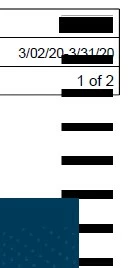
When I redact text, it looks fine. And then I hit Apply and go through the sanitization and everything, and it makes these weird repeat lines all down the page. This is happening on about half of the files that I am attempting to redact, even after redownloading them and opening and closing the application. Can anyone explain this? The same is happening to a colleague but hers has been installed longer, my version was just installed today. TIA
1 reply

Harsh Vardhan Pareek
Community Manager
Community Manager
November 9, 2021

Hi,


Hope you are doing well.

As per the issue description that while redacting it shows unwanted lines. As we have tried but were unable to reproduce the issue on our end. Would you mind sharing a few details to understand the issue better?

1. Did you try it with other PDFs too, is it doing the same?

2. Try to create a new flattened PDF (for windows only) from it and then try to redact.

To create a flattened PDF:

Right-click anywhere on the document> print> select printer as Adobe PDF > then save as a new file.

 Now apply to redact on this new file.


Let us know if it works


Thanks,

Harsh

Participant
November 9, 2021

Thank you for your assistance on this. This is happening on about half of the files I try to redact, but not all of them. I created a flattened PDf as you suggested and it is still doing the same thing on the file I originally had an issue with. I am still not sure what is going on, is this just some glitch that might be remedied with the next update? I have attached another image of what is happening.

Harsh Vardhan Pareek
Community Manager
Community Manager
November 29, 2021

Sorry for the delayed response. 

Thanks for sharing the detailed information. If you are still facing the issue then there are a couple of possibilities for such behavior of Acrobat.

1- Kindly reset preferences by following the steps provided in this discussion link: https://community.adobe.com/t5/acrobat-discussions/how-to-reset-acrobat-preference-settings-to-default/td-p/4792082

2- If this is the case with multiple files, then there's a slight change we need to make in the application's preferences settings. 

Navigate to Acrobat>Edit>Preferences>Security (Enhanced)>disable "Protected Mode at Startup", "Protected View" and "Enhanced Security">OK>close and reopen Acrobat.

Note: these changes are only for testing purposes. Once tested, please change it back to the previous setting. 


Let us know if any of the suggestions help.


Thanks,

Harsh