
Participant
April 9, 2015
Answered

File preview thumbnails aren't working for Acrobat DC files in Windows Explorer

  • April 9, 2015
  • 60 replies
  • 247026 views

I just upgraded from Acrobat XI to Acrobat DC on Windows 7, and now any new PDFs I create display with a generic PDF icon rather than a thumbnail preview of the file.  Files created in Acrobat XI are displaying correctly (see screenshot).  Is anyone else experiencing this and is there a resolution?
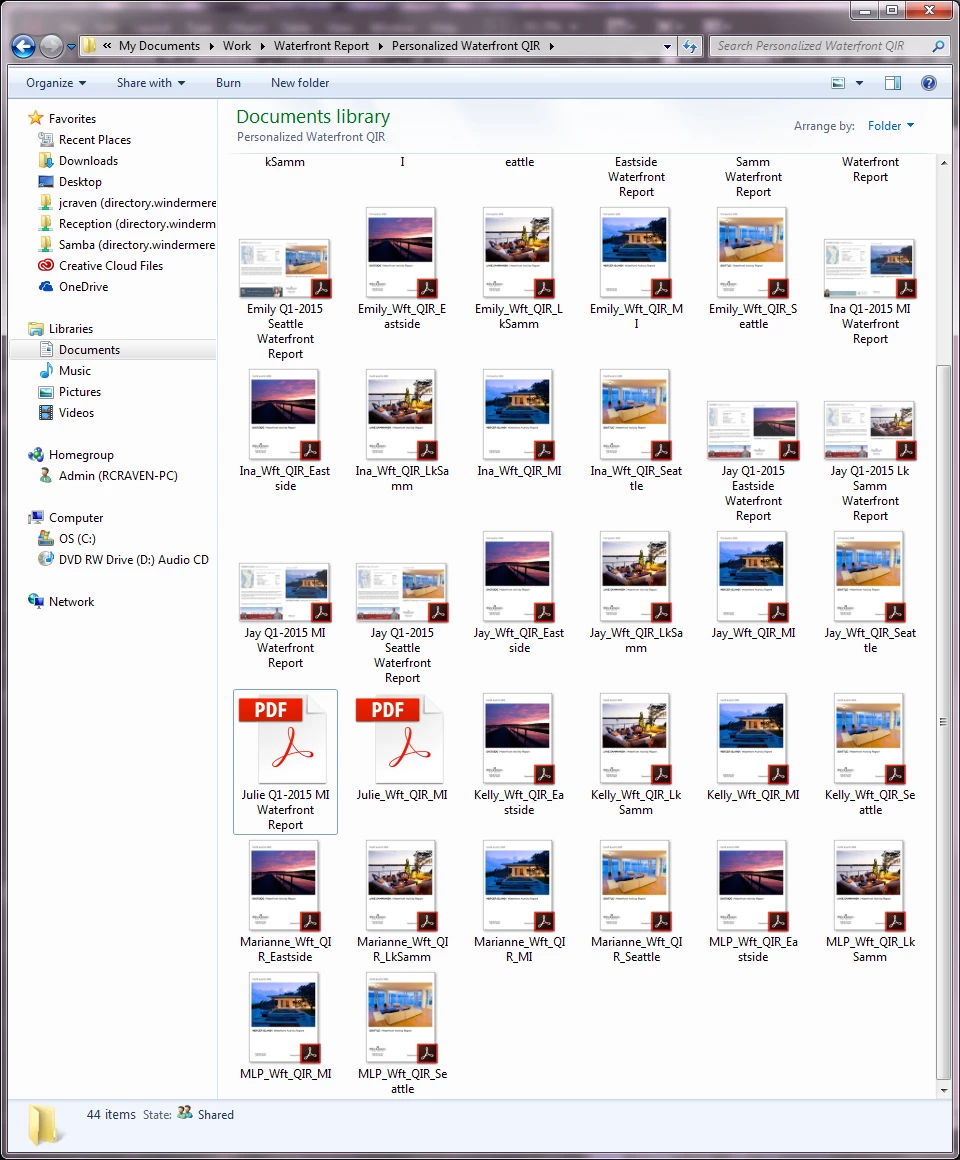
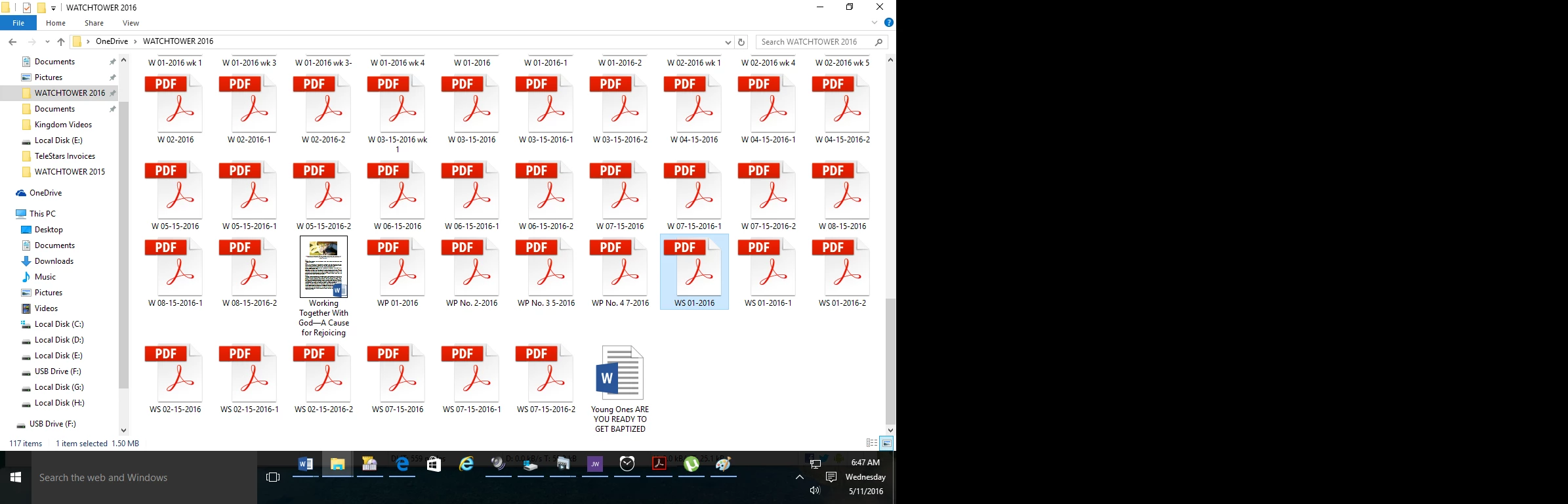
This topic has been closed for replies.
Correct answer AshuMittal9644438

Yeah, this is still what I get!


Hi djbilly

This was fixed in our update released yesterday. Make sure you are on the latest update by visiting Help > Check for updates.

Next, to enable thumbnail previews go to Preferences > General and then select Enable PDF thumbnail previews in Windows Explorer.

Thanks,

-ashu

60 replies

August 6, 2015

This seems to do the trick- $10.00 is reasonable, does a lot more than just restore your pdf icons.

http://www.fastpictureviewer.com/codecs/

also..just discovered this now wtf? Anyone know how to disable/bypass the default save dialog which,  despite the faux sprinkling of alternate options, is basically one big SAVE TO CLOUD button, and yet more clicking to get where you really want to be... sighs.

Participant
July 12, 2015

I've fixed my problem by installing the free FoxIt Reader application as suggested in this thread. I feel like a chump for paying Adobe for a Creative Cloud subscription. With each new version doled out to its captive audience Adobe removes functionality. If only my employers didn't require me to use Adobe applications I could support people like FoxIt who are fully capable of producing a pdf reader that easily generates thumbnails on 64-bit Windows machines. When Adobe says they're having technical problems but FoxIt can do it, what should we think? Is Adobe technically incompetent or does their new Acrobat DC stand for "Doesn't Care" about their customers? It's just plain unacceptable.

Participant
July 12, 2015

Hi guys,

I fixed this problem using this way:

1. Install Sagethumbs / SageThumbs download | SourceForge.net

2. Install Adobe Reader preview handler x64 fixer / Fixes for 64-bit Adobe Reader preview handler and thumbnails

3. Restart the computer.

4. Install Foxit reader and set it as default pdf reader. Foxit Software | Fast, Affordable, and Secure PDF Solutions

5. Open some pdf files in Foxit, then close it.

5. Reset Acrobat Pro DC as the default reader. Refresh the screen. Done!

Participant
July 25, 2015

FoxIt solution doesn't work on my Windows 8.1 x64. Any other idea?

Zdeslav_S
Participating Frequently
July 25, 2015

Hi,
it should work, just install SageThumbs and Adobe fixit app you have links in above posts.
Regards

Participant
June 29, 2015

You can install Adobe Bridge CC and use that as your explorer. I know it is not ideal but at least you can preview your pdf files without having to open each and everyone of them. Seems odd to me that it will work in bridge but not explorer...

Participant
July 22, 2015

Seems like Adobe Bridge is the workaround, but why should we have to have another file browser to get the preview functionality back?

Participant
June 21, 2015

This is laughable, have a read of this from Adobe Help Desk (top is newest, scroll to bottom first):

Notes to Customer

Friday, June 12, 2015 6:54:31 AM PDT
Hi G,

Thank you for contacting Adobe Technical Support.
We are responding in reference to your case no.

We had to remove the thumbnail preview functionality from Acrobat and Reader DC for technical reasons. We know there are users who v
alue it but certain design considerations forced us to make this change.

The new icon for PDFs created by using Acrobat DC seems to appear like this only (as a generic PDF icon). PDF files that were create
d using Acrobat XI represent the same icon as it used to be earlier.

It is not a problem and you can just enjoy this amazing new look of your PDF icons.

For further help please call us at 1800-614-863 (Monday-Friday, 9am-5pm)
You can also visit to www.adobe.com/support for any assistance regarding Adobe
products. You can also visit forums.adobe.com as it’s a useful resource for self-help.

Thanks & Regards
Adobe Support

Notes from Customer

Thursday, May 28, 2015 2:16:14 PM PDT
Hello and thanks for responding. Going backwards to 11 Pro is a disappointing suggestion. Can you please respond as follows:
- How do you expect people to find a PDF file, when you may have 100 files in a folder that are numbered, not labeled (such as plan
s)?
- Do you know of the concept of people thinking visually?

Your software is all based around visual design, now you are moving a LONG WAY BACKWARDS. Can this please be responded to by a senio
r, committed team member from Adobe Australia, I have had enough of support responses that say
"We would like to inform you that functionality for viewing Preview in thumbnails is no more available in new Adobe Acrobat Pro DC."


"is no more available" isn't even English. Come on, lift your game.

Notes to Customer

Monday, May 25, 2015 7:38:48 AM PDT
Hi G,

Thank you for contacting Adobe Technical Support.
We are responding in reference to your case no .
We would like to inform you that functionality for viewing Preview in thumbnails is no more available in new Adobe Acrobat Pro DC.
It was present in Acrobat 11 Pro, you can remove Acrobat DC & install Acrobat 11 Pro if need that functionality.

For further help please call us at 1800-614-863 (Monday-Friday, 9am-5pm)
You can also visit to www.adobe.com/support for any assistance regarding Adobe
products. You can also visit forums.adobe.com as it’s a useful resource for self-help.

Thanks & Regards
Adobe Support

Notes from Customer

Wednesday, May 13, 2015 10:25:59 PM PDT
THUMBNAILS NOT WORKING IN ACROBAT PRO

RiesG
Known Participant
June 21, 2015

Unbelievable!!! They still use that pretentieus "..enjoy the amazing new look...". I'm afraid they will not correct this "amazing new" behaviour. Now thinking of leaving Adobe too.

Participant
June 21, 2015

What about "is no more available" ?????

arakotchian
Known Participant
June 18, 2015

I was having the same problem on a Mac.  All the PDF files were showing up as the generic thumbnail icon.  Here is what fixed it for me.

I went into Finder's View menu, then Show View Options.  I toggled "Show Icon Preview" off then on, that fixed it.  I'm on OS/X 10.10.3 and just 'Updated' Acrobat today.

Maybe there is a similar thing on Windows ?  

I don't buy this "Technical Reasons" crap, the thumbnails are an essential way to find documents with a quick scan.  Someone on this Adobe Acrobat development team needs to go to a basic UI course and stop "Fixing" things that aren't broken.

Participant
June 18, 2015

Unfortunately this did not work for me   Thanks for the attempt though

arakotchian
Known Participant
June 18, 2015

Dang, that sucks.  Its working here though.  I've exported some other types of files as PDF and I'm getting preview thumbnails on those too.  I wonder what the difference is.

Participant
May 21, 2015

So strange there are people on this thread trying to find Adobe only work a rounds (which don't really work), after a non adobe work a round has been found.  Why doesn't Adobe have it's people working on a real solution?

Participant
May 10, 2015

Hi,

Had the same (and really sad) trouble with Acrobat DC.

How I seem to have solved it:

1. Installed Adobe Reader 8 (used this version as I knew the thumbnails feature was working well before)

2. Cleared thumbnails cache

3. Assigned PDF files to Reader 8 (open with - choose default program)

4. Reassigned PDF files to Acrobat DC

Thumbs were back!

I modified and saved one of these files with DC => The generated file had the expected thumbnail!

Hope this helps!

pctechtv
Inspiring
May 16, 2015

How I seem to have solved it:

1. Installed Adobe Reader 8 (used this version as I knew the thumbnails feature was working well before)

This for who it works for is good advice. Something like that seemed to work for me in past versions. In this version it did not.

The way I got it work here I don't understand why but it really seem to to the trick is this.

1. Install Power PDF Trail

2. Set it as the default PDF viewer

3. Set Acrobat DC back to default viewer

4. Uninstall Power PDF Trail.

I then restarted a couple times, and thumbnails are seem to be there to stay. Does anybody know why this could be the case? I would like to know more, but for now I am psyched about having thumbnails in DC!!! Hope this helps others. Thanks

pctechtv
Inspiring
May 17, 2015

Hi I am sorry to say that the previous solution I posted does not work, I did not mean to miss-direct anyone. I just got excited about a solution. Simply, I was not aware that the thumbnails cached, and new ones will not have the thumbnail if created. My apologies. Thanks

Participant
April 30, 2015

Thank you to each and every one of you for this thread! Especially you dear Timothy!! You all have saved me countless amounts of time with this solution! Seriously Adobe - Get with the program on this one!!

Participant
April 29, 2015

What if we are able to decide what is better for us? Thumbnails or "technical stability"?

I'm doing the Foxit Reader way in order to get back the thumbnails.

Bad move this one guys!