Participant
May 20, 2021
Answered

Fill and Sign text is white

  • May 20, 2021
  • 1 reply
  • 10435 views

Adobe Acrobat Pro DC version 2021.001.20155

I have been using "Fill and Sign" to date and sign documents for some time without issue, until today. These are not "form" documents, they are your basic pdf documents. For some reason the textbox created using "Fill and Sign" now creates white text. I understand the default is black, and there is no way to change it, yet mine is white. I'm in need of corrective action please.

This topic has been closed for replies.
Correct answer Amal.

Hi Chauncey


Hope you are doing well and sorry for the trouble. As described, the fill and sign text is white and you are unable to change it.


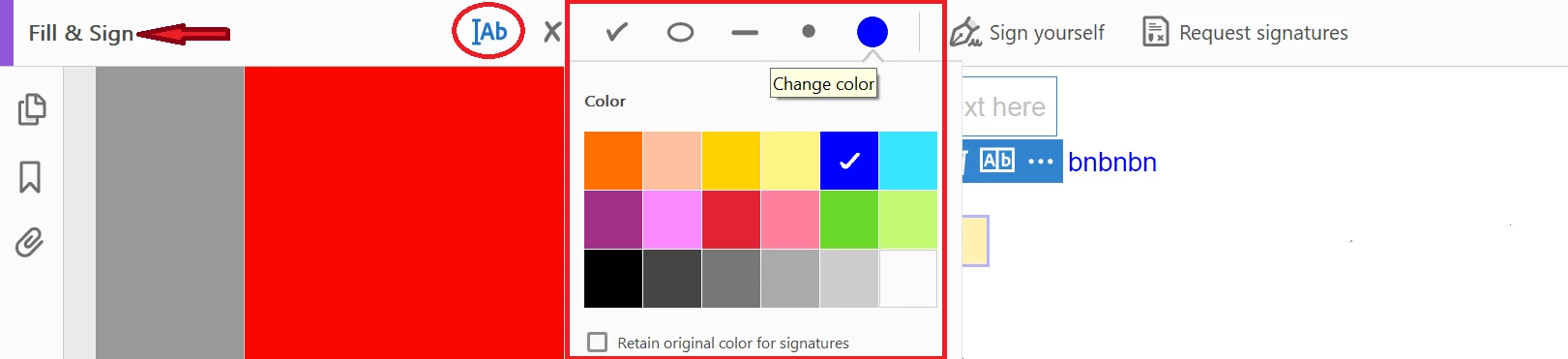
I have tried to reproduce the issue on my end and getting the option to change the font color in Fill and Sign Tool as shown below


As you have the latest version of the application, please try to reboot the computer once and see if that helps.


Also try to repair the installation (Win Only) from the help menu. Go to Help > Repair Installation.


If it still doesn't work, please try to reset the Acrobat Preferences to default as described in the help page - https://community.adobe.com/t5/acrobat/how-to-reset-acrobat-preference-settings-to-default/td-p/4792082


You may also try to create a new test user profile with full admin rights or enable the root account in Mac and try using the application there and check .


Let us know if you are referring to something else.


Regards

Amal

1 reply

Amal.
Community Manager
Amal.Community ManagerCorrect answer
Community Manager
May 21, 2021

Hi Chauncey


Hope you are doing well and sorry for the trouble. As described, the fill and sign text is white and you are unable to change it.


I have tried to reproduce the issue on my end and getting the option to change the font color in Fill and Sign Tool as shown below


As you have the latest version of the application, please try to reboot the computer once and see if that helps.


Also try to repair the installation (Win Only) from the help menu. Go to Help > Repair Installation.


If it still doesn't work, please try to reset the Acrobat Preferences to default as described in the help page - https://community.adobe.com/t5/acrobat/how-to-reset-acrobat-preference-settings-to-default/td-p/4792082


You may also try to create a new test user profile with full admin rights or enable the root account in Mac and try using the application there and check .


Let us know if you are referring to something else.


Regards

Amal

Participant
May 26, 2021

Thank you Amal!