


dzgnr89
Inspiring
September 22, 2019
Question

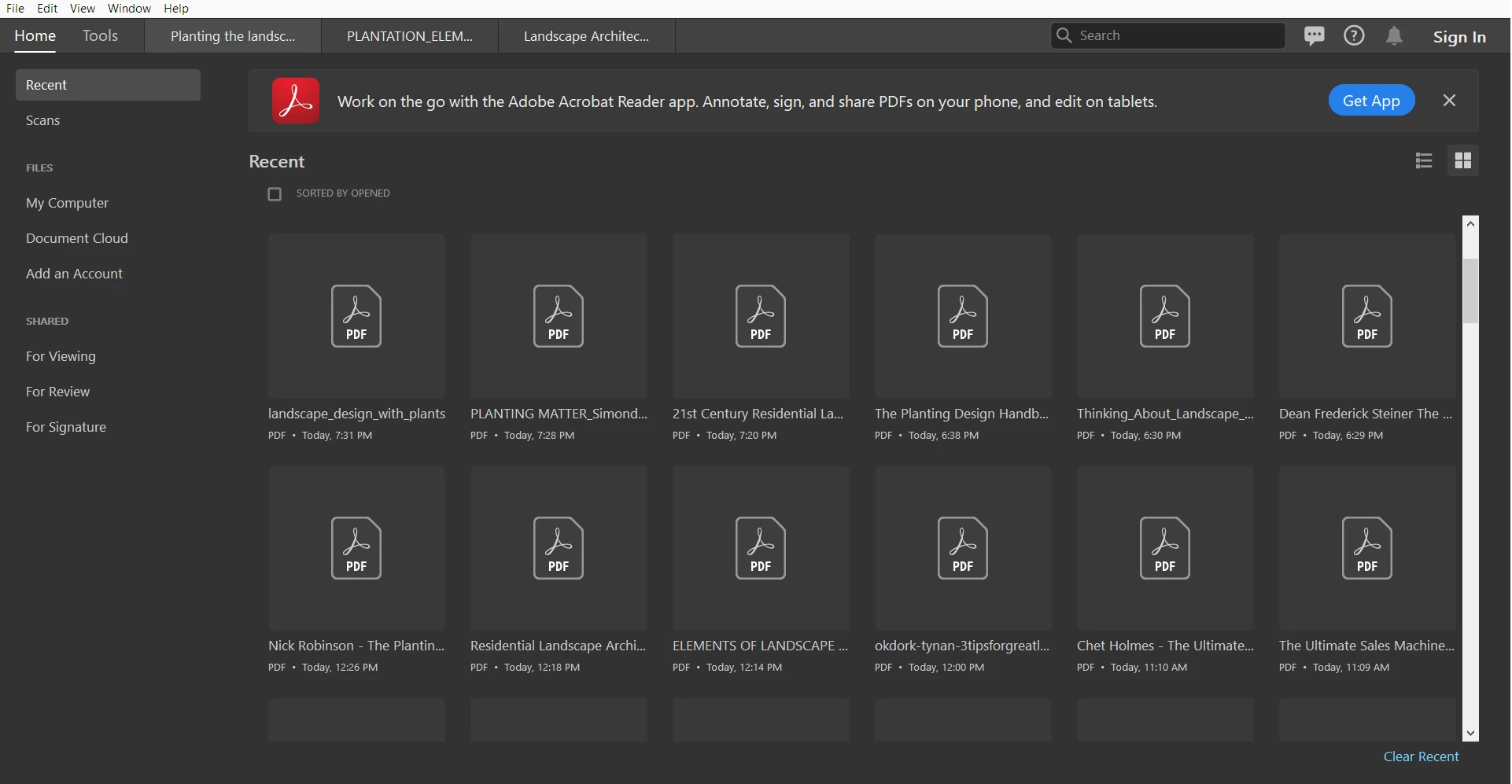
Having thumbnails of the pdf on the homescreen of Acrobat DC?

  • September 22, 2019
  • 1 reply
  • 358 views

How can I show the thumbnails in the homescreen of Adobe Acrobat DC Pro? The pdf thumbnails show up perfectly fine in windows explorer. I am using Windows 10-64 bit build 1903. Currently as seen in the screenshot, they pdf thumbnail for every recently opened document is just a page with acrobat logo. 


    This topic has been closed for replies.

    1 reply

    AkanchhaS8194121
    Legend
    September 23, 2019

    Hey there!


    Thanks for sharing the screenshot.

    As shared above, we see that it only shows the icon of the pdf in thumbnail preview not the content. However, not jutst in Windows Explorer, within Acrobat it should show the thumbnail of pdf in the recent view as well. 


    • If you are working with Acrobat DC, the you must "Sign In" within the application first.
    • Navigate to Help>Check for update>Reboot Acrobat and check back


    Let us know if it still doesn't work.


    Thanks,

    Akanchha