

Participant
August 31, 2023
質問

How do I make several fields required before allowing to click on a radio button?

  • August 31, 2023
  • 返信数 1.
  • 719 ビュー

Hello, 


How do I use a JavaScript to make 3 text fields requried in order to click a radio button?

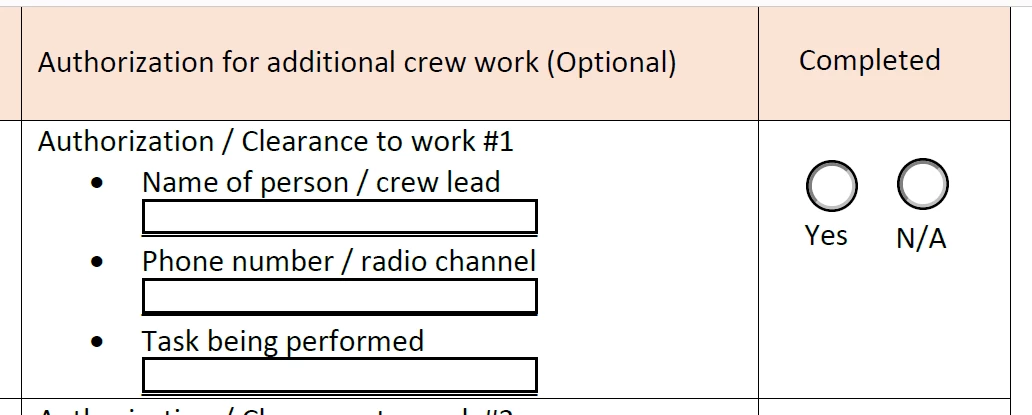
In this case, I want to require that someone filles in the "name of person" "phone number" and "task being performed" before they can select the "yes" radio button. 

I don't want to make anything invisable or greyed out. Instead, if someone tries to click the "Yes" radio button. I'd like Adobe to prevent them, and give a prompt to fill in the three text boxes required. 
 

このトピックへの返信は締め切られました。

返信数 1

Amal.
Legend
September 1, 2023

Hi @Bob_ismyname ,


I hope you're doing well, and thank you for getting in touch. It sounds like you're working on creating a PDF form and want to make certain form fields required. You're on the right track, and I'd be happy to guide you through the process.


How a form field behaves is determined by settings in the Properties dialog box for that individual field. You can set properties that apply formatting, determine how the form field information relates to other form fields, impose limitations on what the user can enter in the form field, trigger custom scripts, and so on.

You can set various properties for an Acrobat form field, depending on the form field type. The properties for each type of form field are selected on a series of tabs. When you change a property, it is applied as soon as you select another property or press Enter.

All types of form fields have a General tab and an Actions tab. Other tabs appear only in specific types of form fields.


Here are the steps you can follow to make a form field required in Adobe Acrobat:

  1. Open the PDF form in Adobe Acrobat.

  2. Go to the "Tools" menu and select "Prepare Form."

  3. Once you're in the "Prepare Form" mode, double-click on the specific form field you want to make required.

  4. In the form field properties dialog box that appears, navigate to the "General" tab.

  5. You should see an option that says " Required." Check this option.


By following these steps, you'll set the selected form field as required, ensuring that users must fill it out before submitting the form.


If you have any more questions or need further assistance with your PDF form or any other related topics, feel free to ask. I'm here to help!

 
Regards
Amal
Bob_ismyname作成者
Participant
September 1, 2023

Hello Amal, thanks for the response. 

Unfortunately, simply making the field required for submittal does not suffice. The 3 fields are ciritcal to this step in the checklist if yes is selected, not the submittal of the form itself.  

What we want is a way to prevent the user from selecting the "yes" radio button if they have not filled in the 3 text fields to the left. 

If they select N/A, then the fields do not need filled in. 

So I need a JavaScript either tied to the 3 text fields that makes the radio button inaccessible. 
Or a JavaScript tied to the radio button that references the 3 text fields before becoming available. 

Ideally if I tried to click the "yes" radio button, and the text fields were not filled in, then I would receive a prompt telling me to fill in the 3 text fields.