


Participant
November 30, 2022
Answered

How do I move the quick actions toolbar in Acrobat Pro 2022.003.20281 on a Mac?

  • November 30, 2022
  • 64 replies
  • 194182 views

I'm using Acrobat Pro 2022.003.20281 on a Mac OS 12.5. In past versions I could dock the Quick Actions Toolbar to the top of the window, but in this version of Acrobat, it hovers in the upper left, sometimes covering art that I need to see when zooming in. Is there a way to dock it so it isn't hovering, or at least temporarily hide it? The attached image shows how it is "floating" above the window. I need it to not float so it doesn't cover my PDF workspace. Thanks!

 

Correct answer Bevi Chagnon - PubCom.com

You can revert to the classic GUI interface by following the instructions here (for both Mac and Windows):

https://community.adobe.com/t5/acrobat-discussions/acrobat-2023-how-to-revert-to-classic-gui-user-interface/m-p/14052807


And let Adobe know your opinion at UserVoice: https://acrobat.uservoice.com/forums/590923-acrobat-for-windows-and-mac/suggestions/47082691-ditch-the-2023-user-interface-in-acrobat


64 replies

Participant
February 10, 2025

Its the work of people who havent giot a clue what the real world of work looks like, its a oh look lets change it for change sake regardless of productivity issues because we think it looks pretty, same with Outlook where you cant flag emails in the actual email you are writing. Plantpots who think they know better when in fact are absolutley clueless, rant over!


Participant
November 12, 2024

Yeh its gotta move to the top, whoever dreamt this up doesnt use Adobe that often, surprising really 🤬

Participant
November 12, 2024

#truth, otherwise they would know this is inefficient, not convenient and extremely unhelpful.  Their insight came from where? Ha.   Also, maybe if they wanted to continue to grow the software, which I understand, they could offer an "option" for the user to do something else with it as they wish; something that works for them. 

Adobe Employee
September 3, 2024

Hi,

Thank you for the feedback.


The latest version of Acrobat on both Windows and Mac, in Modern Viewer, allow the Quick Action Tool bar to be repositioned through a drag option. Please try it out and let us know if it achieves the need to reposition the toolbar wherever it needs to be placed.

Participant
September 3, 2024

I think I can speak for everyone when I report that it does NOT achieve that need. It can only be moved around within the worksplace, and does not shift to horizontal layout, nor can it be docked outside of the work field. It's still in the way, except now it can be a nuisance all over the field of view. All of that real estate across the top of the screen is completely wasted when the toolbars can be docked there, simultaneously accessible and out of the way like the previous version. 

Change for the sake of change is rarely a good thing.

Participant
September 3, 2024

Yes!! 

Participant
September 3, 2024

I HATE  the new layout! need toolbar back on top and pages panel on the left. all these new location covers/take up space of the work/page area.

Participant
August 13, 2024

I used to use Adobe Pro at work exclusively. Now with the floating tool bar it is just harder to do my work...put it back on top or at least offer that opion.  I now us BlueBeam almost 95% of the time I deal with PDF documents.

S_S
Community Manager
Community Manager
August 14, 2024

Hi @Michael C.38448635x8ie @Devyn36647420nuoh,


Hope you are doing well. Thanks for writing in!


Answering Michael, If you hover on the floating toolbar towards the top horizontal bar, your mouse icon should change to a hand tool, and you can move the toolbar to a position that suits you.


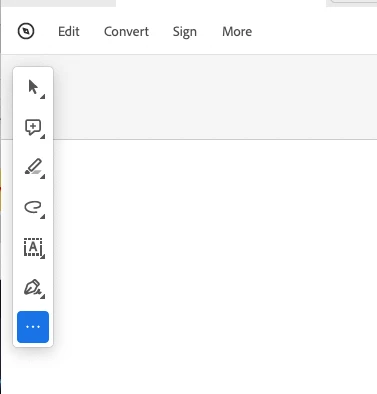
Answering Devyn, if you update your Acrobat to the latest version (go to Help-> Check for updates), you should be able to customize the tool bar using the three dots at the bottom of the toolbar (screenshot attached for reference)


If this does not work, please feel free to write back, and we can troubleshoot further.


-Souvik

Participant
April 10, 2024

In this image, what tool is the "A" with a dotted box around it, and how do I add it to my quick action bar?

Participant
March 20, 2024

Seems like this should be a high priority to be fixed with over 200 replies, hundreds of upvotes, etc. Not only is it counter intuitive to not be able to move the toolbar to a locked position but was something that worked better before the update. Get it together Adobe...

Participant
February 23, 2024

I reverted back to the classic GUI.  The floating toolbar that covers the viewing area is the worst.  I'm trying to figure out any reason I would want that to be floating and I can't think of one. 

Participating Frequently
February 23, 2024

the UI/UX is quite odd. seems the dev team would have been better served if they actually used Acrobat or engaged users. Instead, it seems they tacked on whatever features they came up with with no master plan.

Participant
January 27, 2024

thanks Bevi Chagnon!!!
absoltutly Adobe should...." Ditch the 2023 User Interface"  😞

Participant
January 22, 2024

Not at all pleased with the new Acrobat ProDC's inability to move the toolbars and place them where it works best for me, the user.


To roll this out without any personalizable user options for operation was narrow-minded and short-sighted.  I think of Adobe as a much smarter company with a lot more user engagement experience than what this decision reflects.  Didn't you Beta test this thing before you rolled it out?  It seems obvious by the amount of comments of disgruntled users, that you obviously didn't or you would have been able to see this coming.