


Participant
November 30, 2022
Answered

How do I move the quick actions toolbar in Acrobat Pro 2022.003.20281 on a Mac?

  • November 30, 2022
  • 64 replies
  • 193970 views

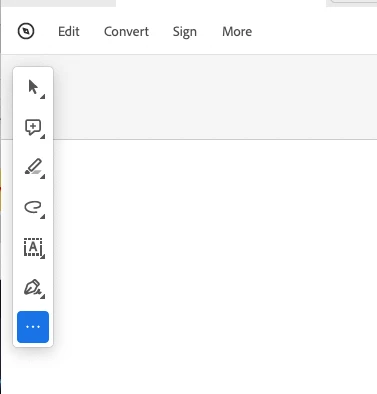
I'm using Acrobat Pro 2022.003.20281 on a Mac OS 12.5. In past versions I could dock the Quick Actions Toolbar to the top of the window, but in this version of Acrobat, it hovers in the upper left, sometimes covering art that I need to see when zooming in. Is there a way to dock it so it isn't hovering, or at least temporarily hide it? The attached image shows how it is "floating" above the window. I need it to not float so it doesn't cover my PDF workspace. Thanks!

 

Correct answer Bevi Chagnon - PubCom.com

You can revert to the classic GUI interface by following the instructions here (for both Mac and Windows):

https://community.adobe.com/t5/acrobat-discussions/acrobat-2023-how-to-revert-to-classic-gui-user-interface/m-p/14052807


And let Adobe know your opinion at UserVoice: https://acrobat.uservoice.com/forums/590923-acrobat-for-windows-and-mac/suggestions/47082691-ditch-the-2023-user-interface-in-acrobat


64 replies

Inspiring
January 11, 2024

Oh, my word. What a terrible update - why are a selection of my tools on the left, some top right and others, including the all-important page count, stuck bottom right? I seem to be constantly casting an eye over my entire screen to find what I need. And you can't edit the floating Toolbar properly because there are tools I never use that are fixed and can't be hidden. This layout makes no sense WHATSOEVER! This UI has gone from terrible to appalling. Is anyone user-testing this software?!!!! 

Participant
December 15, 2023

When I see changes to programs such as this newer toolbar that interrupts the document, I often wonder how much effort was put into it by the programmers in trying it out with actual users before implementation. This change to add a floating bar failed. As others have noted the new format ruins the view. Good call to go to the drop down choice and disable the new Acrobat. I suggest before implementing new format changes that you go outside of your organization to beta test them and take criticism at face value. 

Participant
November 30, 2023

I 100% agree the new placement of the toolbar and the Pages, Bookmarks, Layer and Zoom, of this new interface is not intuitive at all! Please just alow us to customize our work environment my moving and docing toolbars.

Participant
November 16, 2023

Thanks! That floating thing is *annoying* ... 

Participant
November 6, 2023

PLEASE, Adobe, fix this toolbar misfunction. I have had to revert to using the Previewer program to see pdfs while on zoom calls because Adobe, which I PAY for, has a horrific floating TOOLBAR that blocks my view of documents. This renders the program unusable in my daily work. I am really unhappy. Please expand your group of testers before rolling out major program changes.

davidj78851497
Participant
November 3, 2023

I totally agree. I want to dock the thing in the sidebar or the bottom where it doesn't obstruct my work. I can't believe Adobe created a feature that obstructs the workspace.

Participant
November 3, 2023

I was hoping there would be a solution to this, but it seems not! Drives me up the wall when it covers the document and you have to keep moving it out the way (where it covers up another part of the document...). I'd much rather dock it at the top like I used to!

Participant
November 2, 2023

Agreed – this new floating toolbar is super painful! It gets in the way of the content on the page. Please put it back in with the side or top menu bars to get it out of the way Adobe. It's just annoying to the user.

Participant
October 31, 2023

This is crazy. I WANT TO MAKE THIS FLOATING TOOL BAR GO AWAY.  HOW DO I DO THAT?

Participant
October 29, 2023

It's a HUGE nusance. Adobe, fix this. We should be able to dock the toolbar so it is not in the way.