


Participant
November 30, 2022
Answered

How do I move the quick actions toolbar in Acrobat Pro 2022.003.20281 on a Mac?

  • November 30, 2022
  • 64 replies
  • 194182 views

I'm using Acrobat Pro 2022.003.20281 on a Mac OS 12.5. In past versions I could dock the Quick Actions Toolbar to the top of the window, but in this version of Acrobat, it hovers in the upper left, sometimes covering art that I need to see when zooming in. Is there a way to dock it so it isn't hovering, or at least temporarily hide it? The attached image shows how it is "floating" above the window. I need it to not float so it doesn't cover my PDF workspace. Thanks!
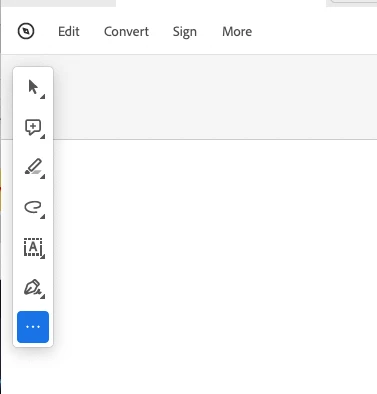

 

Correct answer Bevi Chagnon - PubCom.com

You can revert to the classic GUI interface by following the instructions here (for both Mac and Windows):

https://community.adobe.com/t5/acrobat-discussions/acrobat-2023-how-to-revert-to-classic-gui-user-interface/m-p/14052807


And let Adobe know your opinion at UserVoice: https://acrobat.uservoice.com/forums/590923-acrobat-for-windows-and-mac/suggestions/47082691-ditch-the-2023-user-interface-in-acrobat


64 replies

Participant
September 1, 2023

I agree!  This toolbar covering my document is stupid!
I cannot see the first words (usually my specs needed) in at least 6 sentences!!
This is NOT an upgrade!

S_S
Community Manager
Community Manager
September 7, 2023

Hi @Brenda32021734cewy,


Hope you are doing well. 


We appreciate your valuable feedback! We're always looking for ways to improve Acrobat, and we appreciate the time and effort you have taken to share your thoughts with us.


We acknowledge that the new Acrobat represents a notable change; however, we hope that as you get familiar with the new interface, you can be more productive and get more out of Acrobat.


We are actively working on all the currently unavailable features, such as moving, hiding, or re-sizing the floating/quick toolbar, and are being addressed with the highest priority.


If your critical workflows are impacted, you can switch to the old UI from the “Menu” on the top left corner of Windows and View Menu on MacOS.


We will follow up with a detailed community-featured post, guiding you to familiarise yourself with the new interface and regular updates on upcoming changes.


-Souvik

Dar29
Known Participant
August 28, 2023

I can't even believe how aggravating this new interface is. What purpose is served by swapping the tools and panels from on side of the window to the other? How is this an improvement? What was gained? It just messes with my workflow because I don't know where anything is. I'd be ok with that if there was any added value. It's like they did this just to say they had an update. 
And WHY move the quick access toolbar from the top of the window where it was efficiently placed and quickly accessible, to float ON TOP of the work space? I can't move it, and can't see the top left corner of my document. What are earth is Adobe thinking? 
Last thing, the move object tool is gone. I used it every day as part of my accessibility workflow. 
Can someone tell me what has actually been improved in this new interface, and how it is "intuitive"??
Yes, I will disable the new Acrobat. 

Participant
April 10, 2024

I completely agree! The footing toolbar is so irritating!! So I wasn't happy with it and was going to cancel my subscription only to find out that I can't without being charged an early cancellation fee of $70!! It's outrageous. So now I'm stuck with a product I absolutely hate and it impedes my work. If you don't already have Adobe don't do it!!

Participant
August 24, 2023

This a pain as it covers up part of hte artwork I am trying to approve. 

Participant
August 22, 2023

I also prefer that the toolbar was listed at the top and not on the lefthand side. 

Participant
August 14, 2023

Activating read mode also removes the quick toolbar.

Participant
August 14, 2023

Thank you for asking this question. I just spent half an hour trying to figure out how to get rid of the dang thing - it covers the PDF. Who thinks it's a great idea to add a tool that makes reading a document impossible? Sheesh! 

Participant
July 24, 2023

Hi everyone,


I have found a work around this painful toolbar. CTRL+H to get into Read Mode makes this toolbar disappear for the time being. Or under Menu>View>Read Mode.


Thanks.

Participating Frequently
July 24, 2023

That's a good tip for just reading, thanks. It doesn't help when one is trying to mark up/comment on a manuscript, unfortunately. Unlike for others, reverting to the "old" Acrobat interface is even worse for me, becuase with the June update all comments are not visible at all. I mark up 100 or so articles a year at work, and I've wasted so much time in the last 5 weeks trying to find solutions, get help from Adobe, and plead with my IT department to assist (they are also getting stonewalled by Adobe). Even trying to install an older version of Acrobat Pro is proving difficult, because Adobe doesn't want you to do that. This is true for other Adobe programs, too (see some workarounds here: https://community.adobe.com/t5/photoshop-ecosystem-discussions/why-can-t-i-download-an-older-versions-of-some-programs-how-can-i-download-older-versions/td-p/11853339). This debacle is having a negative impact on two of the six journals my company publishes, but I wouldn't be surprised if the problems I've been having spread to other users in the future.

Participant
June 27, 2023

I'm on a PC and having the same issue and can't find any guidance for it. The option to View >> Disable New Acrobat isn't present on my menu. The only thing I can do is zoom out...which then makes the document harder to read. Otherwise, the toolbar is covering a part of the document and I have no way to read it. I can't scroll around it. Fascinating that this wasn't caught in testing. For now, I guess I just have to wear the really strong glasses so I can read the zoomed-out page.

Participant
June 26, 2023

The new look Acrobat has just rolled out over here (South East England UK) with this same problem! Good to see a thread with some solutions but honestly can't beloeve this wasn't picked up in beta. Annoying to have that floating sidebar blocking part of a pdf all the time.

mariahweyne
Inspiring
June 27, 2023

Disable New Experience.  WIN and MAC


Participant
June 22, 2023

I am looking forward to a solution, as this toolbar blocks my view of information in some documents. In the meantime, I have reverted to old Acrobat, so I do not lose the top corner of my documents.