


Nov 17, 2021 4:24 PM UTC
Answered

How to Disable Cloud Storage

Why are we not given a simple fix to Adobe Cloud storage that we can opt in or opt out?  With all the money your company is making with subscription services your company should have the funds to make this easier for the rest of us to do and you forget why you are in business to meet your consumers needs.


I do not want my files stored remotely.  I have my own backups for my work.  I had stopped using Adobe years ago and the only reason I am a subscriber is for my higher-educational purposes only.  So now it is more ardous to delete files that I no longer need after completion of my courses.


It was a sad day when Adobe went to cloud applications from desktop apps. 
 

default7xbx3q6c1uihCorrect answer
Participant
Apr 19, 2023 7:52 PM UTC

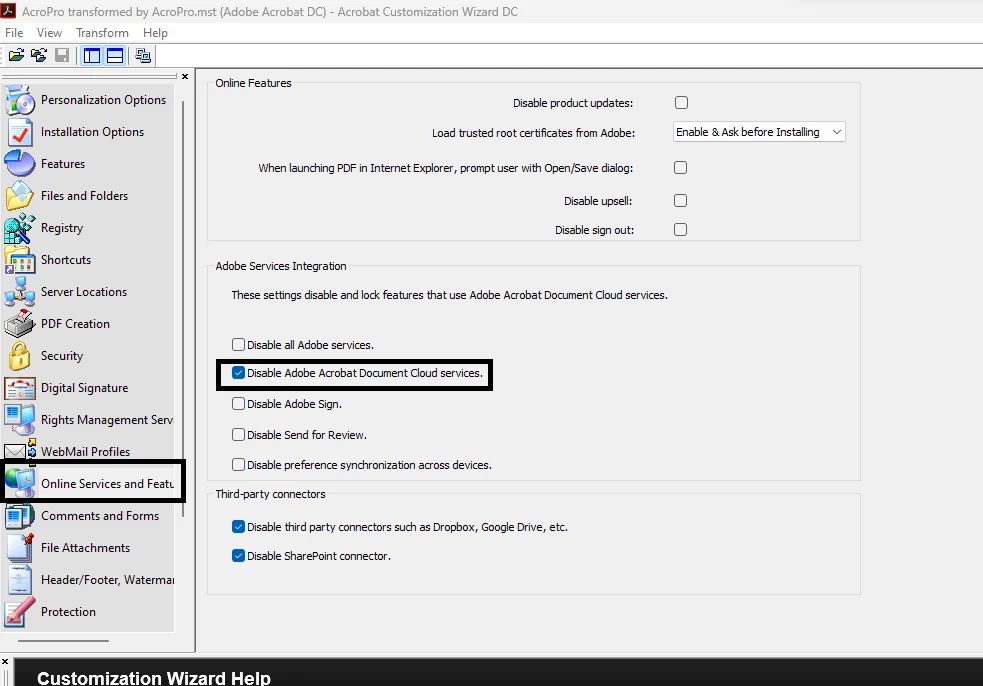
I also used the wizard, this worked for me:

78 replies

Participant
Aug 22, 2026 11:36 AM UTC

Amen. Been having trouble all morning!!!

Translate
Participant
Apr 19, 2024 1:45 PM UTC

PLEASE POST UPDATED INSTRUCTIONS!  Maybe in 2021 this worked.  But it does NOT work today.  I just WASTED FORTY FIVE MINUTES trying to deal with a mess caused by Acrobat's insistence on using cloud storage.  PLEASE give updated instructions on how to disable cloud storage.  Better yet, make cloud storage an Opt In option and stop forcing it down everyone's throats.

Translate
Participant
Jan 11, 2024 4:55 PM UTC

1. Open up Adobe application.

2. Click on your profile button and scrooll down drop down menu.

3. Click  Preferences  and open up Basic Tools

3. Scroll down Basic Tools

           1. uncheck Show Quick Actions on Text

           2. uncleck Show Online Storage when opening file

           3. uncleck Show online storage when saving files

Translate
Participating Frequently
Feb 9, 2024 3:59 PM UTC

Does this prevent a copy of a pdf from being placed into cloud storage when a user shares a file with someone else? Pretty sure there is currently no way to prevent this from happening. This violates a whole bunch of different regulatory compliance requirements.

Translate
Participant
Apr 10, 2024 2:13 AM UTC

We been trying to disable cloud services using the customization wizard with no avail. No much help online regarding this so we escalated with adobe, as it is on april 2024 disabling cloud services isnt fissable, support recommend disabling online storage feature from within adobe itlself but this doesnt change anything. Has anybody been suscessful disabling "adobe acrobat document clound services"?

Translate
Participant
Dec 15, 2023 1:08 PM UTC
Participant
Nov 30, 2023 9:53 PM UTC

I am having  the same issue. 


THE SAVE BUTTON IN MY ADOBE ACROBAT PR DC service is grayed out, and only the Cloud button is available to me.

I DON'T WANT CLOUD STORAGE

I DONT WANT NOTIFIERS REGARDING CLOUD STORAGE

I DO WANT EVERYTHING REGARDING ADOBE CLOUD TURNED OFF

can anyone help us to resolve this.


Translate
Known Participant
Nov 30, 2023 10:42 PM UTC

I'm totally with you, I had it all off but now I've just powered on a New Mac Studio and have to come back in here to remember where the 55 switches are to turn this all off all over again. Between Google, Apple, Adobe and others trying to sleazyly wrap us into their tentacles it amouts to huge amount of wasted time. Reminds me of years ago Bing was trying to surgically attach itself to my brain - how did they get that stopped?

Translate
Known Participant
Oct 30, 2023 9:55 PM UTC

So I export an In Design file to PDF it opens in Acrobat Pro and I click share. NOW I have to make damned sure I unselect "Send as link" or else it ties up the interface while it tries to upload to its GD cloud, always fails– then I have to close it, and reopen it and select email. What a giant PITA!!!! Adobe. Meanwhile Photoshop 2024 won't even open a regular JPG. Adobe forget the bells and whistles, concentrate on the core!


Translate
Inspiring
Sep 12, 2023 8:51 PM UTC

I found a three-step fix on my system. Hope this works for everyone else.

STEP 1
In Preferences > General, select "Reset All Warning Dialogs", click OK and restart the program

STEP 2

After the reboot, go to Preferences > File Handling.

Next to Default File Location, drop down the box and select "On your computer" and click OK.

STEP 3

Restart again and the Cloud Storage 'nag' should be gone.

Translate
Dave Creamer of IDEAS
Community Expert
Community Expert
Sep 12, 2023 9:30 PM UTC

The question was about Acrobat, not Photoshop.

Translate
David Creamer: Community Expert (ACI and ACE 1995-2023)
Inspiring
Sep 12, 2023 9:48 PM UTC

Sorry. Missed that. 🙂

Translate
Participant
Jun 26, 2023 1:44 PM UTC
You turn it off like this:
  1. Click File on the Outlook menu.
  2. Click Options on the File menu.
  3. Click Add-ins.
  4. Select COM Add-ins from the Manage drop-down.
  5. Click Go.
  6. Deselect Adobe Document Cloud for Microsoft Outlook - Acrobat.
  7. Click OK.
Translate
Known Participant
Jun 26, 2023 1:56 PM UTC

Hi Sally, the only "file" I see int he Outlook menu shows me files associated with emails. I don't see "Options" anywhere so for me it's a non-starter . . .

Translate
Known Participant
Apr 20, 2023 3:52 PM UTC

Completely agree, tottally pissed at the last hour I wasted trying to click this and that obscure box to make this go away. I have been happily using Drop Box for the last 5 yrs and a significant time investment has been made to customize and organize this solution. Adobe can't come to the game late and try to railroad us into their cloud vortex. It's too late. I am not re-organizing my entire file system for no good reason at all. So give us a one button Opt-In or Opt-Out. This reminds me of trying to get Bing off my system back when they were trying to shove that in our faces.

Translate
Participant
May 4, 2023 9:56 PM UTC

Hi, I'm trying to keep up, but I'm lost. All I want to do is use SharePoint in order to do a PDF review. But there doesn't seem to be any way to disable automatically loading my file to Adobe Cloud. The other people I want to do the review with don't have Adobe Cloud. How do I disable that? All of the instructions point to Preferences that no longer exist. Can someone just point to basic 2023 instructions on how to disable automatically loading my file to Adobe Cloud?

Translate
Participant
Apr 13, 2023 2:26 PM UTC

Some of the settings posted here are not available anymore, at least in 2023... I reached out to support and it seems that the only way to disable cloud storage is by customizing the install Packaging apps via the Admin Console (adobe.com)

Translate
dnvHelpDesk
Participant
Apr 19, 2023 6:38 PM UTC

there is no option when Packaging apps to "not include" cloud storage...  unless I'm missing something?

Translate
Amal.
Legend
Apr 19, 2023 7:27 PM UTC

Hi @dnvHelpDesk 


Thanks for reaching out.


Would you mind sharing the screenshot of the Acrobats preference window where you don't see the option? Also, please share the version of Acrobat Pro and the OS you are using.


Regards

Amal


Translate