


AcmeCoffeeRN
Participating Frequently
April 9, 2015
Answered

How to make home screen goes away after closing PDF file in Acrobat DC?

  • April 9, 2015
  • 55 replies
  • 43181 views

I just updated Acrobat DC on a Mac. It works fine except the most annoying part is home screen is always there after you view and close any PDF documents. So every time you close a PDF file, you have to press command+w on keyboard twice to close the windows. Very unproductive and annoying. Anyone has any tip in getting rid of the home screen or home workspace? Thanks.

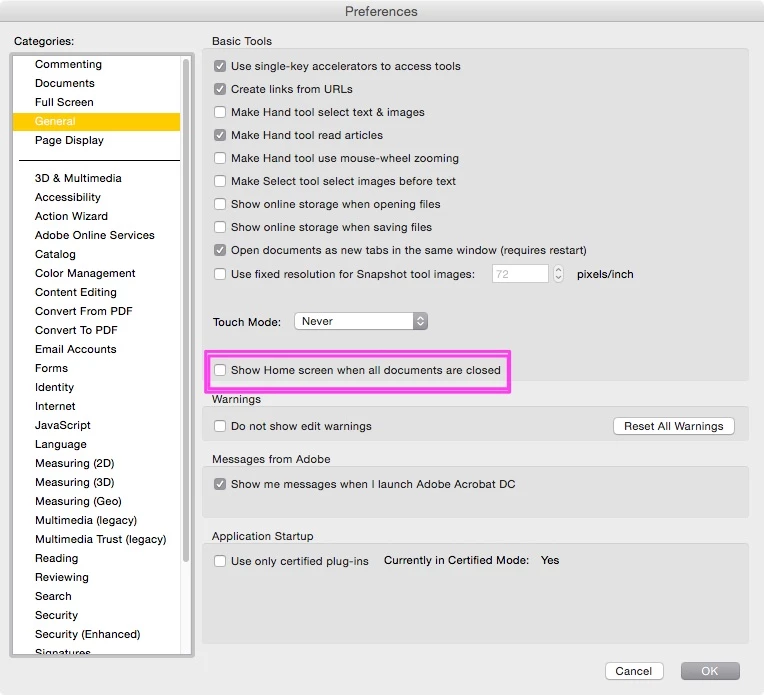
    This topic has been closed for replies.
    Correct answer JR Boulay

    The same in English language.

    55 replies

    visualpoint
    Participant
    April 14, 2015

    Hands down the most annoying "feature" I've encountered in quite a while.  Requires 2 clicks (key strokes) to close every doc... crazy.  Clean it up Adobe and sooner than later please.  

    Inspiring
    April 14, 2015

    Agreed with OP. Designers and Q/A not thinking about how product is used. This was probably something that Sales asked for, and nobody was willing to tell them to go away.

    Participant
    April 14, 2015

    It's terrible, why make me press buttons more than once, I'm getting Repetitive Strain Injury!

    Participant
    April 13, 2015

    You would think there would be an option but I went through all of them and no luck. I assume they have it like that so it works like a hub for their cloud service but certainly not efficient in a production environment. I hope they add the option in an update soon.

    michaeld32543196
    Participating Frequently
    April 10, 2015

    Please let someone have a solution for this. I don't mind all the changes (not that impressed though, either), but this one is a major annoyance. I really hope there is a solution for this.

    MikeA-McArdle
    Participant
    April 13, 2015

    Agreed, this is a deal breaker.