


AcmeCoffeeRN
Participating Frequently
April 9, 2015
Answered

How to make home screen goes away after closing PDF file in Acrobat DC?

  • April 9, 2015
  • 55 replies
  • 43181 views

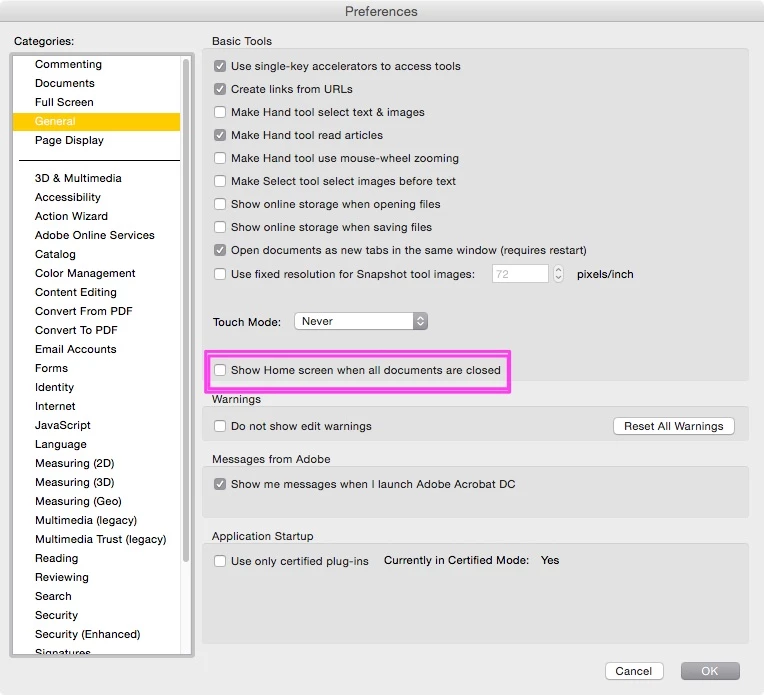
I just updated Acrobat DC on a Mac. It works fine except the most annoying part is home screen is always there after you view and close any PDF documents. So every time you close a PDF file, you have to press command+w on keyboard twice to close the windows. Very unproductive and annoying. Anyone has any tip in getting rid of the home screen or home workspace? Thanks.

    This topic has been closed for replies.
    Correct answer JR Boulay

    The same in English language.

    55 replies

    Participant
    June 8, 2015

    Please let us get rid of this! Not a deal breaker to force me to downgrade, but it does leave me cursing Adobe each extra second I waste.

    Not loving the soft and pastel-y color feel, but I guess I'll adjust.

    Dochartaigh
    Participant
    June 17, 2015

    So really? No reply from any Adobe representative in this topic?

    Myself and all my coworkers (who work in CC all day long) also find this extremely annoying - especially with no way to turn it off.

    Participant
    June 3, 2015

    Also very annoyed by this feature, I have to open dozens of pdfs a day and I have enough keystrokes already!!

    Participant
    June 2, 2015

    I agree with everyone on here. This is super annoying and it's crazy that Adobe would not make a Preferences option to turn it off. Shame on you Adobe. Shame you, sir.

    Participant
    May 28, 2015

    I gave up too and went back to the previous version. Best thing I've done in long time concerning software. I don't mind using the older version forever if that's what it takes.

    This is exactly how you lose customers Adobe. Fix this problem instead of trying to force your multitasking work flow nonsense on us.

    Inspiring
    May 28, 2015

    Reverting to an older version is not acceptable. Adobe needs to fix the current version of the product, per the various issues that have been pointed out in this forum.

    Sandy Campbell
    Known Participant
    August 13, 2015

    It's not acceptable, but, sad to say, Acrobat XI Pro is faster and more user friendly than Acrobat DC. I've installed DC twice to give it a try, and twice I've uninstalled it. The only reason I installed DC a second time was just to get rid of that annoying '1' on the Creative Cloud icon on my OS X menu bar since Adobe doesn't let you have both versions of Acrobat installed at the same time. Shouldn't this be Acrobat XV Pro, and what happened to Acrobats 12 through 14?

    Participant
    May 28, 2015

    Has this been resolved? Or are we still plagued with a giant white screen when we close a pdf?

    AcmeCoffeeRN
    Participating Frequently
    May 28, 2015

    I gave up waiting and reverted back to the last version of Acrobat.

    Participant
    April 28, 2015

    This feature is terrible Adobe! Give us the option to disable this blasted home view window. Having to close two windows every time I close a PDF is just plain dumb. My job entails making and proofing PDFs all the time. At LEAST give us the same option Photoshop has that lets us turn off the Application Frame.

    For now, I'm going back to Acrobat X till this gets fixed.

    Participating Frequently
    April 29, 2015

    I've also gone back to XI now as I noticed all the advanced tools (preflight, content editing, output preview etc.) are not collapsable as in XI meaning your forever clicking in and out of tool options.

    You can submit feature requests and bug reports here:

    adobe.ly/BugReport

    KI6ESH
    Participant
    April 28, 2015

    I agree this is very annoying. In past versions there was a way to disable it in Preferences --> General, but that preference has been removed.

    Adobe, think about it... I want to view a PDF, I open it, I'm done, I want to get back to work... but you force this Home window and recent file list to pop up full screen?!  What is the purpose... do you really think it will encourage me to spend more time with Reader... as if we pay be the hour or something?

    Please put the preference back and allow us to turn it off. And if you want to be really good to your users, add a checkbox at the bottom of the Home window that says "Don't show me this again."  Thanks.

    Participating Frequently
    April 15, 2015

    I've also updated not realising it would completely wipe my existing copy of acrobat pro... Now stuck with this annoying window every time I close a PDF.

    Creating heaps of pdfs per day I'm finding this extremely annoying. They need to put in a option to turn it off!

    michaeld32543196
    Participating Frequently
    April 14, 2015

    So, I have noticed that if you use the mouse and click the "X" button (Top Right) to close the window, it will close both windows together. It's remarkable that this behavior works when closing the window with the mouse, but not with the keyboard commands.