


AcmeCoffeeRN
Participating Frequently
April 9, 2015
Answered

How to make home screen goes away after closing PDF file in Acrobat DC?

  • April 9, 2015
  • 55 replies
  • 43181 views

I just updated Acrobat DC on a Mac. It works fine except the most annoying part is home screen is always there after you view and close any PDF documents. So every time you close a PDF file, you have to press command+w on keyboard twice to close the windows. Very unproductive and annoying. Anyone has any tip in getting rid of the home screen or home workspace? Thanks.

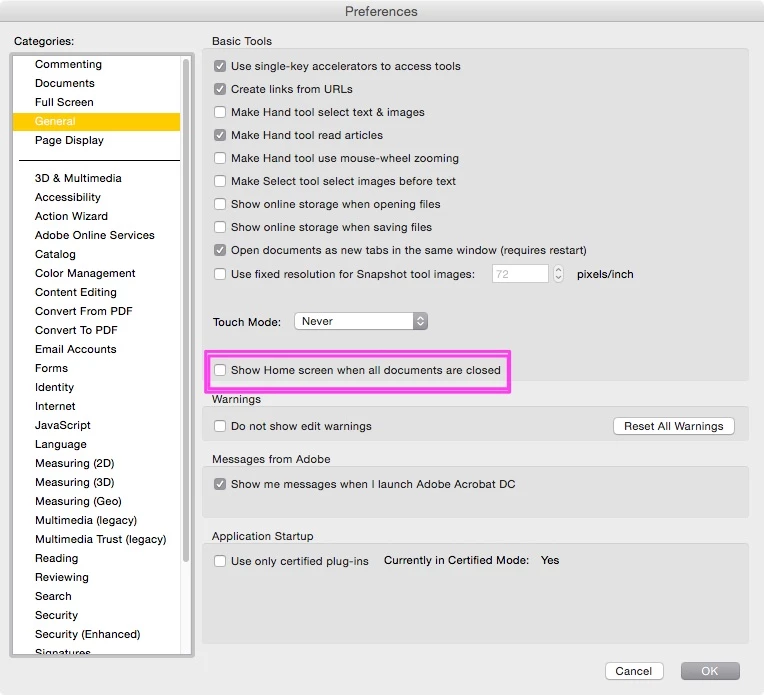
    This topic has been closed for replies.
    Correct answer JR Boulay

    The same in English language.

    55 replies

    Orba
    Participant
    July 14, 2015

    Seriously... This is absolutely annoying. And why hasn't Adobe fixed it? C'mon, guys... this is such a time waster, as I open and close PDFs dozens of times a day. I have NO NEED for this screen. None. Give us the option to turn it off... PLEASE!

    DAdam
    Participant
    July 8, 2015

    AGREED! THIS IS DRIVING ME ABSOLUTELY INSANE!!!!!! Please delete this stupid, useless feature! Why would anyone ever need this? At least give us an option to kill it!

    Participant
    July 8, 2015

    Has anyone else tried my workaround:

    I found on a workaround to this annoying new "feature". Open a PDF & then minimize it to the dock & leave it there. All other PDFs you open will close with one click or command W key stroke.

    It doesn't get rid of the home screen but at least you only have to hit command-w once to close both the pdf & home screen together.

    DAdam
    Participant
    July 8, 2015

    Thanks a lot! That actually does seem to work so far... Still though, I would appreciate being able to kill it permanently.

    nickerssan.
    Participant
    July 6, 2015

    I agree one of the most annoying features ever from an Adobe product. At least with PS you can hide the application frame. Has anybody found the answer yet?

    Participant
    July 4, 2015

    Yes, please stop us having to cmd-w twice after checking a PDF Adobe. It might sound like a small issue, but it's actually incredibly annoying.

    Participant
    June 30, 2015

    Agreed with everyone else. This needs to be a customizable option for users.

    Participant
    June 26, 2015

    I found on a workaround to this annoying new "feature". Open a PDF & then minimize it to the dock & leave it there. All other PDFs you open will close with one click or command W key stroke.

    jfushtey
    Known Participant
    June 26, 2015

    Was so excited, but when I minimize it to the dock and open another PDF file, it's back.  Am I missing something?

    Participant
    June 26, 2015

    The home screen will still be there on the new PDF you open. It just now closes together with the PDF instead of having to hit command W twice.

    Larstown
    Participating Frequently
    June 26, 2015

    I totally agree, super annoying!!!

    x-o-o-x
    Participating Frequently
    September 7, 2021

    Here's an idea: you know how occasionally a dialogue box pops-up when you launch an application from Adobe asking if YOU would or would not recommend their products?

    Well, in the message box - we need to include this request as they are not listening via the community support. 

    It's like: this is it - take it or leave it.


    What community support? 

    daviesdesign
    Participant
    June 24, 2015

    Also finding this very annoying. But i have found this thread useful - i didn't even consider hitting close twice or at least hitting the little X in the corner to close both at the same time. Switching off the feature would make a lot of sense. I don't understand why big companies like this don't get a range of designers and professional users to test out the features before they release it to give their feedback. Make it a pleasure to use and you will have our undying loyalty - seriously.

    jfushtey
    Known Participant
    June 24, 2015

    I agree with everyone.  Just upgrade and am so frustrated with this screen. Going back to the old version now!!!

    Participant
    June 18, 2015

    Double close is like having to turn off your car twice, press the elevator button twice, do the dishes twice..... I think Adobe thought a person would love Acrobat so much they would want to work on nothing but Acrobat docs all day and nothing else, so they leave it open for you.

    When I hit the "X", I expect the app to close like the other 104 apps on my computer.