


AcmeCoffeeRN
Participating Frequently
April 9, 2015
Answered

How to make home screen goes away after closing PDF file in Acrobat DC?

  • April 9, 2015
  • 55 replies
  • 43180 views

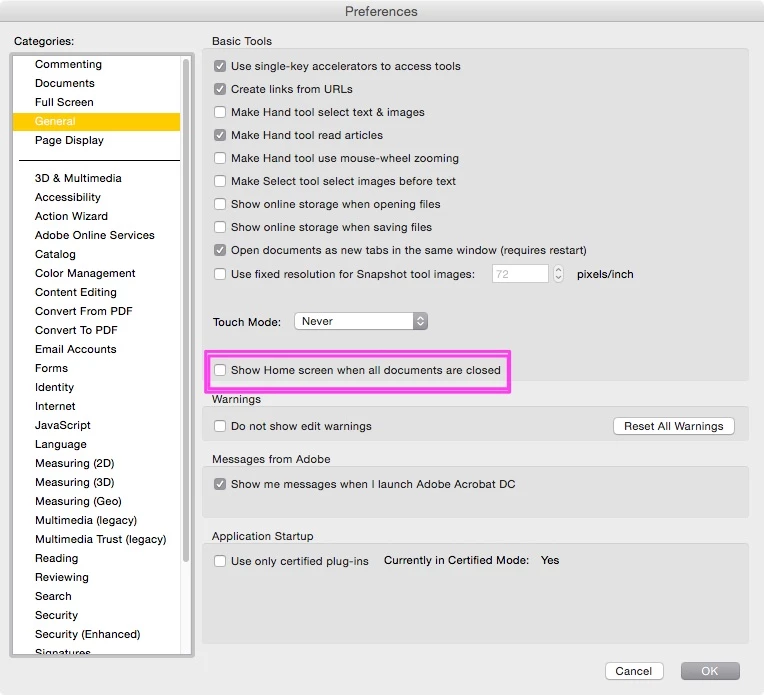
I just updated Acrobat DC on a Mac. It works fine except the most annoying part is home screen is always there after you view and close any PDF documents. So every time you close a PDF file, you have to press command+w on keyboard twice to close the windows. Very unproductive and annoying. Anyone has any tip in getting rid of the home screen or home workspace? Thanks.

    This topic has been closed for replies.
    Correct answer JR Boulay

    The same in English language.

    55 replies

    Participating Frequently
    September 29, 2015

    Actually called Adobe Support and was told "there no way to turn off this feature". I was told that when closing ANY pdf file, the user MUST review the second window of recent files / home screen. Only after reviewing this "feature" can the user proceed. Effectively, the act of closing every file is now also a review of recent files / home screen. There is no plan to remove this "feature".

    BUYER BEWARE.

    Participant
    September 29, 2015

    Did you see that posted fix using a 3rd party plugin. I works great.

    On Tuesday, September 29, 2015, jasonericbrown <forums_noreply@adobe.com>

    Participating Frequently
    September 29, 2015

    I don't use / trust random 3rd party apps (see current Xcode api hack), so no fix to remove this "feature" for most of us whom don't use / trust random 3rd party apps.

    BUYER BEWARE.

    MathPoli
    Participating Frequently
    September 29, 2015

    This "feature" is absolutely useless, highly annoying and slowing down our workflow. Adobe, you really need to fix this. Not asap, NOW!

    Participant
    September 23, 2015

    I find this very frustrating as well.

    But on OS X I have found a workaround until Adobe hopefully fixes this.

    It requires the app Keyboard Maestro (http://www.keyboardmaestro.com/main/).

    You can buy it through this link to recieve a discount: http://www.stairways.com/action/kmdiscount?REF3YMK

    And it requires you use cmd+W to close pdf-files.

    What it does is that everytime you close a window, it checks if the new windows is named "Acrobat Pro".

    If it is, the window is closed. If not, nothing else happens.

    And you can find the macro on Keyboard Maestros forum.

    https://forum.keyboardmaestro.com/t/keyboard-maestro-close-acrobat-pro-window-when-last-document-is-closed-macro/2107

    Participant
    September 29, 2015

    Thank you so much JH... this fixed it.

    That extra screen was so annoying, why do I need a history of the files I just opened. In fact all the small "updates" Adobe makes to get people to think this is a real upgrade gets old like the intro screens and the different icons. I just need to work and work quick, I don't need all the "flash and gingerbread." I wish they had a "business" edition where there were more preference controls to speed things up.

    August 13, 2015

    Is there really still no solution to this? Man.... terrible. I am really surprised that they would consider this a good idea. It's become one of the most irritating aspects of my workflow.

    acrobat overprint preview
    Participant
    August 13, 2015

    If you haven't already done so, see the previous post by abefroman with a link to the Adobe bug report. The more people who report this, the more likely Adobe will realize their mistake and change it.

    Participating Frequently
    August 31, 2015

    Done.  Not that I have any faith at all in Adobe's ability to repsond to customer demand...

    Participant
    August 13, 2015

    EVERYONE, PLEASE EXPRESS YOUR FRUSTRATION TO ADOBE HERE:

    Feature Request/Bug Report Form

    (Sorry to shout, but this needs to be seen)

    Participating Frequently
    October 2, 2015

    I found this discussion tonight, and just sent in a Feature Request to Adobe. The lack of an option to disable this new "feature" is very annoying.

    acrobat overprint preview
    Participant
    August 13, 2015

    Yes, someone let Adobe know that this is a dumb and annoying feature that I curse every time I see it.

    Participant
    August 6, 2015

    This is really annoying & Slowing our workflow !

    please resolve this issue

    Participant
    August 5, 2015

    Adobe, please resolve this issue. It is interrupting workflow and slowing down productivity. We need to be able to permanently hide the home screen.

    Kris Hunt
    Legend
    July 18, 2015

    Agreed — extremely annoying. I wonder if there is a single Acrobat user anywhere who appreciates this "feature". There is already a way to open recent files: File > Open Recent File.

    I also hate what they've done to the Save dialog box. I'm considering downgrading.

    Participant
    July 30, 2015

    Yes, me too, just wanted to share the fact that i have to click twice and cant see whats behind, its not like i even need that window! Also, agree on the save box, please please add an over ride, so it can just be a simple save box. Adobe want to appeal to big businesses who are connecting all over the place, surely a "off" button isnt too hard to do?, but for my single user experience i want to REVERT......

    spaquet
    Participant
    July 15, 2015

    This is really annoying. Because of this window I've reverted back to using the previous version of Acrobat. Please allow for users to permanently close this window.