

figureitoutaaa
Participant
February 19, 2026
Question

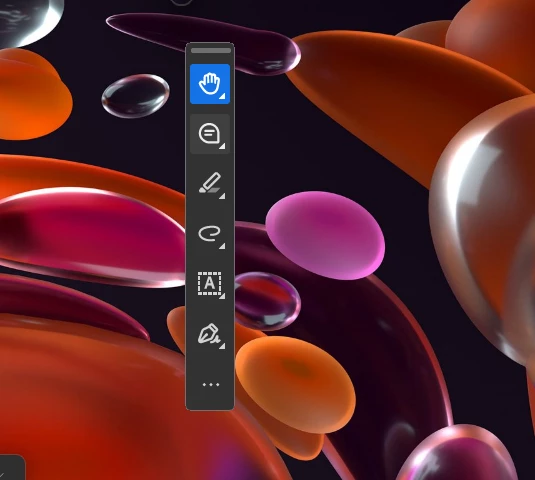
I can only see the toolbar. Nothing else unless I do ctrl + l.

  • February 19, 2026
  • 12 replies
  • 5648 views

I hit something and now only the floating toolbar is there. I can’t see any of the documents when I open them.  
 

    12 replies

    RaffaelCristobal
    Participant
    February 24, 2026

    Hey everyone, I think I might have found an accidental solution, or at least it worked for me. When I opened the document I would only see the toolbar and a near invisible circle next to it, I somehow managed to click on the circle and drag it and saw that my window with the PDF was growing larger until I dragged it to the size I wanted. I closed and opened the app with multiple documents since then and its still the correct size. Hope it works for the rest of you. 


    Rhodysmom
    Participant
    February 24, 2026

    This was extremely helpful. Thank you for posting this solution.  

    FRGeu
    Participant
    February 24, 2026

    Same here. Workarounds work but are time wasters. Please fix asap.

    LindaEC
    Participant
    February 24, 2026

    I am having the same issue - I have tried the suggestions here but I cannot view a PDF except with ctrl-L. If I “maximize” I get a full screen of white.

    Participant
    February 24, 2026

    This is a show stopper bug. Tried repair, reinstall and it was still there. Pared down to one monitor and lowest resolution to be able to manipulate the minimized window. Embarrassing! A Sign to minimize other things. 

    alizee_maz
    Participant
    February 24, 2026

    Worked for me too :) Thanks so much! 😁@ktsurly

    ktsurly
    Participant
    February 23, 2026

    I figured out an easy fix (after trying all of the suggestions here with no luck) … hopefully it works for someone else!

    Hover over the Acrobat icon in your taskbar at the bottom of the screen. When you do that, the file name should appear above the taskbar. Right click on the file name, and you should get a window that says move, size, minimize, maximize. Click maximize and you’ll be able to see your document again. Good luck!

    sapienzamike
    Participant
    February 23, 2026

    Thank you! That worked!

    Majestic_Songbird6C19
    Participant
    February 23, 2026

    I’m having the same problem, only started recently.   I have 2 monitors and it seems to occur when I drag an open Acrobat session to a new monitor.   Thank you for the tip on the keyboard shortcuts.  I can do Ctrl K to edit preferences, but my page display is already set to automatic.

    I placed a call to Adobe support and the only solution they gave me to reinstall Acrobat.  That fixed it, but 10 minutes later the problem happened again.

    I was looking for a way in preferences to disable the New Acrobat experience but can’t find it. Apparently you need to get back into the normal view and then disable new acrobat from the menus, but for some reason you can’t from preferences.

    ktsurly
    Participant
    February 23, 2026

    This just started happening to me today after an update. Ugh! I was able to maximize it by hovering over the Acrobat icon in the taskbar, then right clicking the file name of the document and selecting maximize. Hope that helps!

    Chantel1324
    Participant
    February 24, 2026

    This was SOOOO helpful! Thank you so much. I had been trying to deal with this since yesterday.  😰

    carrie_4844
    Participant
    February 23, 2026

    I don’t want the page to fill my whole screen. How can I get Adobe to not fill the whole screen? 

    carrie_4844
    Participant
    February 23, 2026

    I went to Disable New Acrobat and now I can minimize the screen again. 

    AnandSri
    Community Manager
    Community Manager
    February 23, 2026

    Hello All,


    Thank you for your cooperation and patience. Could you please try the registry settings changes and let us know if that works for you?

    delete registry "HKEY_CURRENT_USER\Software\Adobe\Adobe Acrobat\DC\SDI"

    • Press Windows key + R

    • Type: regedit.exe

    • Press Enter > If prompted by UAC, click Yes

    • Make changes to the registry

    Regards,

    Anand Sri.

    nylaw427
    Participant
    February 23, 2026

    I am seeing the same thing.  I tried the above and it did not work for me.  Any other words of advice?

    AnandSri
    Community Manager
    Community Manager
    February 23, 2026

    Hello ​@nylaw427 


    I am sorry for the trouble. Could you please restart the app and the machine once, and try the registry settings? If the issue continues, then please share a screenshot and a quick screen recording of the error message.


    Thanks,

    Anand Sri.

    Kristin2026
    Participant
    February 23, 2026

    What a horrible update! I cannot get a document open nor maximize a miniscule bubble. FIX this! 

    ktsurly
    Participant
    February 23, 2026

    This just started happening to me today after an update. Ugh! None of the keyboard shortcuts did anything and I was stuck with the little dot and menu that did nothing. I was able to maximize my document by hovering over the Acrobat icon in the taskbar, right clicking the file name of the document and selecting maximize. Hope that helps!

