

figureitoutaaa
Participant
February 19, 2026
Question

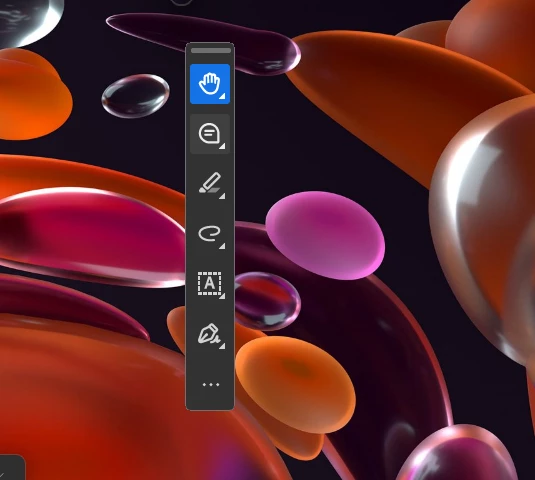
I can only see the toolbar. Nothing else unless I do ctrl + l.

  • February 19, 2026
  • 12 replies
  • 6021 views

I hit something and now only the floating toolbar is there. I can’t see any of the documents when I open them.  
 

    12 replies

    Participant
    February 20, 2026

    The same thing happened to me. I think what is happening is that the main window is going into a super minimized state. If you look to the upper left of the toolbar, you will see an almost invisible tiny circle. (It might be in a different place for you.) That is what remains of the window. If you hover over the circle, you will see the curser change to arrows - then drag to resize the window to be a normal visible size. 


    NOTE: in the invisible (super minimized) state you can use Win + up arrow to maximize to a window. However, if you click back to minimize the window will disappear again.  

    jerry_3681
    Participant
    February 20, 2026

    Worked for me. Annoying the latest acrobat update comes this way.

    CathyH1020
    Participant
    February 20, 2026

    Worked for me! Thank you so much.

    creative explorer
    Community Expert
    Community Expert
    February 19, 2026

    @figureitoutaaa do you have two screens or more? Sometimes it can be on a different screen. 

    Can you at least see the menu bar at least? If you see Window - You can select the document.

    If not, just restart your computer. Hopefully, that restart will snap it back into play

    m
    figureitoutaaa
    Participant
    February 19, 2026

    Thank you for the thoughts. I only have one screen. I can’t see the menu bar. All I can see is the toolbar. I restarted. I uninstalled and reinstalled the program. I feel like it’s a “simple” setting but I cannot figure it out.

    creative explorer
    Community Expert
    Community Expert
    February 19, 2026

    @figureitoutaaa also, go into your Preferences, Control K, and set the Page Layout and Zoom to Automatic 

    Hit CTRL 0 or CTRL 1 to fit the document to your screen (keyboard shortcuts)


    m

