

figureitoutaaa
Participant
February 19, 2026
Question

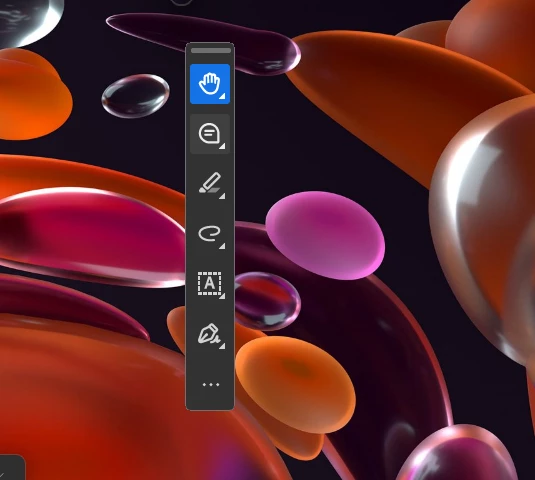
I can only see the toolbar. Nothing else unless I do ctrl + l.

  • February 19, 2026
  • 31 replies
  • 31923 views

I hit something and now only the floating toolbar is there. I can’t see any of the documents when I open them.  
 

    31 replies

    Chicago-Joe
    Participant
    March 12, 2026

    This helped.  Finally.    I notice a small circle/area above the menu and was able to drag the edge wider to full screen.  Then i could see the document and regular screen.  It seems to have reduced the main screen down to a blip.   Anyway.  Thanks to the group here for the help.

    aipatel
    Participant
    March 11, 2026

    Try Win + Up Error key.

    AnandSri
    Legend
    March 11, 2026

    Hello All,


    I hope you are doing well, and thank you for your patience and cooperation on this.


    The latest build of Acrobat and Reader 25.001.21288 Planned update, Mar 10, 2026, contains the fix. Please install the latest build of Acrobat/Reader from the Menu > Help > Check for updates. Install the updates, restart the app and the machine, and try again.


    If you are not getting the option to install the latest build, please restart the machine, and try again.


    Let us know if you experience any issue.

    Regards,

    Anand Sri.


    jngshin
    Participant
    March 10, 2026

    somebody needs to get fired for this. i uninstalled and reinstalled just to try to fix this and it still has the same issue. and they make it so obtuse how to fix it. what the hell is this who wants it!?

    jngshin
    Participant
    March 10, 2026

    think i solved it.

    Menu → Disable New Acrobat


    once again a company makes a perfectly good app complete garbage. was going to unsubscribe if this issue kept happening.

    maggie_9933
    Participant
    March 10, 2026

    Hey i am having this issue as well, how do i get to the menu on a dell / using windows if i can only see the tool bar

    kandaceBRS
    Participant
    March 9, 2026

    Ctrl + Space Bar + X Key

    jngshin
    Participant
    March 10, 2026

    doesnt work

    Manuel29054617pxri
    Participant
    March 6, 2026

    OMG I am so glad, to have found this. I was going out of my mind, I hope they fix it soon 

    Manuel29054617pxri
    Participant
    March 6, 2026

    Yes disable new acrobat, fixed it

    Ellen326690698w6d
    Participant
    March 5, 2026

    glad I’m not the only one

    Adam M 2026
    Participant
    March 5, 2026

    somehow - it has messed up your ‘minimised’ preference. i fixed by clicking and draging the window to a preferred size. closed it then reopened and so far nor mal service has resumed

    charlie_3699
    Participant
    March 9, 2026

    If I try to resize the window I get the same problem. I can only see the document in a maximized window. 

    creative explorer
    Community Expert
    Community Expert
    March 4, 2026

    This is why I ‘disable new Acrobat’ right off the bat. I don’t have any issues with the classic view! 

    m
    jngshin
    Participant
    March 10, 2026

    can you explain how to disable it?

    mmeyers509
    Participant
    March 4, 2026

    After days of struggling with this, I clicked on the Adobe icon in the tray at the bottom and saw a small option to maximize and it restored it to full screen and not just the toolbar sliver!  WHEW…  Very frustrating.

