
Question
Issue with footnotes when converting from Word to PDF
I'm having the issue as several other users, where tiny codes of some sort are appearing before footnotes when I convert the file from Word to PDF. The codes are not there in Word. I've tried using different fonts. I've tried converting the document to a PDF in numerous different ways: saving as PDF, using the Adobe ribbon in Word, creating the file from Acrobat. (I'm using Windows 10 Enterprise.)
Here's what the codes look like, first from a low zoom level and then from a high zoom level.
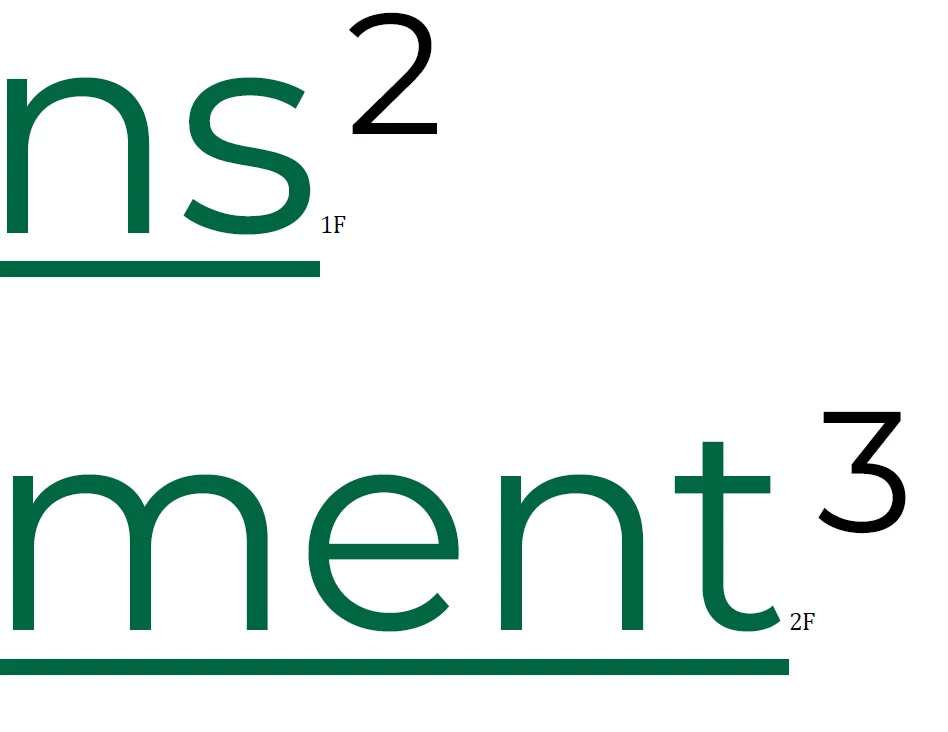
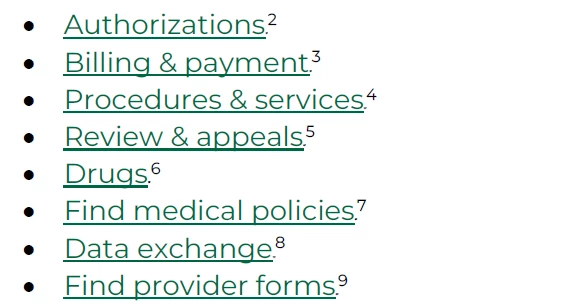
Here are the other posts I found on this exact issue. None of them appear to have been solved.
- https://community.adobe.com/t5/acrobat-discussions/footnote-error-size-1pt-font-generated-when-converting-to-pdf-from-word/m-p/11342519
- https://community.adobe.com/t5/acrobat-discussions/about-footnotes/m-p/13785810
- https://community.adobe.com/t5/acrobat-discussions/strange-characters-under-footnote-references-in-pdf/m-p/14221921
- https://community.adobe.com/t5/acrobat-discussions/footnote-codes-being-added/m-p/9239850
The only advice I saw, either creating the PDF in a different way or checking the font, is not helping. Please advise?


 AdChoices