Participant
May 15, 2021
Answered

multiple measurements in 3D PDF

  • May 15, 2021
  • 1 reply
  • 1591 views

Which setting do I have to choose so that multiple measurements are displayed? 

I can only see a single measurement result at a time.


This topic has been closed for replies.
Correct answer Manfred5EA1

Hi there


We are happy to hear that you have found the solution and the issue got fixed. Would you mind sharing the solution here on community so that other users with similar issue may refer to it.


Regards

Amal


Hello everybody,

here you go:

https://helpx.adobe.com/de/acrobat/using/measuring-3d-objects-pdfs.html#:~:text=3D%2DObjekte%20messen,%2DMen%C3%BC%20neben%20dem%20Navigationswerkzeug.)

Measure 3D objects

5 Measure the 3D model:

There you have to study points 5.3 - 5.6 carefully and be patient while trying them.
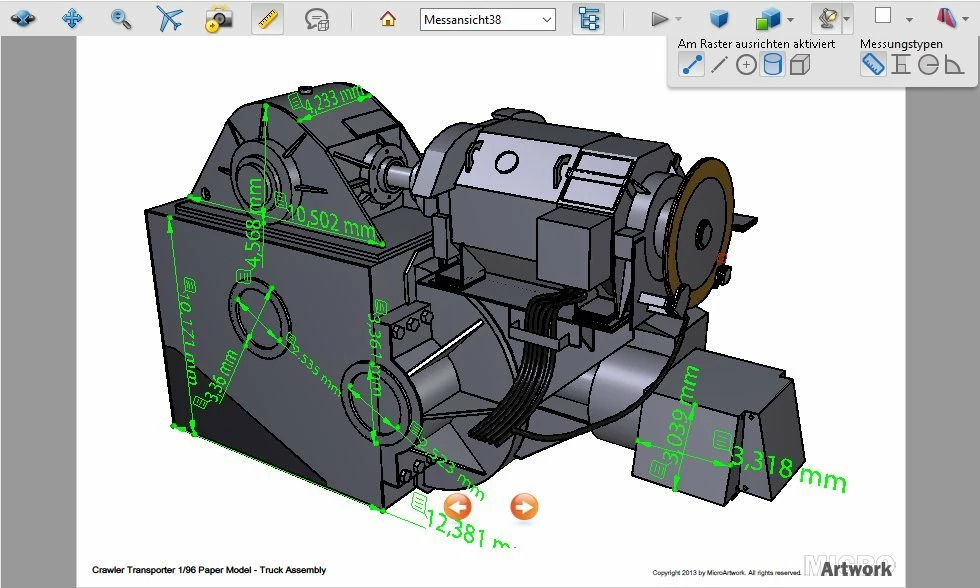
Source: Micro Artwork, Mischa Klement (cyana)


That's all!

Manfred

1 reply

Amal.
Legend
May 17, 2021

Hi Manfred


Hope you are doing well and sorry for the trouble. As described, you are unable to see multiple measurements in 3D PDF file.


What is the version of the Adobe Acrobat DC you are using? To check the version go to Help About Acrobat and make sure you have the latest version 21.01.20155 installed. Go to Help > Check for Updates and reboot the computer once.


Also try to repair the installation (Win Only) from the help menu and see if that works.


You may also try to reset the Acrobat Preferences to default as described in the help page - https://community.adobe.com/t5/acrobat/how-to-reset-acrobat-preference-settings-to-default/td-p/4792082


Also, please check out the help page - https://helpx.adobe.com/acrobat/using/measuring-3d-objects-pdfs.html and see if that helps


Regards

Amal


Participant
May 17, 2021

Thanks Amal for your comment. 

I have the  latest version 21.01.20155 installed which is constantly updated. Therefore I should be able to use the possibility of performing several measurements, all of which are displayed if Acrobat Reader is able to do so. If this option exists, it probably needs to be set, which is why I would like to know how to set this.
I can still only take one measurement that is displayed. Unfortunately, this measurement result disappeared during the following measurement.

Surely there has to be a setting in which several measurements remain displayed, or does a saving of this document have to be preset?
I am familiar with this option from the SketchUp software, for example.

Regards,

Manfred


Amal.
Legend
May 19, 2021

Hi Manfred


We are sorry to hear that. have you tried resetting the Acrobat preferences to default as described earlier? Also please try to create a new test user profile with full admin rights or enable the root account in Mac and try using the application there and check.


Regards

Amal