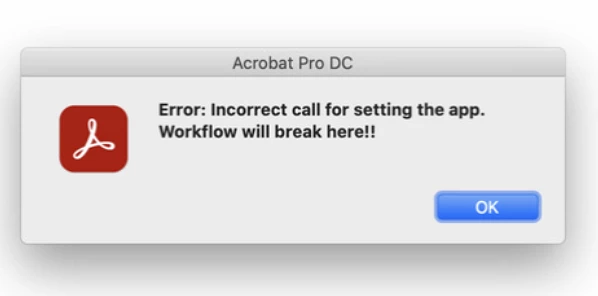
This topic has been closed for replies.
Correct answer JuanVictoriano410

This issue has been resolved, we ended up reinstalling the Acrobat app from the creative cloud client. Fixed the issue.

2 replies

Amal.
Community Manager
Community Manager
July 20, 2022

Hi there


Hope you are doing well and sorry to hear that.


++ Adding to the discusion


What is the version of the Acrobat DC and the OS you are using? To check the version go to Help > About Acrobat and make sure you have the recent version 22.1.20169 installed. Go to Help > Check for upates and reboot the computer once.


Also, please try to repair the installation from the help menu (Win Only) and check if that works.


Please try to reset the Acrobat preferences as described here https://community.adobe.com/t5/acrobat-discussions/how-to-reset-acrobat-preference-settings-to-default/td-p/4792082


You may also try to create a new test user profile with full admin rights in Win or enable the root account in MAC and try using the application there and check.


Also, a small video recording of the steps you are doing and the issue you ar experiencing will be very helpful.


Regards

Amal

JuanVictoriano410AuthorCorrect answer
Participant
July 28, 2022

This issue has been resolved, we ended up reinstalling the Acrobat app from the creative cloud client. Fixed the issue.

Document Geek
Community Expert
Community Expert
July 20, 2022

I've never seen that error before in 20 years of using Acrobat. What were you doing before that error message came up?

Participant
July 20, 2022

So weird, right? I have never seen this error myself. I work in IT trying to help an end-user with their Acrobat app. They were trying to simply organize pages into one document from a directory on their local hard drive with other PDF files.