


Known Participant
November 7, 2023
Answered

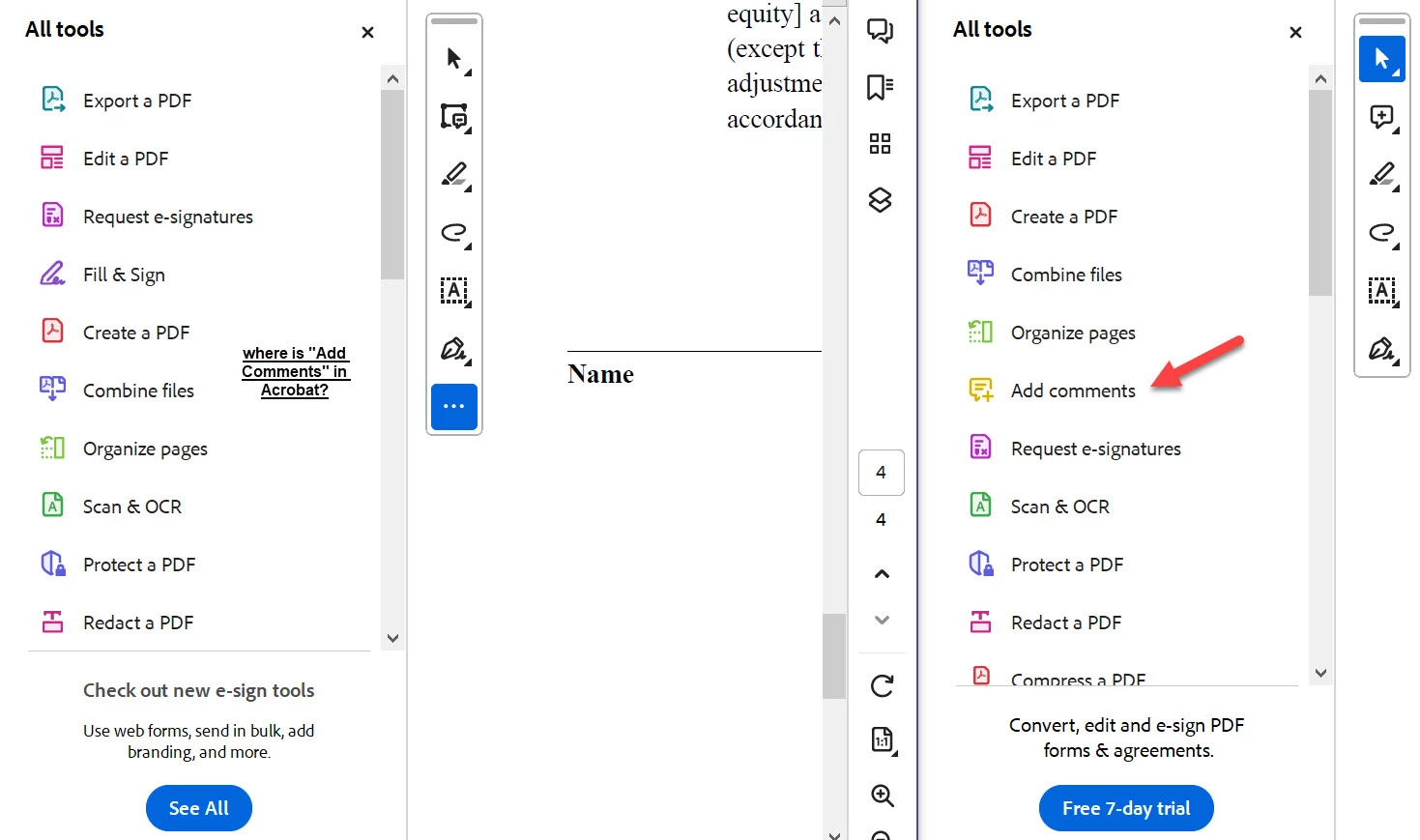
New Acrobat Experience - where is "Add Comments" tool

Hello,


Please see the screenshot image showing the new Acrobat Pro experience (UI) on the left and the new Acrobat Reader experience (UI) on the right.   How can I get "Add Comments" into my All Tools of Acrobat Pro?  thank you


by the way, is there any consensus about the new UI .... I have to get used to this.


thanks

Craig


Bernd Alheit
Bernd AlheitCorrect answer
Community Expert
November 8, 2023

Correct

6 replies

Participant
January 14, 2025

To get the full "Add Comments" with all options as a toolbar, the solution is here: https://community.adobe.com/t5/acrobat-discussions/add-comments-tool-not-available-on-all-tools-menu/m-p/14957305

TL;DR version: File >> "Disable New Acrobat."

I don't mind the floating toolbar, but as a quick tool only. The full "Add Comments" should be in the list of all tools down the left side. The old method where you select a toolbar on the left and all options appear on top was MUCH better than.....taking away the most used tool. I was going crazy trying to figure out why "Add Comments" would show in the "Add to toolbar" but not in the list of tools.

Translate
Participant
February 19, 2025

I am going mad with this situation, I am struggling to fint the add text comment without border, any ideas? thank you

Translate
Bernd Alheit
Community Expert
Community Expert
November 8, 2023

"Add a comment" is available on the toolbar:

Translate
Known Participant
November 8, 2023

Thank you very much

so i assume there is no way to get "Add a Comment" into the "All Tools" listing 

Translate
Bernd Alheit
Community Expert
Bernd AlheitCommunity ExpertCorrect answer
Community Expert
November 8, 2023

Correct

Translate