
Participant
December 3, 2022
Question

Oversized cursor and highlighter

  • December 3, 2022
  • 2 replies
  • 1610 views

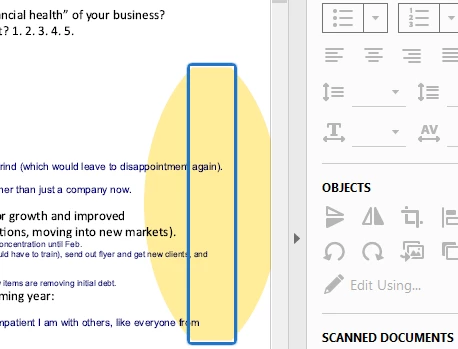
Recently my Adobe Pro started all of a sudden giving me a huge cursor. Additionally, when I try to highlight a word or sentence, the highlighter highlights a massive section rather than the small word I want. I have run the repair tool, signed in and out, uninstalled and reinstalled, tried to save as a new document with a diff name. Still the problem remains. here is a pic of what happens. 
 

2 replies

Participant
April 25, 2025

Has anyone yet to resolve this problem? I see it posted everywhere, but I've yet to see a sound solution. I know I need to update Adobe X Pro , but I've been using it for years and out of the blue my cursor size when trying to edit words or lines. The cursor is half of the page rendering the program useless. I have searched for hours trying every solution is anyone have one that works.

Thanks and sorry for the frustration. Maybe I should explore Google PDF converter and editor.

Legend
April 29, 2025

Hi @WDC1WDC,

Thanks for reaching out


From what you’ve described, this behavior often occurs when working with scanned or flattened PDF files, where the document is essentially treated as an image. In such cases, Acrobat cannot interpret real text or layout structures, which may cause the issue.


Here are a few things you can try:

1. Check if the PDF is scanned or flattened

  • Try selecting text. If you’re unable to highlight actual words or characters (only large blocks or nothing at all), the file is likely scanned or flattened.

  • You can confirm this by going to File > Properties > Description and checking if “Tagged PDF” is marked as “No.”


2. Use OCR (Text Recognition)

If it’s a scanned document, run Optical Character Recognition (OCR):

  • Go to Scan & OCR > Recognize Text > In This File.

  • Select the appropriate page range and language.

  • After this, the cursor and highlighter tools should behave normally on the recognized text layer.

Could you try creating a new PDF file out of an MS Word file and then try editing in Acrobat and check if this issue occurs. If this issue is reproducible, sadly, it can't be entertained as you know your version of Acrobat is out of Support.


~Tariq

nicohirsch
Community Expert
Community Expert
December 3, 2022

Do you have this problem with all documents or only with one or a few?

Here's a thread about the same issue (however only concerning certain documents, not all): 

Reduce cursor size in Adobe Reader DC and X Pro - Adobe Support Community - 9647654


Maybe the suggested workaround (printing the document to another pdf-file instead of just saving it with a different name) will help in your case aswell?

Participant
December 8, 2022

Hi, thank your for the response. My issues appear to be on all documents. I tried saving as another document, uninstalling and reinstalling, etc. I did read the thread you note in your response and tried the suggestions but still am having the issue.