Hello @courageous_dancer9690
I hope you are doing well, and thank you for reaching out. We're sorry for the trouble you had.
Setting French in Creative Cloud doesn’t automatically switch Acrobat if the French UI files weren’t installed with Acrobat on the new PC.
If you’re on Windows (most likely from your screenshot)
Install the French language files for Acrobat
- Close Acrobat.
- Open Control Panel > Programs > Programs and Features.
- Select Adobe Acrobat > Change.
In the setup wizard, choose Modify > Next.
- Expand Languages, select Français, and set it to “This feature will be installed on the local hard drive.”
- Click Install, then Finish.
- Check this article to learn more: Change Acrobat language.
Option A (via preferences):
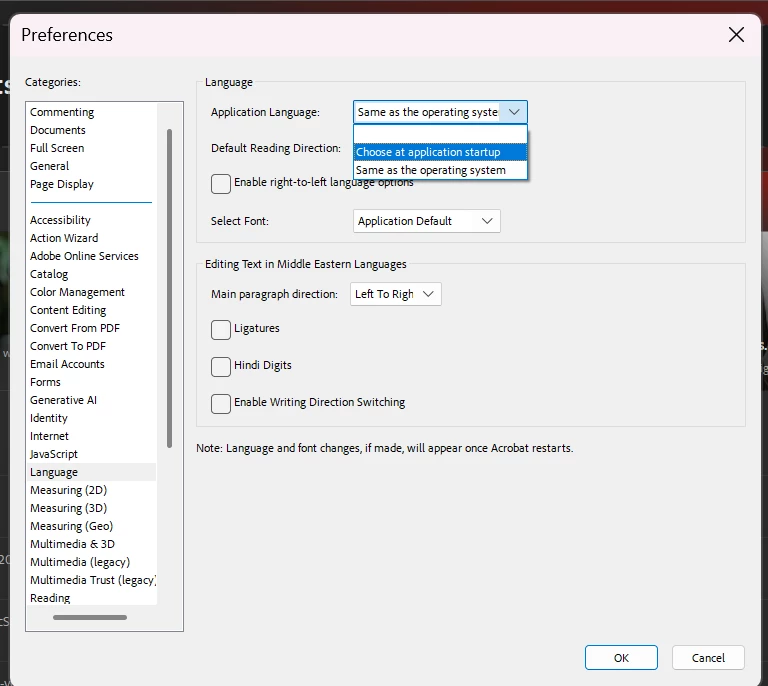
- Launch Acrobat > Menu > Preferences > Language.
- Set Application Language to choose at application startup. Click OK and quit Acrobat.
- Relaunch Acrobat and pick Français from the prompt.
Option B (force the language picker):
Hold Ctrl/Cmd for Mac and then start Adobe Acrobat from the Start menu; select Français in the pop‑up.
If you’re on macOS
Open Acrobat > Menu > Preferences > Language, pick Français from Application Language, click OK, and restart Acrobat. (No separate “Modify” step on macOS.)
I hope this helps, and let us know if you experience any issues.
Thanks,
Anand Sri.
[Edited response]




 AdChoices