
Participant
October 28, 2022
Question

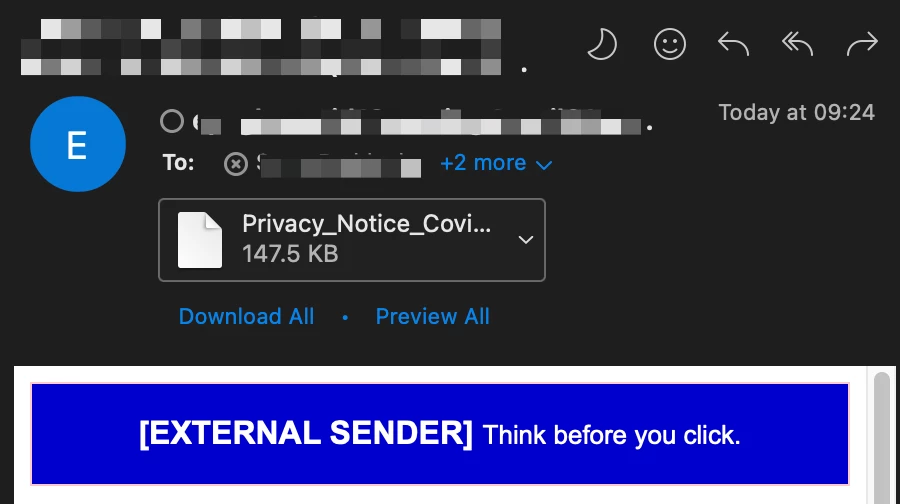
PDF Icon missing from Apple Mail & Outlook (Mac OS 13 - Ventura)

  • October 28, 2022
  • 34 replies
  • 33631 views

See the below image, this is the same in both Outlook & Apple Mail, this happens when I both receive a PDF or compose an email and attach a PDF, and the icon shows a blank page. 


I have attempted to uninstall Adobe Acrobat and then reinstall it. 

I have set Adobe as the Default and went to "Change All"

I even attempted setting it to preview and then back to Adobe but still get this issue of not being able to easily determine the file type. 
 

This topic has been closed for replies.

34 replies

Amal.
Community Manager
Community Manager
April 18, 2023

Hi there


Hope you are doing well and thanks for reaching out.


Apple has acknowledged the issue but has declined to fix it in a minor release. According to their response, the issue will only be addressed in the next major version of macOS. It might be helpful for you to directly follow up with Apple with case number FB11787697 to obtain more detailed information about the bug and when you can expect a resolution.


I'm sorry to hear that the issue has not been resolved yet, but I hope this information helps


~Amal

Participant
May 18, 2023

Problem appears fixed with MacOS Ventura 13.4. 

Participant
May 18, 2023

MacOS Venture 13.4 has fixed this for me!!!  HOORAY!!!

Inspiring
April 10, 2023

I think Adobe needs to fix this problem. As I have checked with Microsoft Excel, Word, and other icons, they all work fine.

Inspiring
April 10, 2023

Check out Preview. Same issue. Ergo, Apple’s problem.

Participating Frequently
April 10, 2023

Word excel power point icons not all time are coming with their logo, most time without bud pdf no chance since November. I will continue  my complaints to Apple . Very unpleasant and disappointing situation 

Participating Frequently
April 8, 2023

I too installed the new update from Apple---STILL NOTHING. In the end, once determined who is at fault, will receive a lawyers letter

ein_reh
Participant
March 30, 2023
Embarrassing for Adobe, Apple or Microsoft. The error is ignored by all manufacturers. For many months! I buy the best and receive unfinished scrap.


Participating Frequently
March 30, 2023

Ventura 13.3 was updated last night with the hope that something will change. Unfortunately not. The problem is still the same every time I open outlook white icon attachment appears, and it is annoying 

Inspiring
March 31, 2023

Yes, even I was anxiously looking for the update. Unfortunately, nothing has been fixed.

Participating Frequently
March 27, 2023

Yes, this is still not workinh after at least 4 months; I am annoyed by have let clients know they can click on the word PDF and they will still get the document.  Upsetting, though, as it is unclear if it is there at all. I have not been able to find a solution. I will not upgrade my laptop to Ventura. A big mistake it seems I made with the desktop computer.


Participating Frequently
March 28, 2023

They are ignoring all of us silently. Both mail and outlook on my MacBook had the same issue, while outlook on my phone and iPad showed all icons of the attachments. Ventura has these problems with third parties and no reply from both support centres (Microsoft and Apple), like Adobe support. Silence 

Participant
March 27, 2023

It gets even crazier --I just update to Ventura 13.3--STILLL doenst work

Participant
March 27, 2023

Same here.  I just updated to 13.3 and I'm still seeing Adobe PDF documents with a blank icon.  One of my company's clients is seeing it for both PDFs and Office documents.

Participating Frequently
March 27, 2023

From 4 months apple and microsoft are not responding on this issue. I m thinking to downgrade to Monterey and reinstall all sistem once again. 

Participant
March 27, 2023

I am running Ventura 13.2, the PDF shows blank icon in outlook since i updated from 12.6, and Excel.xlsx is blank as well. I have tried to uninstall all the MS apps and PDF, but it doesn't help to solve the issue, but here i found something interesting:

1. If I switch the outlook to new UI interface, somehow the icon come back, but it won't last for long.

2. I start to doubt it might be the issue of Outlook, so i download another mail box, when atttaching the PDF and xlsx file, the icon are all good.

3. Outlook supports feedback that it might alreday fixed in Ventura 13.3 Beta 2, but i am not runing this version, guys can take a try.

Participant
March 6, 2023

Hi,


I started having this problem after installing Adobe pdf reader on my Mac, I have completely uninstalled the Adobe from the computer (not just the application, all the associated files), uninstalled Outlook and then redownloaded Outlook. It has fixed the issue for me!


Below is the guide I followed to completely uninstall Adobe on Mac.


https://nektony.com/how-to/uninstall-adobe-reader-on-mac

Participating Frequently
February 28, 2023

I have been writing about this since it first occurred. Bottom line is the PDF icon no longer appears when sending a document thorugh email, and it appears neither Apple nor Adobe care to fix it.


I have been told "next update for Ventura, but two of those have come and gone so far, and it is not fixed. The only saving grace is that a lot of people are experiencing this now, and they are realizing you just have to click about the name of the document (which is invisible) to actually open it. I've tried the uninstall/reinstall Adobe and that did not work. The workarounds people have suggested here are just entirely too time consuming to bother.


The situation  is annoying at best, and frustrating at worst. More people need to complain!

Inspiring
February 28, 2023

The issue is not only inconvenience; when I receive pdf attachments, I often cannot see them, or miss them, because they are so inconspicuous; a white blank with no border.


People have been writing about this for months (since Ventura). It's unclear if the problem is with Apple or Adobe. But there is no excuse if the two mega-companies are not communicating about this.


However, I suspect it is a problem with Apple; the icon in Preview is the same (white blank). A very few users claim not to have the issue. I wonder why not.

pauls15481907
Participant
February 28, 2023

Running 13.2.1 and it isn't working.  I have a work around.  I do a screen shot and then crop and save.  At least it looks normal in email. 

Raouf BELIMANE
Participating Frequently
February 28, 2023

Hello,

Can you please share your solution? I still have the issue with 13.2.1.

Thank you