Participant
September 22, 2021
Question

Remove blue "Share" button in Acrobat 2020 Mac

  • September 22, 2021
  • 2 replies
  • 1454 views

How do I remove the blue "Share" button in Acrobat Pro 2020 Mac? Searching reveals that in other versions of Acrobat one can right-click on the toolbar and select a "Hide Share Button Label" (see https://community.adobe.com/t5/acrobat-discussions/how-to-remove-the-blue-share-button-on-the-toolbar/m-p/10071980/thread-id/116009), but I do not see such an option. 
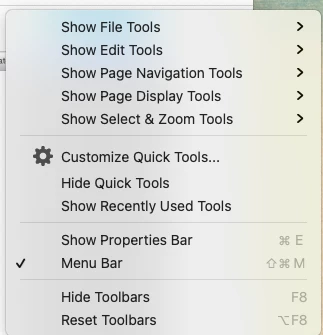
This topic has been closed for replies.

2 replies

stacyt36508447
Participant
May 23, 2022

I have Adobe Acrobat Standard 2020 I'm using on a Windows operating system and this blue button appeared during the last update.  I also do not have a selection when right-clicking in the toolbar aread to hide.  How do we get rid of this button that no one wants?? It gets in the way of the other buttons I selected for my CUSTOMIZED toolbar. 

Amal.
Legend
May 24, 2022

Hi there


We are sorry to hear that. Would you mind sharing the version of the Acrobat Std. 2020 you are using?  To check the version go to Help > ABout Acrobat and make sure you have the recent version  installed. Go to Help > Check for updates and reboot the computer once and check. 


Also try to repair the installation from the help menu.


You may also try to reset the Acrobat preferences as described here https://community.adobe.com/t5/acrobat-discussions/how-to-reset-acrobat-preference-settings-to-default/td-p/4792082


Regards

Amal

stacyt36508447
Participant
June 7, 2022

Adobe is up to date (no updates available) and I'm currently running Adobe Acrobat Standard 2020 (Version 20.005.30334).

Amal.
Legend
September 22, 2021

Hi Dliu


Hope you are doing well and sorry for the trouble. As described you are unable to hide the share button label on Mac by right clicking on the toolbar there is no option 'Hide share button label' on Mac


- Have you started experiencing this issue recently?


- Would you mind sharing the version of the Mac OS and Adobe Acrobat 2020 you are using? To check the version go to Help > About Adobe Acrobat and make sure you have the latest version 20.004.30015 installed. Go to Help > Check for updates and reboot the computer. You may also download the patch manually from the link https://www.adobe.com/devnet-docs/acrobatetk/tools/ReleaseNotesDC/index.html


We are here for help, just need more information.


Regards

Amal

dliu281Author
Participant
September 23, 2021

Hi Amal — Yes, I do have the latest version 2020.004.30015 installed. I am running macOS 11.6. I only just purchased and installed Acrobat Pro 2020 a couple weeks ago, so the issue is recent. Thanks.